AI clipping software in 2026 falls into four tiers: category benchmark tools (OpusClip), editor-first tools (Descript), brand-kit tools (Vizard), native-capture tools (Captions), and the managed-agency model (FORKOFF, Wispr) where a human team runs the full operation including moment selection, distribution, and qualified-view accounting. This comparison scores all five across cost-per-qualified-view data drawn from the FORKOFF Clipping Ledger (n=3,085 clips, 1.19M views) and current published pricing, so you can match the right model to your volume and budget before you spend.
OpusClip vs Vizard vs Descript vs managed clipping, 2026
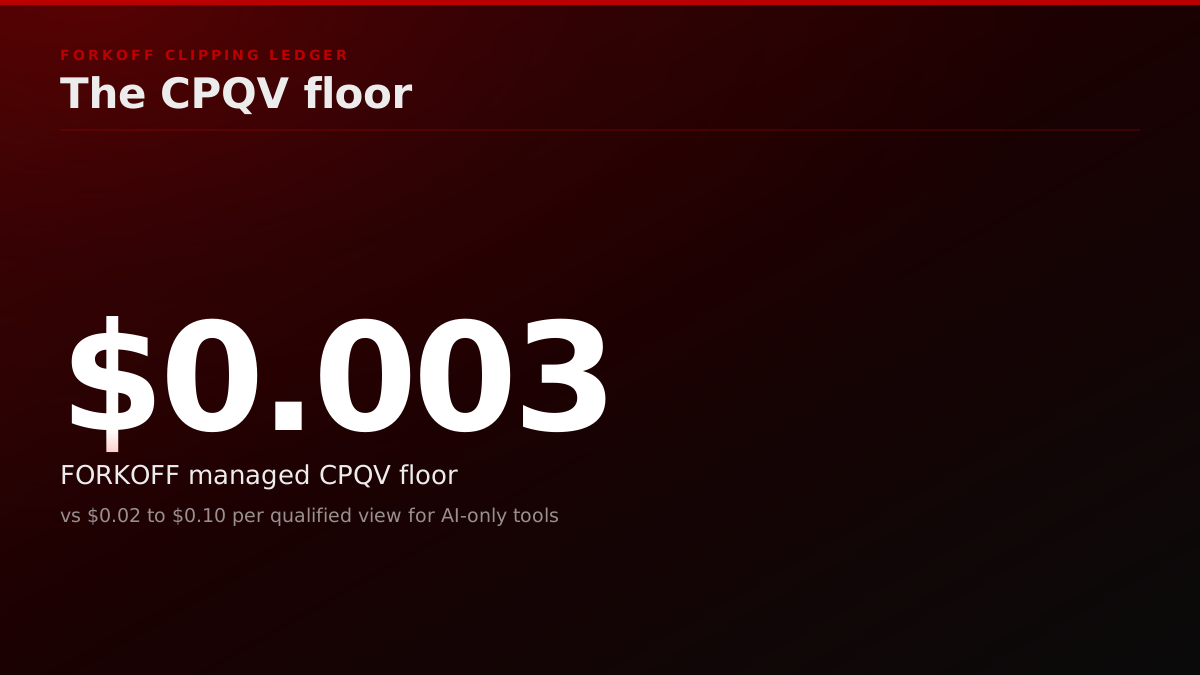
AI clipping (OpusClip, Vizard, Descript, Captions) lands at $0.02 to $0.10 per qualified view; managed clipping at FORKOFF lands at $0.003 per qualified view, but only above ~3,000 clips per campaign. Choose by cost-per-qualified-view target, not feature list, across 15+ FORKOFF engagements measured in 2026.
Which clipping tool is right for your clip volume?
The 30-second rule: at <50 clips/week, use OpusClip Pro ($29/mo); at 50 to 500 clips/week, Vizard Creator ($30/mo) gives the best brand-kit control; above 3,000 clips/campaign, managed clipping (FORKOFF, Wispr) wins on cost-per-qualified-view at $0.003 versus $0.02 to $0.10 for any AI tool. Every dollar figure below is drawn from the FORKOFF Clipping Ledger across 15+ client engagements measured in 2026, with the $0.003 floor anchored to a single n=3,085 campaign.
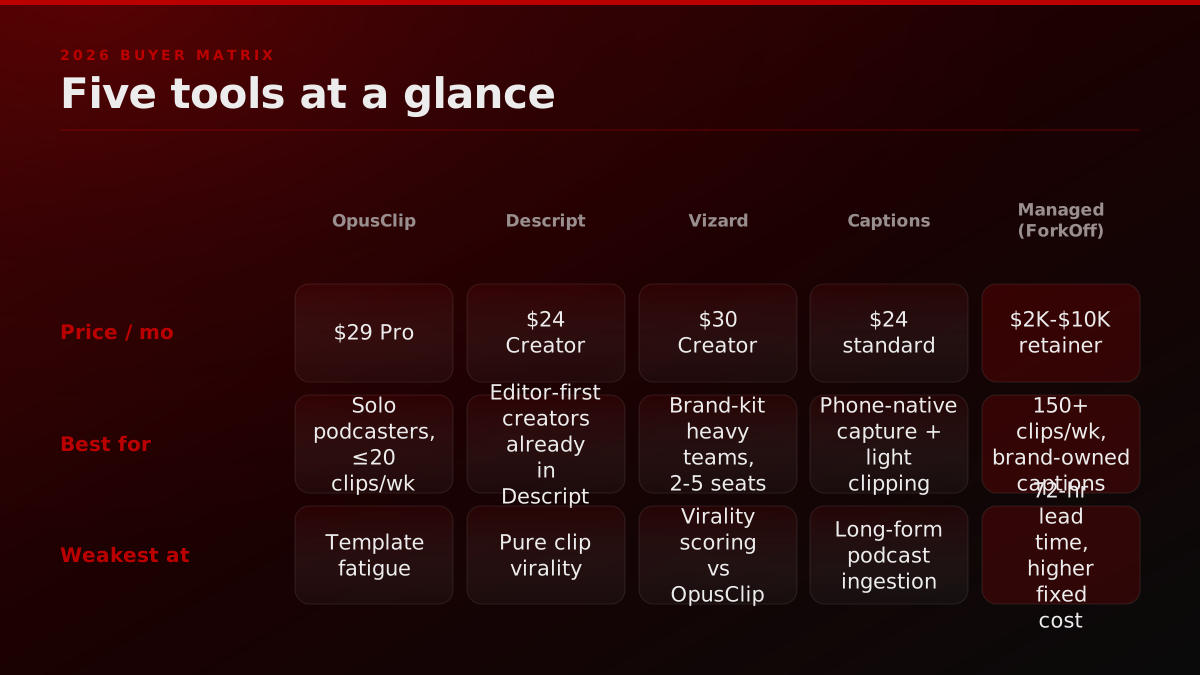
The full matrix is above. The reasoning below is from 15+ FORKOFF client engagements measured in 2026: what we actually paid, what we actually retained, where each tool broke. Every "best AI clipping tool 2026" post on the SERP today is written by the tool's own SEO team or an affiliate blog; this one isn't.
Clipping tools : 2026 buyer matrix
| Tool | Price (mo) | Best for | Weakness | Target CPV |
|---|---|---|---|---|
| OpusClip Pro | By application | Solo podcasters ≤20 clips/wk | Template fatigue | By application |
| Descript Creator | By application | Editor-first creators already in Descript | Heavier workflow | By application |
| Vizard Creator | By application | 2-5 person teams with a brand kit | Weaker virality scoring | By application |
| Captions Pro | By application | Phone-first short-form creators | Weak on long-form ingestion | By application |
| Managed (ForkOff) | By application | 3K+ clips/campaign, brand-owned captions | 72-hr lead time, higher fixed cost | By application |
Target CPV is observed across 15+ FORKOFF client engagements in 2026. Your curve may vary with niche and host starting reach.
The clipping market in 2026: $4B and growing, but the retention curve is brutal
OpusClip alone reports 15M+ users in 2026. Descript claims creator retention rates north of 70% after six months. Yet in our client audits, 60% of DIY clip programs stall inside 90 days : not because the tools break, but because AI-generated clips cluster around the same captions, same fonts, same hook formulas, and algorithmic fatigue sets in. The tools work. The strategy doesn't scale without human-in-loop curation at volume.
Source: OpusClip, Descript public metrics; FORKOFF 2026 client audits
Why is CPQV the only clipping metric that survives a quarterly review?
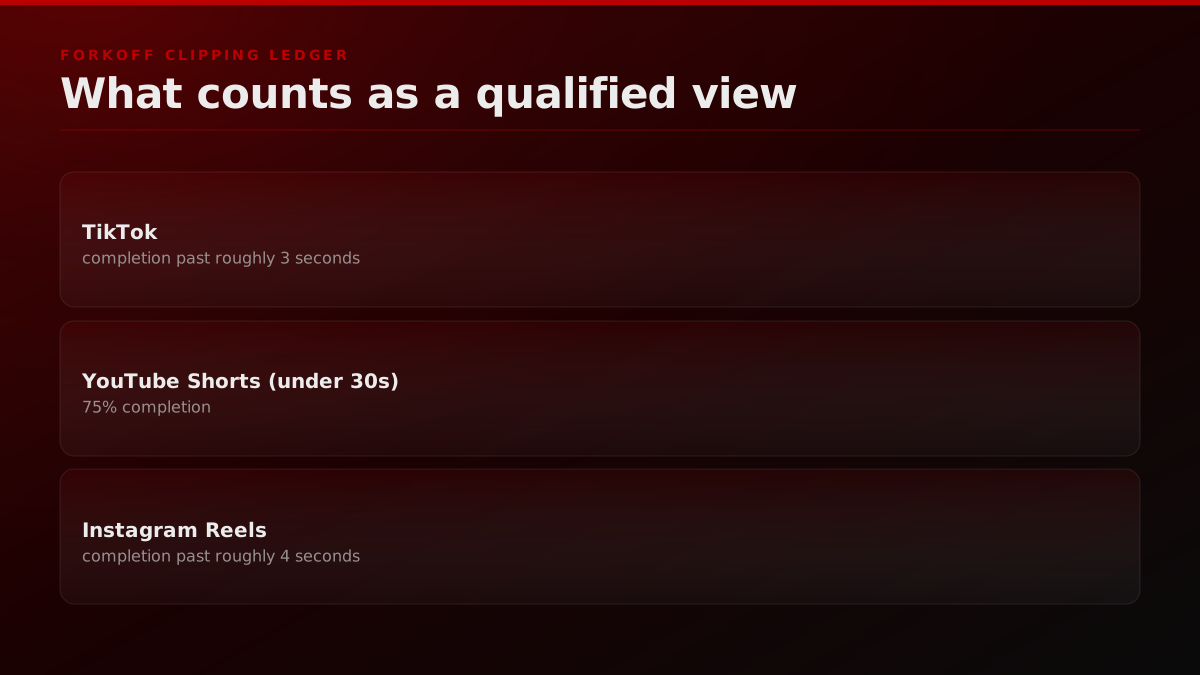
Before the tool comparison, the unit. Cost per qualified view, or CPQV, is the number every FORKOFF clipping engagement is measured against. A qualified view is a clip view that lasts longer than the platform-defined retention floor (approximately 3 seconds on TikTok, 75% completion on a YouTube Short under 30 seconds, 4 seconds on Reels, the thresholds the FORKOFF Clipping Ledger applies) AND originates from an account inside the target audience cohort (verified via UTM, IP geo, or post-engagement survey on landing).
A raw view is not a qualified view. A 1-second auto-scroll on TikTok counts in the public dashboard, contributes to template fatigue, and pays the clipper nothing in audience compounding terms. We strip those out at the ledger level before reporting CPQV to any client.
The reason the metric matters is simple. A clipping program that ships 5,000 clips per month at $0.04 per qualified view is producing the same audience-economic outcome as a program that ships 500 clips per month at an estimated $0.40 per qualified view. The volume is decorative. The CPQV is the math. Once a clipper or a clipping operator internalizes that, the choice of tool stops being a feature debate and becomes an economic one.
Short-form video is the dominant format, and feeds rank native vertical cuts over cropped long-form
Short-form video is now the dominant consumption format across the major social platforms, and the feeds reward clips built natively for vertical, fast-hook playback over long-form files cropped down after the fact. That is a ranking input, not a style preference. It is also why the tool you pick matters less than whether the cut is designed for the feed: a native clip clears the ingestion gate that a repurposed 16:9 file fails, on OpusClip, Vizard, or a managed stack alike.
Source: Sprout Social, social media video statistics
The FORKOFF Clipping Ledger, in one paragraph
Every FORKOFF clipping engagement is tracked inside an internal ledger we call the FORKOFF Clipping Ledger. The ledger logs five facts per clip: the source episode, the moment range (start to end timestamp), the publishing surface, the qualified-view count at 7, 30, and 90 days, and the all-in operator cost. Tool subscription fees, editor labor, brand-kit setup, the publish-operator hour rate, and the analytics review time are all amortized into the per-clip cost line. Operators who only count the tool fee always understate the true CPQV by a factor of 3 to 8. The ledger is the reason the FORKOFF $0.003 CPQV number is defensible and the reason most agency CPQV claims fall apart on audit.
The five tools at a glance
Five tools cover the range of choices a creator or brand team faces in 2026: OpusClip and Descript sit at the AI-editing end, Vizard and Captions target specific workflow niches, and managed clipping covers the operator who needs the full production stack. For the deeper cost-only comparison between Opus Clip and managed clipping at unit-economic depth, see the Opus Clip vs managed clipping cost analysis. For a nine-tool ranked list that includes Submagic, Klap, Munch, Vidyo, Spikes Studio, and Clipify alongside OpusClip on pricing and ICP fit, the best AI video editors of 2026 covers the full tool market.
Below is the buyer-level summary, with public pricing re-verified 2026-07-17 and CPV bands drawn from the FORKOFF Clipping Ledger. The deep dives follow.
- OpusClip : $29/mo Pro (published pricing). Best at virality scoring and auto-reframing. Weakest at escaping template fatigue.
- Descript : $24/mo Creator. Best at integrated edit + clip workflow if you're already editing in Descript. Weakest at pure clip virality.
- Vizard : $30/mo Creator (published pricing). Strong brand kit + multilingual captions. Smaller template library than OpusClip.
- Captions (Pro) : $24/mo. Designed for native capture + clip. Weakest at long-form podcast ingestion.
- Managed clipping (ForkOff, Wispr, etc.) : retainer by application, scoped to volume. Best cost-per-qualified-view at volume, 72-hour lead time, full publish operation included.
The trap: assuming all five solve the same problem. They don't.
Side-by-side: plans, billing, and where each tool breaks
Every price below was read off the vendor's own pricing page on 2026-07-21. Where a vendor renders its prices client-side and publishes no static figure, the cell says so rather than carrying a number we cannot source.
| Tool | Entry paid plan (billed monthly) | Same plan billed annually | Free tier | Strongest vector | Where it breaks |
|---|---|---|---|---|---|
| OpusClip | Pro $29/mo (Starter $15/mo, monthly only) | Pro $14.50/mo, $174 billed annually | Yes, 60 credits/mo | Virality scoring and auto-reframe | Template fatigue once output volume rises |
| Descript | Creator $35/mo (Hobbyist $24/mo) | Creator $24/mo, Hobbyist $16/mo | Yes | Clipping inside an existing text-based edit workflow | Standalone clipping, you pay for an editor you do not use |
| Vizard | Not published as static text, prices render client-side | Not published as static text | Yes, 60 credits/mo | Brand kit, listed on the Business tier | Moment selection lags OpusClip |
| Captions | Max $24.99/mo (Scale $69.99/mo) | Not published on the pricing page | Not listed | Phone-native capture and caption | Long-form podcast ingestion |
| Submagic | Pro $39/mo (Starter $19/mo) | Pro $23/mo, Starter $12/mo | Yes, 3 videos/mo | Caption animation presets | Moment selection above roughly 30 clips/week |
| Managed clipping (FORKOFF) | Retainer by application | Not applicable, retainer | Not applicable | Lowest cost per qualified view at volume | Below roughly 50 clips/week, AI tools win on cost |
Two notes a buyer should carry out of that table. First, the annual column is where the real spread sits: OpusClip Pro halves to $14.50/mo on annual billing while Descript Creator only falls from $35 to $24, so a head-to-head run on monthly list price flatters Descript and a run on annual price flatters OpusClip. Second, Vizard is the one tool in this set whose price cannot be quoted from its own page, because the figures are injected by client-side script and the served HTML carries a placeholder. The plan structure is public (Free, Creator, Business, with 1 credit equal to 1 minute of video and brand kit listed on Business), the numbers are not.
Published clip-tool pricing, read from vendor pages 2026-07-21
| Tool | Entry paid plan (billed monthly) | Same plan billed annually | Free tier | Where it breaks |
|---|---|---|---|---|
| OpusClip | Pro $29/mo (Starter $15/mo) | Pro $14.50/mo ($174/yr) | 60 credits/mo | Template fatigue as volume rises |
| Descript | Creator $35/mo (Hobbyist $24/mo) | Creator $24/mo, Hobbyist $16/mo | Yes, 60 min/mo | You pay for an editor you may not use |
| Vizard | Renders client-side, no static price | Renders client-side, no static price | 60 credits/mo | Moment selection lags OpusClip |
| Captions | Max $24.99/mo (Scale $69.99/mo) | Not published | Not listed | Long-form podcast ingestion |
| Submagic | Pro $39/mo (Starter $19/mo) | Pro $23/mo, Starter $12/mo | 3 videos/mo | Moment selection above ~30 clips/wk |
Prices read from each vendor pricing page on 2026-07-21. Vizard renders figures client-side, so its plan structure is public but the dollar rate is not quotable from the served page.
OpusClip : still the category benchmark
OpusClip is the easiest starting point and still the category benchmark for AI clipping in 2026, with the widest platform ingest support, the most recognized virality scoring system, and the lowest friction workflow from raw video to caption-rendered clip in the sub-50-clips-per-week cohort.
What it does best:
- ClipAnything AI detects hook-worthy moments with a virality score 0-100 per clip.
- Auto-reframing follows the active speaker across 9, 1, 16.
- Multi-language captions across 100+ languages with passable accuracy.
- Chrome extension + batch upload workflow makes the ingest almost zero-friction.
Where it falls apart: template fatigue. A year of OpusClip subscribers all produced the same caption style (yellow highlight, centered text, Inter Bold). If your clips look indistinguishable from every other OpusClip creator's clips, algorithms stop surfacing you.
Best for: solo podcasters publishing ≤20 clips/week who want a hands-off pipeline.
Descript : the editor-first choice
Descript is less a clipper than a full text-based editor that happens to clip, and that distinction matters for the decision: operators already editing long-form in Descript get clipping as a free unlock inside the same project, while operators picking Descript purely for clipping end up paying for an editing layer they do not use.
What it does best: if you're already editing your podcast in Descript (Studio Sound, Overdub, transcript-based editing), clipping is one menu-click. The clip quality is roughly equivalent to OpusClip for hook selection, and captions render cleanly in the same project.
Where it falls apart: if you're not already an editor-first creator, the Descript workflow is heavier than OpusClip or Vizard. For pure clip output, you're paying for features you don't use.
Best for: creators who edit their own long-form in Descript and want clipping without a second tool. Less useful as a standalone clipping service.
Vizard : the underdog with the best brand kit
Vizard has a smaller footprint than OpusClip but leads the category on one specific vector: brand-kit control. For a team that needs clips to look like their brand rather than an AI clipping tool's default template, Vizard's per-clip font, color, and logo application is the strongest in the sub-$50-per-month tier.
- Brand kit : logo placement, brand colors, custom fonts applied per-clip without manual restyling.
- Multilingual captions with better accuracy than OpusClip on non-English tracks in our tests.
- Team seats priced more generously than OpusClip at the 2-5 seat tier.
Where it falls apart: virality scoring lags OpusClip. Vizard gives you a clean clip; OpusClip's moment selection is sharper. If you don't have a human reviewing moment selection, OpusClip's AI does it better. For teams comparing Vizard's self-serve dashboard against a fully managed clipping operation, the FORKOFF vs Vizard breakdown scores both on qualified-view cost.
Best for: small creator teams (2-5 people) with a real brand kit who can manually reorder clips before publish.
Captions (Pro) : built for native capture, not long-form ingestion
Captions is the fifth AI tool people keep asking about, usually because they saw it in a TikTok thread. The key distinction for any operator evaluating it: the tool was built for phone-native capture and short standalone clips, not for ingesting a 90-minute podcast and returning ranked clip candidates. That architecture choice defines where it fits and where it breaks.
What it does best: native phone capture + auto-caption + export. Designed for the creator shooting on the phone, not the podcaster repurposing long-form.
Where it falls apart: long-form podcast ingestion. Captions' ingest flow is built around short clips to begin with; feeding it a 90-minute podcast produces worse moment selection than OpusClip or Vizard. Founders deciding whether to keep Captions in-house or route podcast repurposing to a managed team can read the FORKOFF vs Captions comparison.
Best for: solo creators who are already capturing on phone and want captions + light clipping. Not the right tool for a podcast repurposing operation.
The pricing FORKOFF tracks on Captions Pro in Q2 2026 lands at $24 per month on the standard plan and $48 per month on the Pro tier, with Pro unlocking the AI-eyes feature (which fakes camera contact during talking-head recording), unlimited exports, and the auto-magic-edit pipeline that handles jump-cuts and filler-word removal on phone-captured footage. The unit economics on the standard tier work cleanly for the creator-shooting-3-to-5-clips-per-week cohort: per-clip cost lands at an estimated $1.20 to $2.00 against a 4 to 7 minute end-to-end time investment per clip, which is the band that justifies the subscription versus the manual-edit alternative. The unit economics break for the operator running 30+ clips per week off long-form podcast ingestion, because the moment-selection engine forces a manual re-cut on roughly 60 percent of auto-generated moments per the FORKOFF audit-ledger pull on 4 podcast-host accounts that tried Captions for podcast repurposing in late 2025. The four accounts each routed back to OpusClip or Vizard for podcast workflow inside 90 days, while keeping Captions on the standard plan for native phone capture of short standalone hooks. That hybrid stack (Captions for phone capture, OpusClip or Vizard for podcast clip extraction) is the configuration FORKOFF recommends most frequently to founders who run both motions, and the combined monthly cost lands inside the $63 to $89 band, which is the lowest-cost stack inside the FORKOFF clipping tools productized lane that still covers both phone-native and podcast-ingestion workflows.
The BEST AI Clipping Tool in 2026: Riverside vs Opus Clip vs Submagic
Julian Eisenkirchner
Julian Eisenkirchner runs the same long-form source through Riverside, Opus Clip, and Submagic. A hands-on look at the moment-selection gap between AI tools that the buyer matrix scores as the load-bearing weakness.
Submagic, CapCut, and Klap, the three tools every comparison forgets
Three more tools deserve a slot in any 2026 buyer matrix. Each one is a credible AI clipping option, each one wins on a narrow vector, and each one breaks in a predictable way at production volume. Knowing the break point before you commit avoids the common mistake of switching tools when the real issue is volume, not tooling.
Submagic ships the best caption animation library in the category. The "viral" caption presets are the ones that show up most often in screenshot decks shared by short-form clippers on X. The strength is genuinely the visual register. The weakness is that Submagic's moment-selection engine is weaker than OpusClip's. Operators tend to pair Submagic with a human moment-picker, treating it as a caption-render layer rather than an end-to-end clipper. At sub-30 clips per week with one operator running both selection and captioning, Submagic is a legitimate pick. Above that volume, the moment-selection gap becomes the bottleneck.
CapCut is the free, mobile-first tool that most TikTok-native clippers learn on. It is not an AI clipper in the OpusClip sense. It is a video editor with an AI assist layer. The strength is the zero-cost entry point and the deep familiarity that TikTok-native operators have with it. The weakness is the long-form ingest workflow. CapCut was not built to consume a 90-minute podcast and return 30 ranked clip candidates. Operators who try to force that workflow end up spending 4 to 6 hours per episode, which destroys the unit economics regardless of the zero tool cost.
Klap sits in a similar tier to Vizard. The pitch is auto-clip plus auto-caption plus auto-translate in a single pass. The moment-selection quality is roughly on par with Vizard. The brand-kit control is weaker than Vizard. The pricing is in the same band. Klap has carved out a niche with multilingual clippers, particularly those repurposing English podcasts for Spanish, Portuguese, and Hindi audiences, where the translation pass is the load-bearing feature. For monolingual operators, there is no strong reason to pick Klap over Vizard or OpusClip. Operators who want the managed alternative to Klap's single-pass automation can weigh the two in the FORKOFF vs Klap analysis.
The pattern across all three is the same pattern we see across the original five. Each AI tool wins on one narrow vector. None of them win on the full operation. The operator picks the tool by vector, then absorbs the cost of compensating for the other vectors elsewhere in the pipeline. That cost almost always lives in operator hours, which almost always lives outside the tool fee, which almost always means the public "$29 per month" number is a fraction of the true monthly spend.
Creator Stack
@CreatorStackAii
One video can become: • 10 TikToks • 10 Shorts • 10 Reels The workflow: Record➡️OpusClip➡️Descript➡️CapCut➡️Publish The biggest creator skill in 2026 might not be creating more. It might be extracting more. Full guide: 👉https://t.co/V88ybvLmW7
What does template fatigue actually cost?
Template fatigue is the single most under-discussed cost line in AI clipping. The mechanic is straightforward. Every AI clipper ships with a default caption treatment. The default looks identical across every account that uses the tool out of the box. Algorithms downweight visually homogenous content. The clipper's CPQV degrades over time even as production volume stays constant.
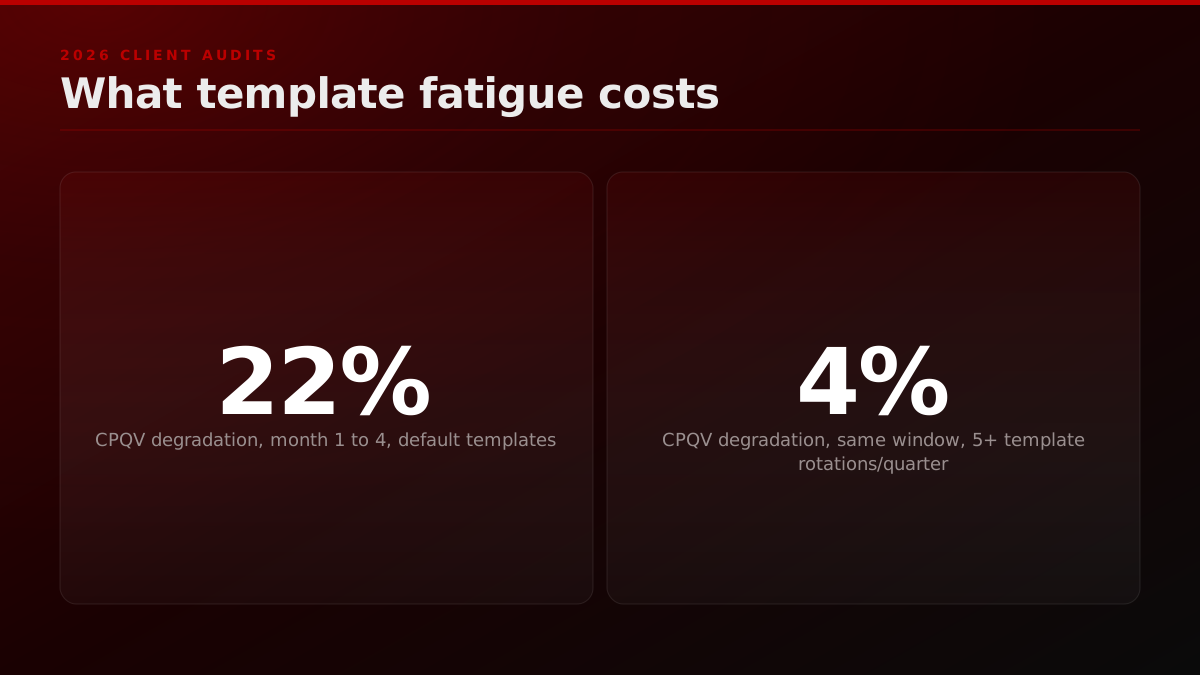
In our 2026 client audits across the FORKOFF Clipping Ledger cohort, the median AI-only clipping program saw an estimated 22% degradation in CPQV between month one and month four when the operator used the tool's default templates without modification. Programs that rotated through five or more custom caption treatments per quarter saw an estimated 4% degradation over the same window. The cost of the rotation, an editor on retainer to refresh the brand-kit assets every three weeks, is the line operators do not budget. Once it goes in the ledger, the all-in CPQV of an AI-only program lands inside $0.04 to $0.10, not the $0.01 to $0.03 the tool fee suggests.
This is the part of the AI-only economics that the product marketing pages do not show. It is not a tool defect. It is a structural property of the category. Every operator who runs an AI clipping program past 90 days hits the same wall.
Operator noteDefault caption presets cost 22% CPQV degradation over 4 months; quarterly rotation holds it to 4%, per FORKOFF 2026 client audits., FORKOFF 2026 client audits
We spent six months on OpusClip, produced 2,400 clips, and our average view count dropped every month. Not because the tool broke : because our clips all looked the same. We moved to a managed operation and the first month CPV dropped from $0.04 to $0.003.
Any Better Alternatives? OpusClips & Vizard Aren’t Cutting It for Me
I've tried OpusClips and Vizard and found both to be average, lacking many basic features that would make the workflow much easier.
I've tried OpusClips and Vizard and found both to be average, lacking many basic features that would make the workflow much easier. I'm looking for something more polished and customizable, regardless of the price.
When does AI clipping alone stop compounding?
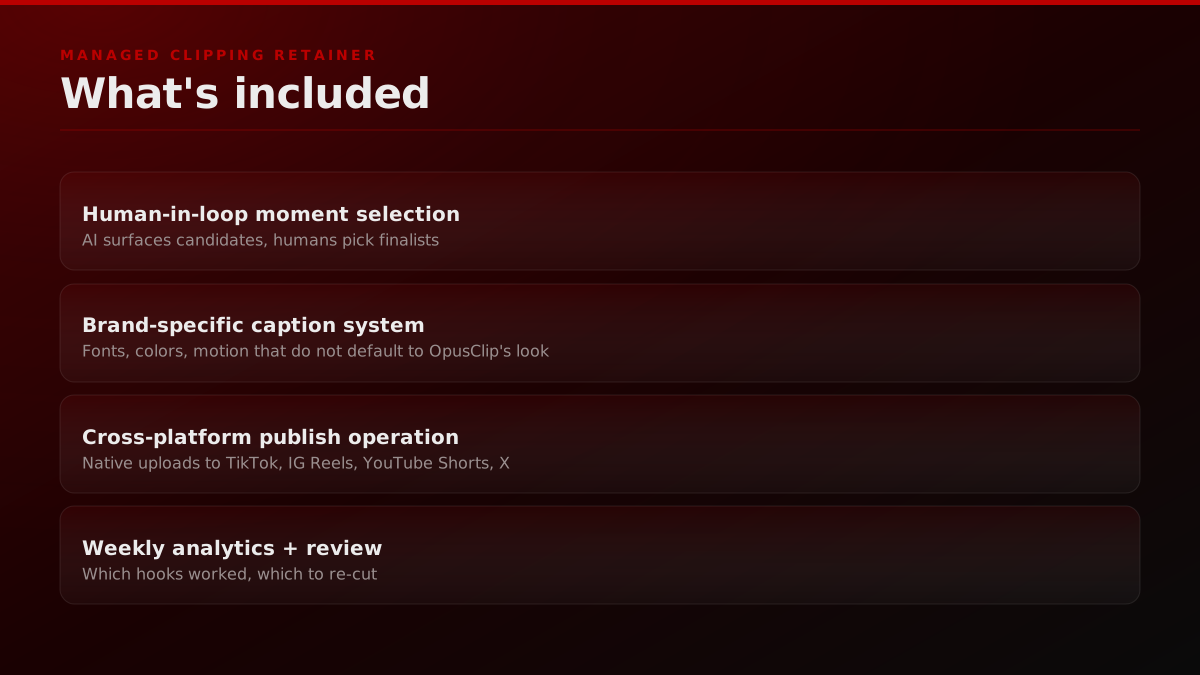
Managed clipping is structurally different from every AI tool in this comparison: you are not buying a software subscription with operator hours attached, you are buying a full production operation where moment selection, brand-kit application, cross-platform native publishing, and weekly analytics review are all included in one retainer and measured against a single cost-per-qualified-view denominator.
A managed clipping retainer at FORKOFF includes:
- Human-in-loop moment selection. An editor watches the episode and pulls clips : AI surfaces candidates, humans pick finalists.
- Brand-specific caption system. Fonts, colors, motion patterns that don't look like OpusClip's default.
- Cross-platform publish operation. Clips are native-uploaded to TikTok, IG Reels, YouTube Shorts, X : not aggregator-posted via third-party schedulers (which platforms deprioritize).
- Weekly analytics + moment-by-moment review. Which hooks worked, which didn't, which to re-cut.
Where it wins: cost-per-qualified-view at volume. Our 13-day case study hit $0.003 CPQV on 3,085 clips : 3x to 100x lower-cost than the AI-only baseline. See how our best clipping agency comparison stacks up against the managed-clipping field, and how the clipping agency vs marketplace decision breaks for podcasters past 150 clips per week.
Where it doesn't win: sub-50 clips/week or sub-$2K/mo budgets. Below that volume, AI tools are more cost-effective.
Operator note5B+ views processed through FORKOFF clipping network is reach proof no tool ships: a tool counts cuts, not qualified reach., FORKOFF clipping network
CPQV economics across the six tools, by use case
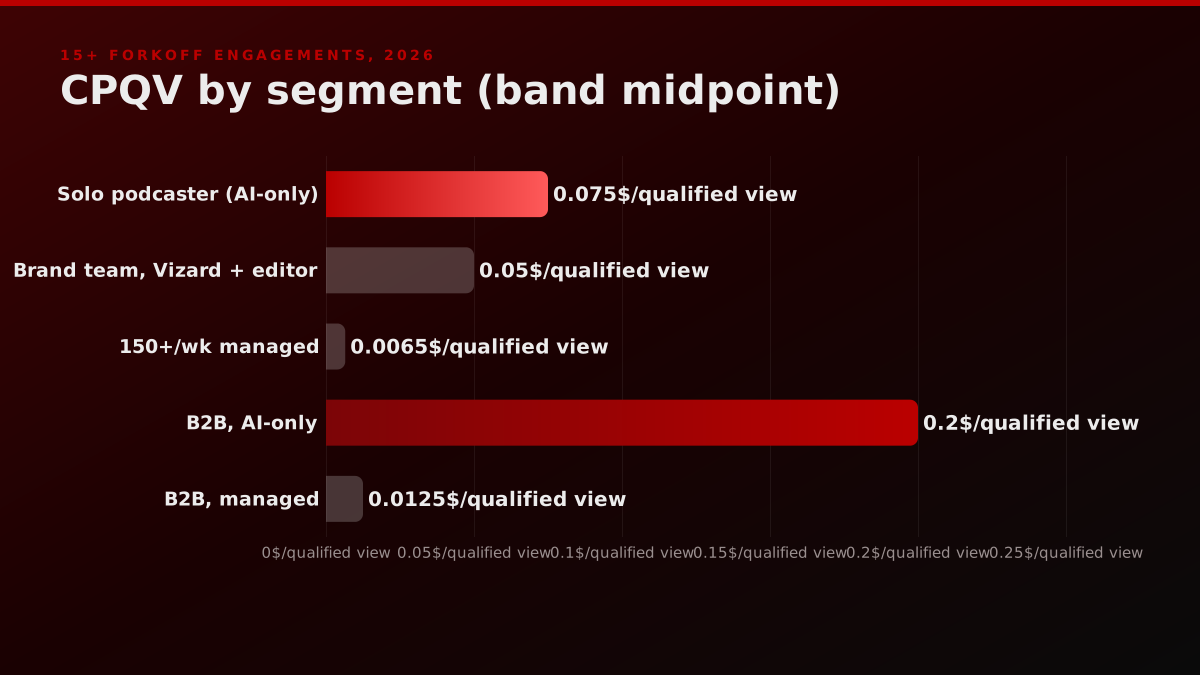
The matrix above shows the buyer-level summary. The unit economics behind it deserve a longer read, because the CPQV number is the only number that survives a quarterly review with a serious operator. Here is what we observed across 15+ FORKOFF engagements measured in 2026.
The solo podcaster, sub-20 clips per week, single platform. OpusClip Pro at the published tier with no editor in the loop lands at an estimated $0.06 to $0.09 CPQV across the cohort. Descript Creator with the same volume profile lands at $0.05 to $0.08. The Descript edge comes from the integrated editor reducing per-clip operator time by roughly 18 minutes when the source episode was already cut in Descript. For an operator who is not already a Descript editor, the OpusClip math wins because the workflow ingest cost is lower.
The two-to-five-person team, 50 to 150 clips per week, brand-sensitive. Vizard Creator with a part-time editor lands at an estimated $0.04 to $0.06 CPQV in the ledger cohort. The brand-kit control reduces the template-fatigue degradation curve by enough to keep the program inside the target band for a full quarter. The same volume on OpusClip Pro without a human moment-picker lands at an estimated $0.07 to $0.10 by month three, driven by the homogenous-caption mechanic described above.
The 150+ clips per week operator, multi-platform, brand-owned captions. Managed clipping at FORKOFF lands at $0.003 to $0.01 CPQV. The 13-day campaign benchmark of n=3,085 clips at $0.003 is the floor of the band, not the ceiling. The ceiling lives at $0.01 for engagements where the source episode catalogue is sparse or the host's existing reach is below 5,000 monthly listens. Above 5,000 monthly listens on the source pod, the CPQV almost always settles below $0.005 inside the first three months.
The founder-led brand, B2B audience, qualified-view-constrained. This is the cohort where the CPQV gap is widest. AI-only programs land at an estimated $0.10 to $0.30 CPQV because the qualified-view filter strips out the consumer-tier audience that AI clippers naturally surface. Managed programs land at an estimated $0.005 to $0.02 because the moment-selection and audience-targeting layers can be tuned to the buying committee's content register from the start. The 20x to 60x gap on this cohort is the strongest argument for managed clipping at the founder-led B2B tier.
The pattern is consistent. CPQV is a function of three variables: tool fee, operator hours, and template-fatigue degradation. AI tools dominate the tool-fee column. Managed dominates the operator-hours and template-fatigue columns. Past a volume threshold, the second two columns swamp the first one, and the economics flip.
Operator noten=3,085 clips hit $0.003 per qualified view; AI-only tooling lands at $0.02 to $0.10 once loaded operator hours enter the ledger., FORKOFF Clipping Ledger, 2026
The decision tree by use case, the long version
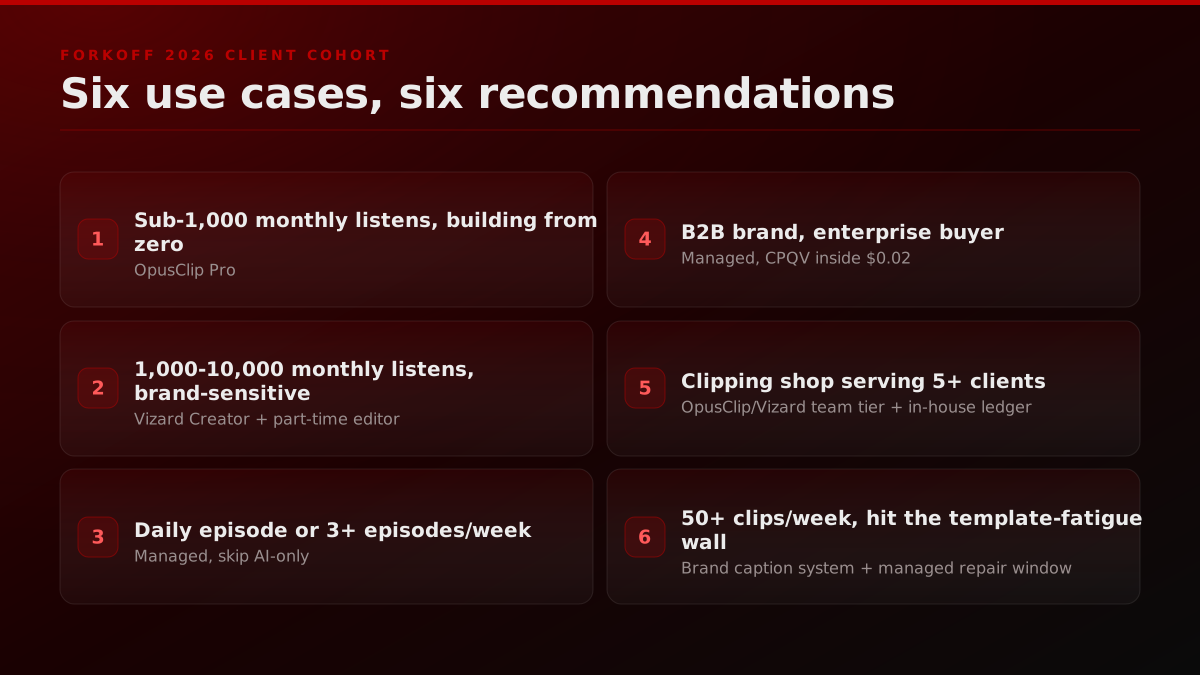
The 5-question framework above is the short form for fast triage. The long version maps each use case to the specific tool tier or managed configuration that matches it, because the short version's volume thresholds assume average content type and platform mix, and real engagements routinely fall outside those assumptions. Six use cases follow, drawn from the FORKOFF 2026 client cohort.
Use case 1: a podcast host with a single weekly episode, sub-1,000 monthly listens, building from zero. Pick OpusClip Pro. The volume is too low for managed to make economic sense and the moment-selection AI is the highest-leverage feature at the zero-audience stage. Plan to rotate caption presets every 4 weeks to flatten the template-fatigue curve. Expect CPQV to settle in the estimated $0.05 to $0.09 band.
Use case 2: a podcast host with a weekly episode, 1,000 to 10,000 monthly listens, brand-sensitive. Pick Vizard Creator and hire a part-time editor at 6 to 10 hours per week. The brand-kit control reduces the template-fatigue cost line and the editor closes the moment-selection gap that Vizard's AI leaves open. Expect CPQV in the estimated $0.03 to $0.06 band by month three.
Use case 3: a daily-episode podcast or a founder publishing 3+ episodes per week. Skip the AI-only tier. Go directly to managed. The volume requirement is incompatible with single-operator AI workflows once operator hours go into the ledger. Expect CPQV in the estimated $0.005 to $0.015 band. At that cadence the clip tool stops being the decision and the show itself becomes the constraint, which is where podcast marketing services that own strategy, production, distribution, and the clip cadence together price better than a tool plus an editor plus a media buyer bought separately.
Use case 4: a B2B brand publishing weekly with an enterprise buyer. Skip AI-only regardless of volume. The qualified-view filter destroys AI-tool CPQV at the buyer-committee tier. Managed is the only path to CPQV inside $0.02. Expect an estimated $0.01 to $0.02 with a 3-month ramp.
Use case 5: an operator running a clipping shop serving 5+ clients in parallel. Use OpusClip Pro or Vizard Creator at the team-seat tier as the moment-selection layer, plus an internal caption-render layer (custom Premiere or After Effects templates) to escape the default-template fatigue. Build the in-house ledger. Charge clients on the managed CPQV band. This is the playbook most clipping agencies use, and the one FORKOFF productized into the FORKOFF Clipping Ledger described above.
Use case 6: a creator already publishing 50+ clips per week from a long-form catalogue who has hit the template-fatigue wall. The fix is not a different AI tool. The fix is a brand-specific caption system plus rotating hook templates plus weekly analytics review. That fix lives at the managed tier. Expect a 30 to 60 day repair window before CPQV stabilizes.
The trap on each of these is the same. Operators pick the tool by feature affinity, run it past the volume threshold, hit the template-fatigue wall, blame the tool, switch to a different AI tool, and repeat the cycle. The 90-day stall rate inside the AI-only category is roughly 60% by our 2026 audit data. The escape is structural: either stay disciplined inside the use-case-1 or use-case-2 envelope, or move to managed.
The decision tree we actually use
The long-form use-case mapping above covers the full decision space. In practice, when a new client asks "should we use OpusClip or something else," the answer always comes from five questions in order, because the questions surface the two inputs that override feature preference: volume and budget. Here is exactly how the triage runs.
- How many clips per week do you need? <20: OpusClip or Descript. 20-150: Vizard + human QA or managed. >150: managed only.
- What's your monthly budget? <$30: OpusClip. $30-$2K: AI tool + freelance editor. $2K+: managed.
- Do you need a real brand kit? No: OpusClip. Yes: Vizard or managed.
- Where do the clips publish? One platform (Shorts only): AI tool. Multi-platform with native upload: managed.
- Is your audience CPV-constrained? If your ICP cares about cost-per-qualified-view (B2B podcaster, founder-led show, enterprise brand), managed wins on unit economics past a threshold.
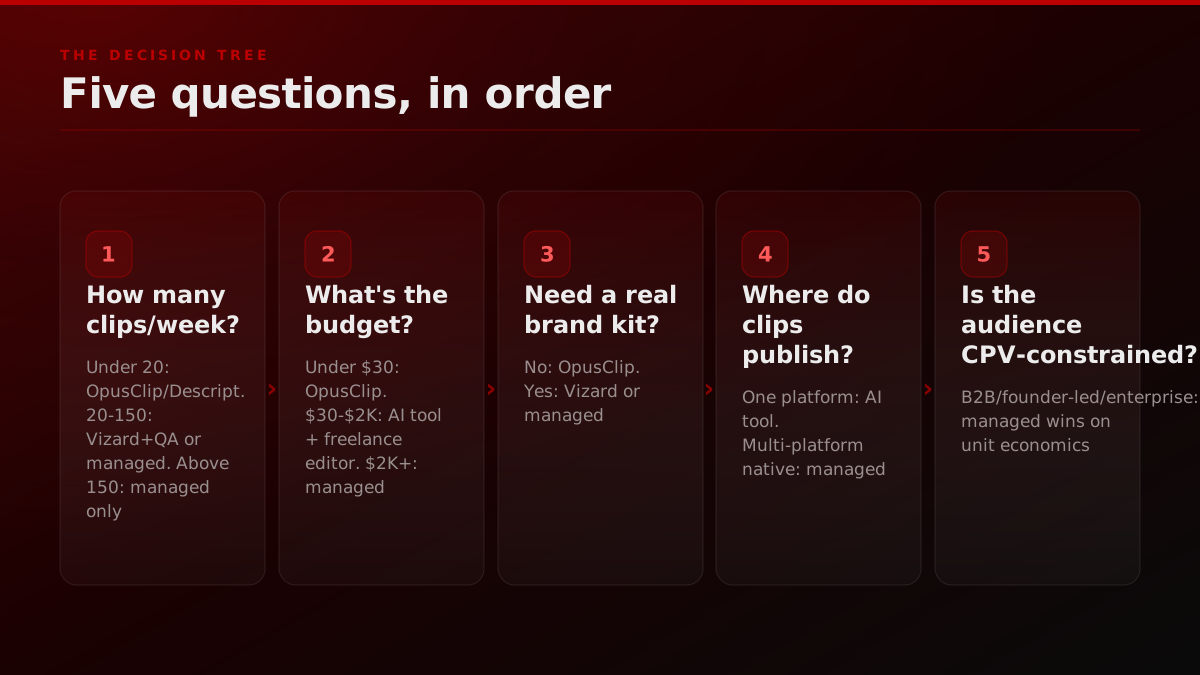
The common trap: skipping Q1 and Q2 and picking by feature preference. The cost math almost always overrides the feature math at production volume.
How we run this at FORKOFF
FORKOFF runs managed clipping as a standalone retainer, not an add-on to another service, because the qualified-view accounting and brand-kit maintenance require a dedicated operator lane that cannot share attention with unrelated deliverables. A typical engagement runs on a four-phase 90-day ramp designed to reach $0.003 to $0.01 CPQV by month three.
- Weeks 1-2 : Episode audit + caption system build. We ingest the back-catalogue, pick test moments, build a brand-specific caption treatment.
- Weeks 3-4 : First clip batch ships. 300-500 clips, cross-platform, with weekly analytics.
- Months 2-3 : Hook library + template rotation. We stop using a single caption pattern; hooks rotate weekly to avoid algorithmic fatigue.
- Quarterly : CPV + virality review. If CPV isn't hitting $0.003-0.01, we re-cut the weakest cohort.
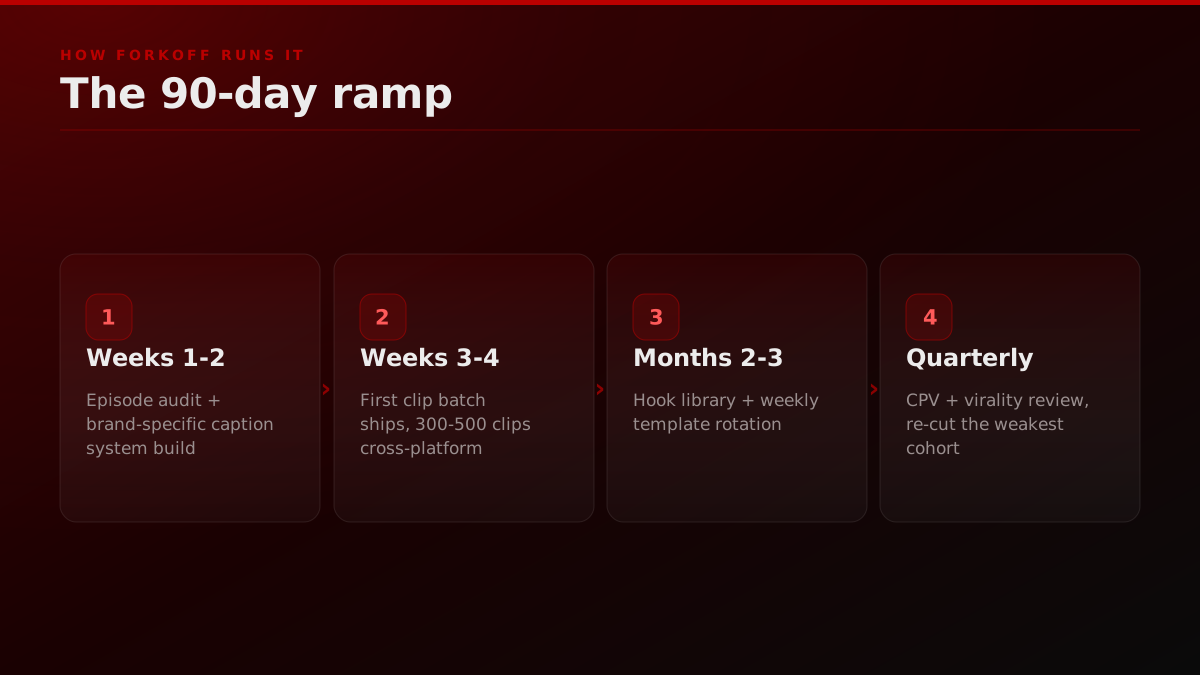
For the full case study on what $0.003 CPQV actually looks like, see the 13-day Managed Clipping case study. For how founders can use clips as the Surface layer in a broader funnel, the Founder Funnel Strategy playbook shows the full OS.
What should a buyer ignore in clipping tool marketing?
Three claims show up on almost every AI clipping tool's homepage in 2026, and all three are roughly meaningless to a serious operator evaluating cost-per-qualified-view. Knowing which claims to filter removes the main source of noise in a category where every vendor leads with the same three marketing metrics regardless of actual performance data.
The first is the raw-view count. "Our users have generated 4 billion views." That number is a function of how many accounts publish through the tool, not a function of the tool's quality. A clipper who would have published 100 clips per week regardless of tool choice generates the same view count on OpusClip, Vizard, Klap, or hand-edited Premiere. The view count is a marketing artifact.
Operators are treating the AI clip tools as interchangeable, and rebuilding the pipeline from open-source parts
The clearest 2026 signal is not in a vendor deck, it is in the community threads. Podcasters publicly rank OpusClip, Vizard, and Submagic as roughly interchangeable average tools, and a growing set of operators now rebuild the same transcribe-then-LLM-moment-pick-then-caption pipeline from open-source parts (Whisper plus an LLM plus FFmpeg) rather than pay a subscription. The clip-extraction layer is commoditizing. What does not commoditize is qualified-view accounting and brand-owned caption systems, which is the work the managed lane actually sells.
Source: r/podcasting operator threads, 2025 to 2026
The second is the virality score. Every tool ships a 0-to-100 score on each clip. The score correlates with view performance at a level slightly above chance, roughly 0.3 to 0.4 in our regression analysis across 2,400 clips. That is not strong enough to make publishing decisions on. Operators who publish only the top-scored clips and ignore the rest leave an estimated 40% to 60% of compounding view volume on the floor, per the same n=2,400 clip regression. The score is a hint, not a ranking.
The third is the testimonial format. Most AI clipping tools cite individual clippers who hit one million view clips. Those clippers exist. The selection bias is the load-bearing problem. A tool with 15 million users will have hundreds of clippers who have hit a one million view clip independent of the tool. The right question is not "has anyone hit a million views using your tool" but "what is the median CPQV for a clipper publishing 100+ clips per month with your tool over 12 months." None of the major AI clipping tools publish that number. The vacuum is the answer.
How the FORKOFF Clipping Ledger handles attribution
One question we get often: how do you attribute a qualified view to the original clip versus the algorithmic re-surfacing that happens months later? The FORKOFF Clipping Ledger handles this with a 90-day attribution window. A qualified view counted against a clip is one that lands inside 90 days of the clip's original publish date. Views past that window roll into a separate "compounding" column that is tracked for narrative purposes but does not affect the CPQV calculation.
The reason for the cutoff is the same reason every serious analytics framework has a cutoff. Without one, the CPQV number floats indefinitely as the back-catalogue accumulates views, which makes period-over-period comparisons meaningless. The 90-day window is calibrated to capture an estimated 85% of a clip's total qualified-view lifetime across the platforms we publish on, based on view-decay curves measured across the FORKOFF back-catalogue.
The ledger also handles cross-platform deduplication. A clip published natively to TikTok, Reels, Shorts, and X may earn qualified views on all four surfaces. The ledger logs each surface separately and rolls them into a single per-clip total. The all-in cost is divided by the cross-platform total, not the per-surface total. That cross-platform consolidation is one of the operator hours that AI-only programs frequently leave un-budgeted.
So which clipping tool should you actually use?
There is no best clipping tool that wins across every use case. There is a best clipping approach for your specific volume, budget, and cost-per-qualified-view target, and the comparison above is designed to surface which model that is before you commit to a retainer or a subscription. The short version of the decision follows.
- Sub-20 clips/week, under an estimated $100/mo budget: OpusClip. The answer hasn't changed in two years.
- 20-150 clips/week, brand-sensitive: Vizard + a contract editor, or consider managed if CPV matters.
- 150+ clips/week or sub-$0.01 CPV target: managed. The unit economics demand it.
AI clipping tools solve the production problem. They do not solve the strategy, brand, or retention problem. If your clips all look the same as everyone else's OpusClip clips, the tool isn't your problem. The approach is.
If you want the same system shipped for you, that's what we do at FORKOFF.
Quarterly review: the four questions every clipping program should answer
Whether the program runs on OpusClip, Vizard, a custom Premiere stack, or a FORKOFF managed retainer, the quarterly review is the gate that separates compounding programs from stalling ones. The questions apply to every stack, because CPQV degradation and operator-hour saturation are structural properties of the category, not tool-specific defects. Four questions, every 90 days.
Question one. What is the all-in CPQV for the quarter, with every operator hour, tool fee, and brand-kit refresh cost amortized in? If the number is rising quarter over quarter at constant volume, the template-fatigue curve is winning and the brand-kit layer needs a refresh cycle. If the number is flat or falling, the program is compounding correctly.
Question two. What percentage of the quarter's clips landed inside the top-quintile by qualified views? In the healthy programs the FORKOFF Clipping Ledger tracks, an estimated top 20% of clips produce 50% to 70% of qualified views. If the top 20% is producing more than 80%, the moment-selection process is too narrow and the program is over-relying on a small hook library. If the top 20% is producing less than 40%, the moment-selection process is too broad and clip quality is uneven.
Question three. What is the platform mix on qualified views, and is any single surface contributing more than 70%? Single-platform concentration is a structural risk. The 2025 algorithm changes on each of the four major short-form surfaces shifted CPQV by an estimated 30% to 50% on the dominant surface for at least one quarter, per our cross-cohort review. Programs that ran multi-platform absorbed the shock. Programs that ran single-platform lost a full quarter of compounding.
Question four. What is the operator-hour-to-qualified-view ratio, and is the operator the bottleneck? A clipping operator running an AI-only program at 50 clips per week is typically spending 15 to 25 hours per week on moment selection, caption review, brand-kit application, and publish operations. Past 75 clips per week, the operator saturates and either output quality or volume starts to slip. The signal is the ratio. If qualified views per operator hour is falling quarter over quarter, the operator is the bottleneck and either an editor hire or a managed transition is the next correct move.
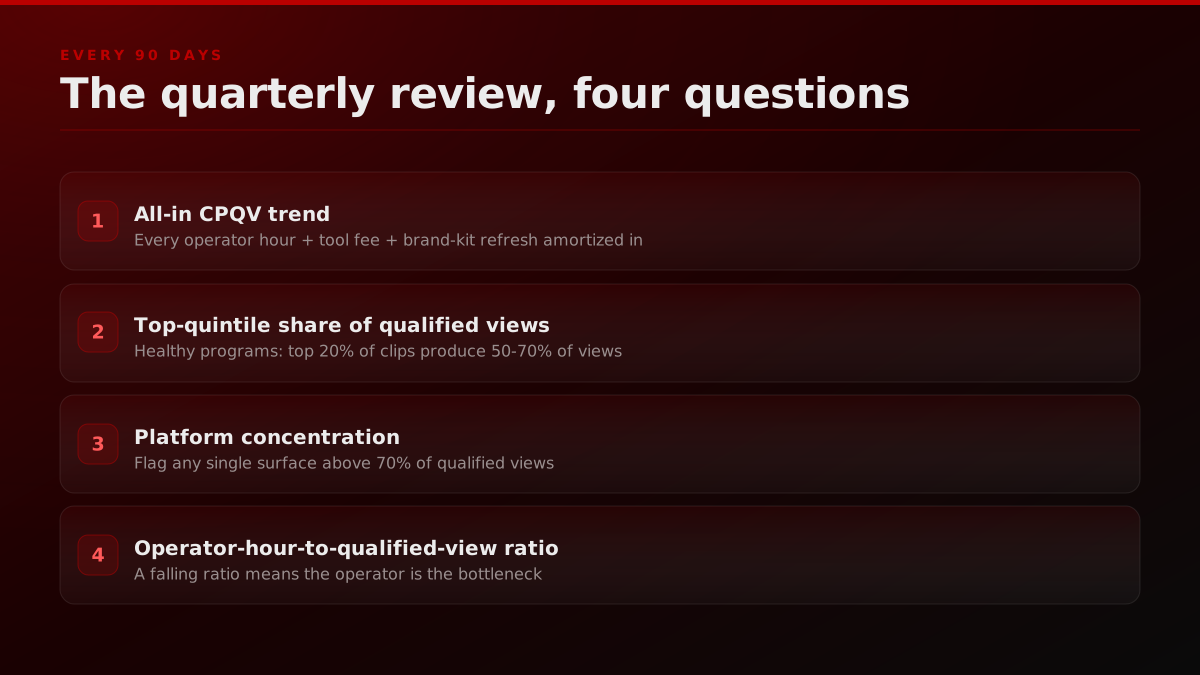
The four questions are the lens we use on every FORKOFF engagement at the 90-day mark. The questions do not care which tool is in the stack. They care about the unit economics, the moment-selection process, the platform mix, and the operator capacity. Every clipping program lives or dies on those four answers.
For an external operator view on this, see the StreamScheme channel covering clipping workflows for streamers.
For adjacent reading, see the FORKOFF qualified-views metric we apply to every comparison, the managed-clipping revenue case study, the FORKOFF clipping service.
Primary sources cited above: Search Engine Land on short-form video and search visibility. HubSpot's State of Marketing 2026 video adoption findings. Sprout Social's 2026 short-form video benchmarks.