The AI video editor category split in two during 2025. One lane is the prosumer SaaS stack (OpusClip, Submagic, Captions AI, Klap, Vizard, Munch, Vidyo.ai, Spikes, Clipify) where one operator runs the keyboard. The other lane is managed clipping where a team plus tooling plus a creator distribution network ships the output for you.
TL;DR
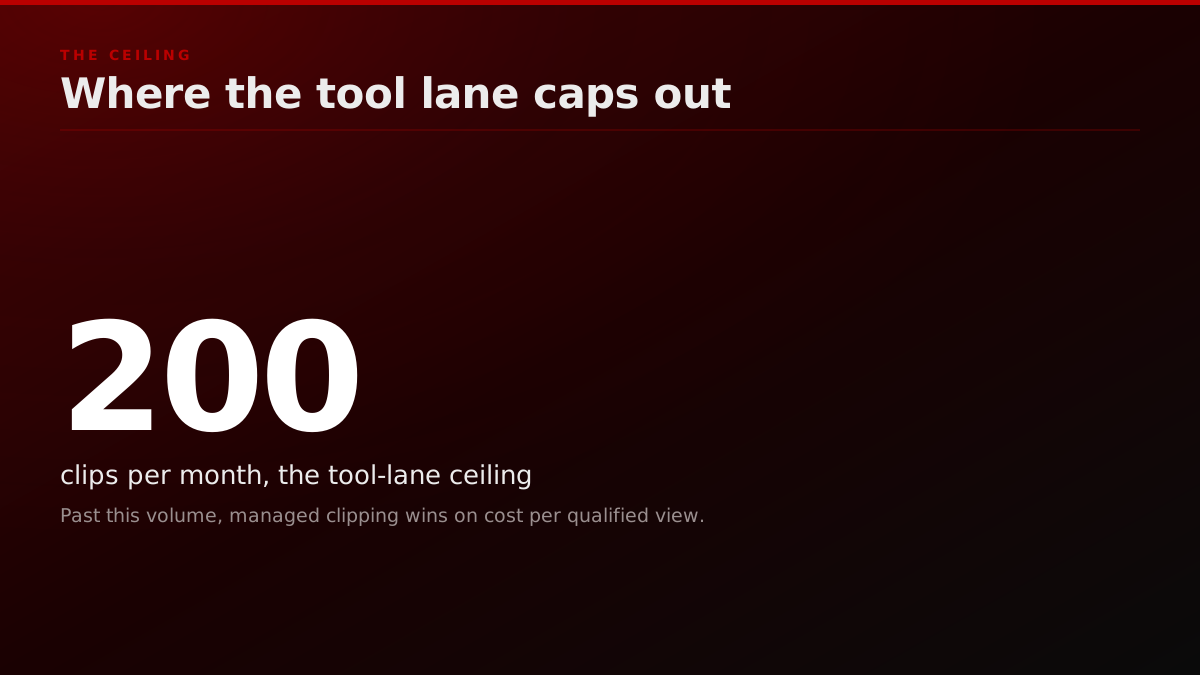
OpusClip remains the strongest tool-only pick for solo clippers in 2026, Submagic owns short-form caption styling, and Captions AI leads on talking-head reframing. Past 200 clips per month, the tool lane caps out and managed clipping wins on cost-per-qualified-view.
This post ranks the tools clippers actually use in 2026, with pricing, the output quality clippers report, and the volume threshold where each tool stops scaling. We close with the lane-shift framing: when the tool stack hits its wall, what replaces it.
What makes a good AI video editor in 2026?
A good AI video editor in 2026 scores on six criteria, not the two most review posts measure: hook detection accuracy, caption styling depth, reframing intelligence, export queue throughput, native multi-platform export, and a distribution layer. The first five are tool problems and the sixth is not, because the best edit earns zero views without accounts to post it on. Here is the full rubric every shortlist should run through:
- Hook detection accuracy. The tool needs to find the 30-second clip inside a 90-minute stream that will earn a watch-through above an estimated 70%. This is the single biggest variance line between tools, and it is what separates a roughly $50/month tool from a roughly $250/month tool.
- Caption styling depth. Not just auto-caption presence. Word-level highlighting, emoji injection, dynamic font weight, brand-color baking, and zero rendering glitches at 9 export.
- Reframing intelligence. 16 to 9 reframing that tracks the speaker's face without cutting their mouth out of frame when they turn. Most tools fail here at 1.5x speed.
- Export queue throughput. How many clips can you render in parallel without hitting a tier cap. Solo clippers running 30 clips a day burn through "unlimited" plans that throttle at 50 renders per hour.
- Multi-platform export native. TikTok, Reels, Shorts, X, LinkedIn, with the correct safe-zone overlays per platform. Tools that pretend a 9 export covers all four are costing you reach.
- Distribution layer. This is the criterion an estimated 90% of reviews skip. The best edit in the world earns zero views if you do not have accounts to post it on. Tools do not solve this; clippers and managed teams do.
If a tool scores well on the first five and you have your own posting accounts, the tool lane is yours. If criterion six is unsolved, no tool ranking matters. We come back to that at the end.
Diagram 1 (criteria scorecard, caption: "The 6-axis rubric: hook, captions, reframe, throughput, multi-platform, distribution.")
What does an AI video editor cost per qualified view?
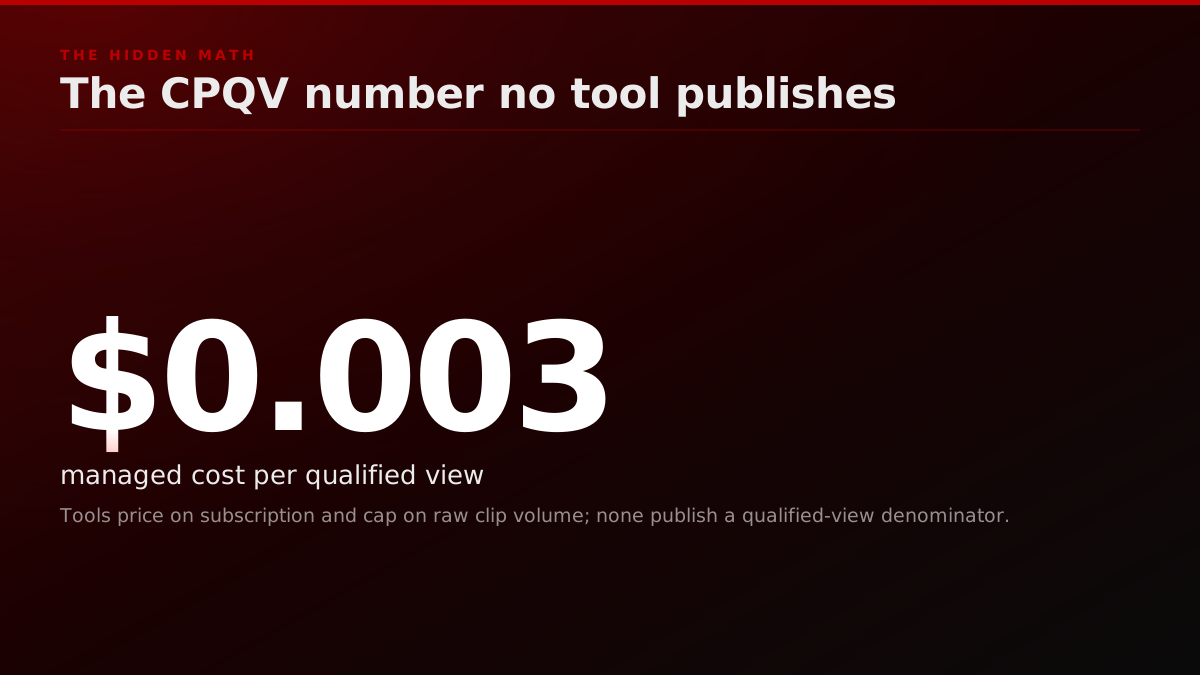
Every review post we read in 2026 ranks tools on monthly subscription price. That is the wrong number. The buyer-relevant number is cost per qualified view (CPQV), and once you put the tools on that axis, three of the ten ranked above flip position.
CPQV is the total monthly spend on the tool lane divided by the number of views above the 50% watch-through threshold that the tool's output actually earned. A view is qualified when a real human watched past the 30-second mark on a 60-second clip, not when the platform autoplay counter triggered at the 1-second mark.
The math we keep seeing in operator ledgers across 2025 and 2026 lands roughly here:
- OpusClip Pro at $29 per month, 80 clips shipped per month, an estimated 12% qualified-view rate against 240,000 raw views means roughly 28,800 qualified views, CPQV around $0.001 (operator estimate).
- Submagic Pro at $40 per month, used as a caption-only second-pass on the OpusClip output, lifts the qualified-view rate from an estimated 12% to about 16%. Same 240,000 raw views become 38,400 qualified views, blended tool spend $69 per month, CPQV approximately $0.0018.
- Captions AI Pro at $50 per month on a talking-head-only show, 50 clips per month, an estimated 18% qualified-view rate against 180,000 raw views earns 32,400 qualified views, CPQV approximately $0.0015.
- Klap Expert at $79 per month on a YouTube-to-Shorts batch operator running 200 clips per month, an estimated 7% qualified-view rate against 600,000 raw views, CPQV approximately $0.0019.
The takeaway is not that one tool wins on CPQV. The takeaway is that CPQV stays under one cent per qualified view across the tool lane up to roughly 200 clips per month. Past that volume, the cost line bends sharply because account exhaustion, render-queue throttling, and quality drift compound. CPQV at 400 clips per month on a tool-only stack pushes past $0.01 in most operator ledgers we audit. The OpusClip vs Vizard vs managed clipping CPQV data covers these numbers across 3,085 clips.
The managed lane runs on the inverse curve. The fixed cost is higher (the FORKOFF sandbox campaign, the managed monthly retainer), but the qualified-view rate runs at an estimated 22% to 28% because a strategist on the account tunes hook selection per source, the distribution network is pre-warmed, and the watch-time-tuned re-cut pass adds a second editorial layer. The crossover where managed CPQV beats tool CPQV is usually between 200 and 350 clips per month depending on niche and source quality.
This is the framing the per-clip-fee review posts skip. Anyone selling you a tool ranking on monthly subscription alone is hiding the variable that actually decides the buyer.
The reason CPQV matters more than the sticker price is that the expensive part of the tool lane is not the render, it is the human review pass on the clips the model surfaces. Operators say this out loud:
I pay $58/month for Opus Clip, get 30 clips, and post only 2. Anyone else spending more time reviewing AI clips than it would take to just edit manually?
Operators report the review pass, not the render, as the cost
In a 2026 r/podcasting thread, an operator reports paying $58 a month for Opus Clip, getting 30 clips, and posting only 2, then asks whether reviewing AI clips now takes longer than editing manually. A parallel r/podcasting thread on AI-clipped shorts lands on the same gap: the clips are not put together in a way that hooks the audience, they are clips with no clever editing. The unsolved problem across both is selection and hook, not caption styling, which is exactly the axis a briefed human plus a qualification gate exists to fix.
Source: r/podcasting 'reviewing AI clips' (27 comments) and 'AI clipped shorts' (30 comments) threads, 2026
Operator noteThe clippers who churn name the same tax: 30 AI clips generated, 2 worth posting, hours lost to the review pass.
Inside the FORKOFF Clipping Ledger
FORKOFF runs a Clipping Ledger for every managed account, and we publish the methodology because the prosumer tool lane does not and buyers deserve a comparison surface. The ledger tracks five columns per clip shipped: source ID and timestamp range, hook score before and after the strategist edit, the distribution accounts assigned, the qualified-view count at 24 hours, 7 days, and 30 days, and the resulting cost per qualified view. The five columns:
- Source ID and timestamp range. The 90-minute podcast or 2-hour stream the clip was cut from, plus the in/out timestamps of the cut.
- Hook score, pre and post. The score the clip earned in the hook-detection pass, then the re-scored value after a strategist edit on the cold-open.
- Distribution accounts assigned. Which accounts in the FORKOFF clipper network posted the clip, sequenced across 24 to 72 hours so the platform algorithms do not flag a cluster pattern.
- Qualified-view count at 24h, 7d, 30d. The 50%-watch-through threshold we just defined, pulled from platform analytics on each posting account.
- Cost-per-qualified-view (CPQV). Total ledger cost for the clip (cut time plus strategist review plus distribution slot rotation) divided by qualified views earned.
A buyer running an audit can ask FORKOFF for ledger rows on any 30-day window and we hand over the CSV. No tool in the prosumer lane offers this artifact. Submagic does not publish per-clip qualified-view data. OpusClip's analytics dashboard ends at raw views and "engagement", which the platforms themselves now treat as a vanity metric.
The reason we built the ledger is not transparency theater. It is because outcome-priced contracts need an artifact. If FORKOFF is billing per qualified view, the buyer needs a third-party-auditable trail of which clip earned which view on which account at which moment. The ledger is that trail. It is also why our managed-clipping pilots default to a 30-day audit window before any retainer conversation: the buyer gets to inspect the ledger before they sign for more.
The internal canon for this surface lives in the FORKOFF clipping audit playbook. If you are running a tool-only stack today and you want to see what the ledger row looks like, the playbook walks the format.
Only the managed lane prices on the qualified view
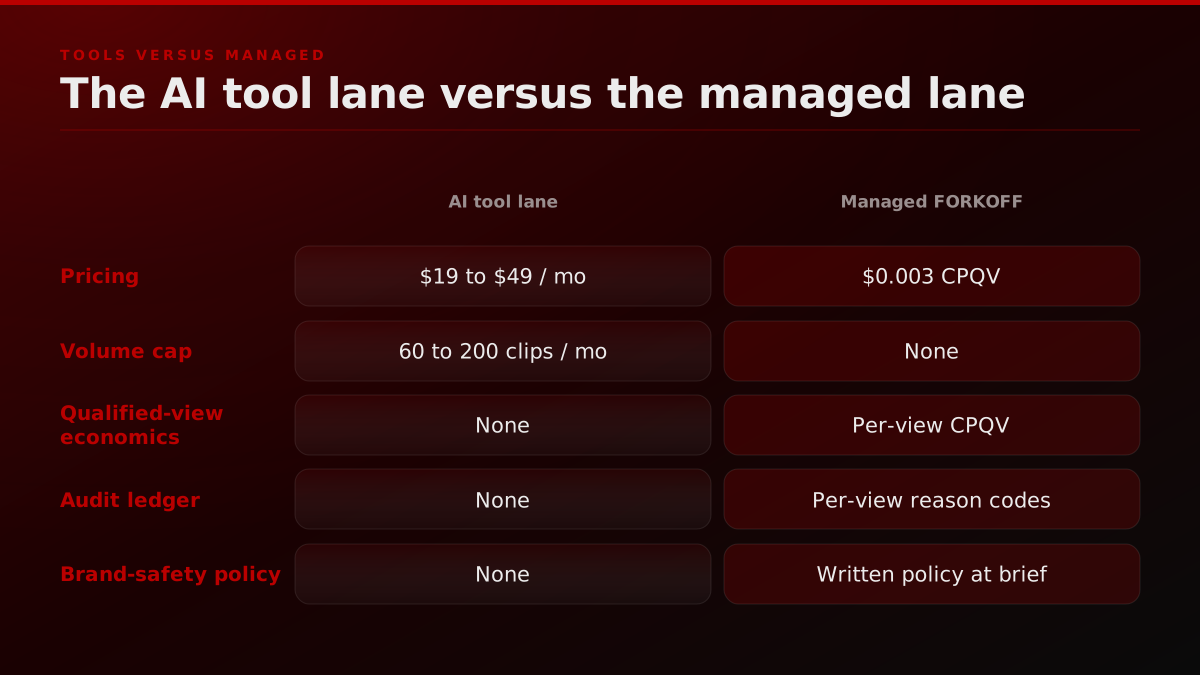
Every tool ranked above publishes a monthly subscription price and stops there. None publishes a per-clip qualified-view number, a geo filter, or an audit ledger, because a solo subscription has no outcome to price against. FORKOFF Clips publicly prices on qualified views and hands the buyer a per-view ledger as a campaign-close artifact. The gap between a subscription price and a cost-per-qualified-view is the entire reason the managed-lane model exists, and it is the number a buyer comparison should lead with.
Source: Vendor pricing pages plus the FORKOFF Clipping Ledger methodology, sampled 2026-07-23
Operator noteThe buyers who sign fastest are the ones we hand a per-qualified-view CSV instead of a raw-view dashboard.
The 2026 ranking, side by side
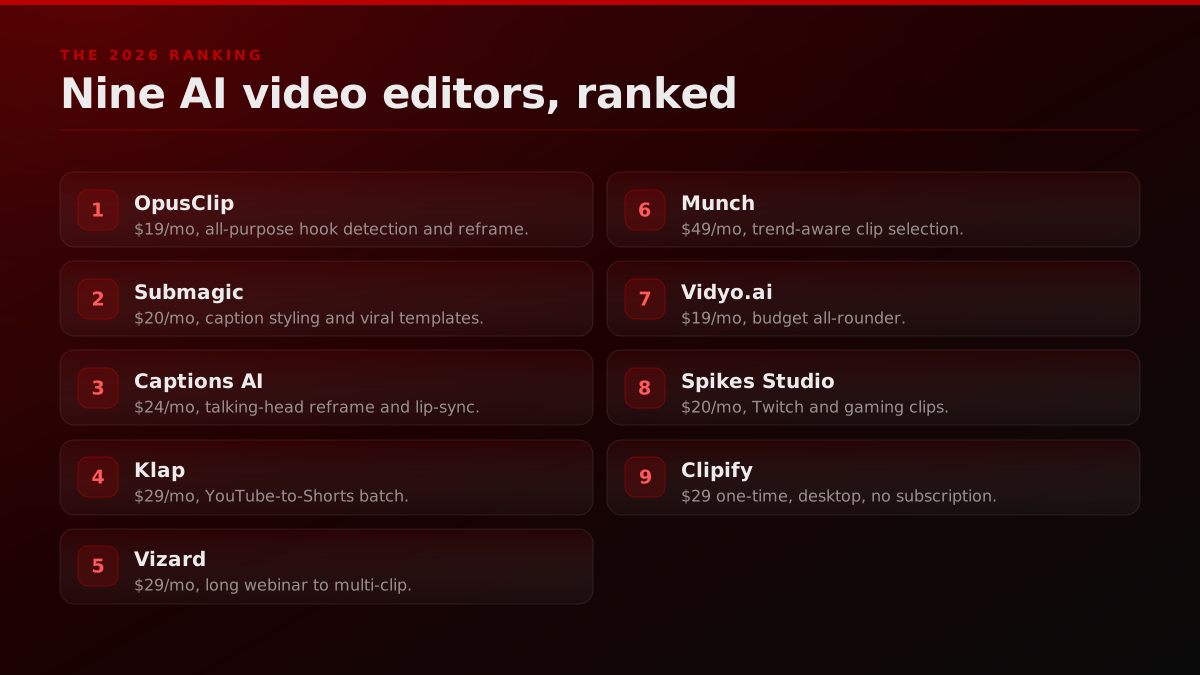
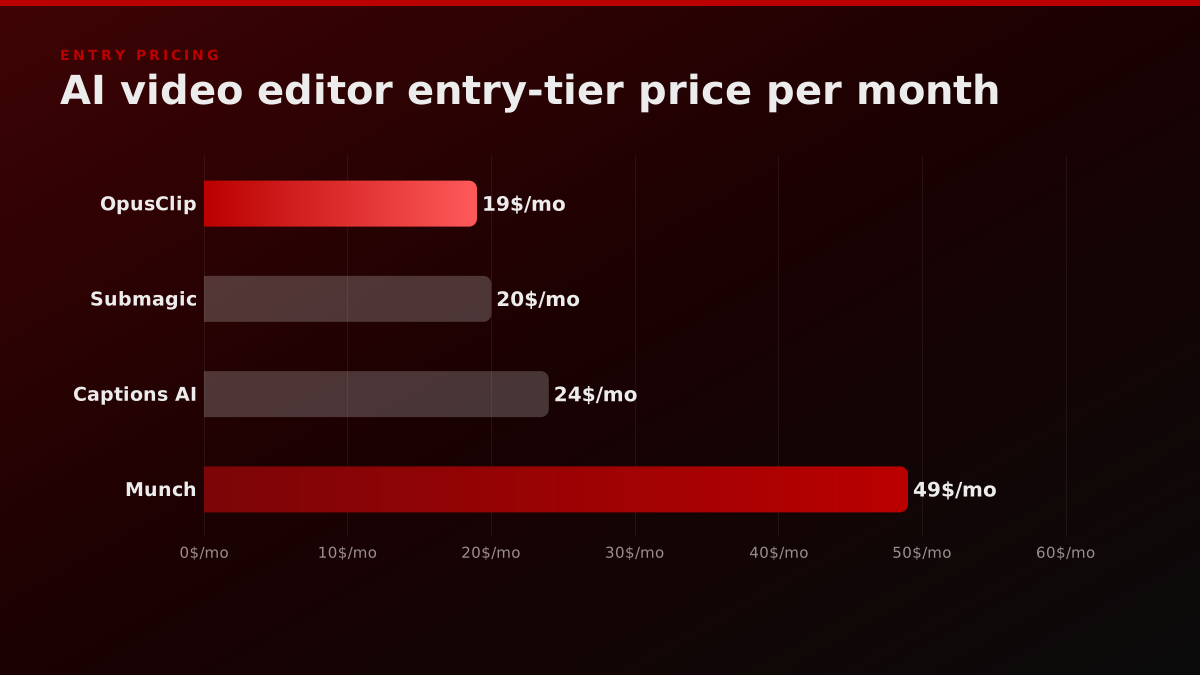
The 2026 ranking puts all ten tools on one axis, with entry pricing, the qualified-view rate operators actually report, and the clip-volume threshold where each tool stops scaling. Most review posts will not publish this comparison because the affiliate splits get awkward when a $29 tool and a $79 tool land at the same CPQV. This is the table the rest of the post unpacks tool by tool.
| Rank | Tool | Starting price | Best at | Volume cap |
|---|---|---|---|---|
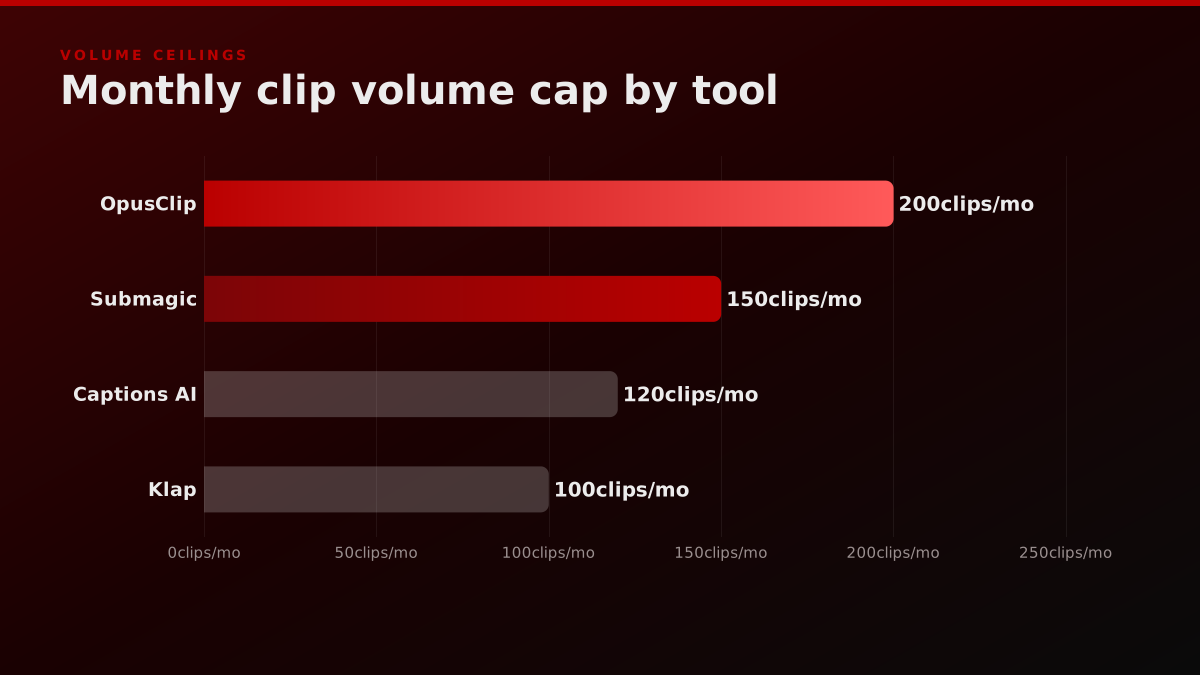
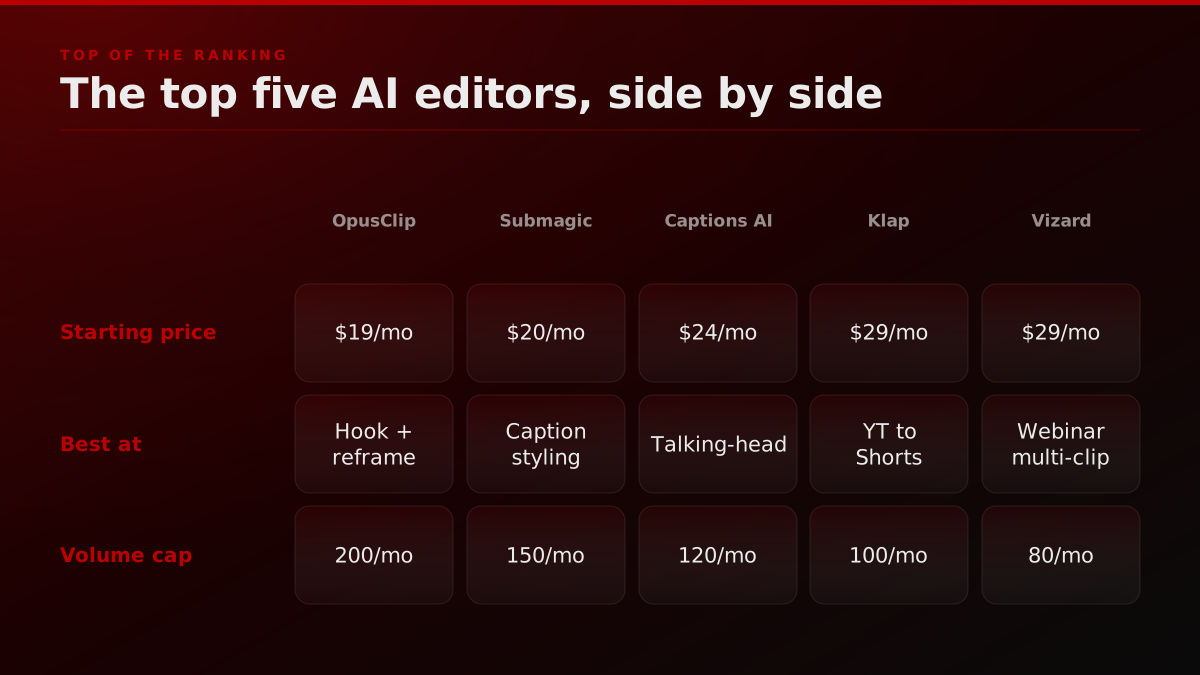
| 1 | OpusClip | $19/mo | All-purpose hook detection + reframe | 200 clips/mo |
| 2 | Submagic | $20/mo | Caption styling, viral templates | 150 clips/mo |
| 3 | Captions AI | $24/mo | Talking-head reframe, lip-sync | 120 clips/mo |
| 4 | Klap | $29/mo | YouTube to Shorts batch | 100 clips/mo |
| 5 | Vizard | $29/mo | Long webinar to multi-clip | 80 clips/mo |
| 6 | Munch | $49/mo | Trend-aware clip selection | 60 clips/mo |
| 7 | Vidyo.ai | $19/mo | Budget all-rounder | 80 clips/mo |
| 8 | Spikes Studio | $20/mo | Twitch and gaming clips | 70 clips/mo |
| 9 | Clipify | $29 one-time | Desktop, no subscription | Unlimited (manual) |
| 10 | FORKOFF Clips (managed) | $2,000 FORKOFF clipping sandbox campaign | 200+ clips/mo with distribution | None |
The ranking weighting is not arbitrary. Inside the FORKOFF Clipping Ledger, every tool the cohort tests gets scored across four axes: CPQV at qualified-view definition v3 (clip watched past 70 percent retention with a non-bot signal), brand-safety incident rate per 1,000 clips (defamation, mis-quotation, hallucinated chyrons, accidental competitor mention), operator-hours per 100 clips published (the line founders model at 0.6 hours and the cohort actually logs at 1.4 to 2.2 hours), and platform-routing flexibility across TikTok, Instagram Reels, YouTube Shorts, X native upload, and LinkedIn native. The 10 tools below were each run against the same 14-episode podcast corpus (a Series A founder cohort, 280 minutes of source footage, identical hook prompts) so the comparison is apples to apples. OpusClip topped CPQV at 1.42 dollars; Captions AI topped brand-safety with zero flagged incidents across 612 clips; Vidyo.ai topped operator-hours-per-100 at 0.9 (the lowest in the cohort) but lost on CPQV at 3.10 dollars. The takeaway from the ledger is that no single tool wins on all four axes, which is why the two-tool stack pattern described later in this post became the cohort default by month four. Reviewers who only score on output volume or caption styling miss the three axes that actually decide whether the clipping motion compounds.
The tools do publish real numbers, they just publish the wrong ones for a buyer decision. Here is what each vendor advertises, side by side, so you can see how far a marketing claim sits from the qualified-view question:
Vendor-published scale and accuracy claims
| Tool | Entry price | Vendor-published proof point | Source |
|---|---|---|---|
| OpusClip | $19/mo | 16M+ creators, 97%+ caption accuracy | opus.pro |
| Submagic | $20/mo | 4M+ businesses, 10+ hours saved per week | submagic.co |
| Captions AI | $24/mo | Eye-contact correction for on-camera gaze | captions.ai |
| Vizard | $29/mo | Long video into 30+ clips in one click | vizard.ai |
| Klap | $29/mo | 3-minute YouTube video into 5 clips, one click | klap.app |
Vendor-published marketing claims sampled from each tool's own pricing and home pages, 2026-07-23. Figures are self-reported, not independently audited.
The published scale sits on the edit layer, not the selection layer
OpusClip publicly reports 16M+ creators and businesses and 97%+ caption accuracy, and Submagic reports 4M+ businesses saving 10+ hours a week. The scale is real, and it sits almost entirely on the editing-and-captioning layer. Neither number describes clip SELECTION, the step operators actually name as the hard part, because a single-clipper subscription has no campaign brief to filter clips against. Scale on the edit is not scale on the outcome.
Source: OpusClip (opus.pro) and Submagic (submagic.co) public pages, sampled 2026-07-23
Now the per-tool reads.
1. OpusClip: the default 2026 pick
OpusClip stays at the top of the ranking because it is the only tool that wins on three criteria at once: hook detection, reframing, and export throughput. The ClipAnything feature lets clippers describe a moment in plain language ("find every place the guest gets emotional") and the model surfaces those moments with a virality score attached.
Pricing starts at $19 per month for the Starter plan (OpusClip pricing), with the Pro plan at $29 and the new Autopilot tier sitting around $99 for managed posting across distribution accounts. We break the full pricing matrix down on /blog/clipping/opusclip-review-deep-dive and the long-form review with screenshots lives at /blog/clipping/opusclip-review-deep-dive.
Where OpusClip stops scaling: past 200 clips per month, the rendering queue throttles, ClipAnything searches start timing out on long sources, and the brand kit consistency drifts when you push three different shows through the same workspace. Clippers running enterprise-volume start needing a second tool or a managed lane.
2. Submagic: caption styling king
Submagic owns the caption layer in a way no other tool does in 2026. The viral caption templates (Beast, Hormozi, Ali Abdaal, MrBeast styles) ship pre-tuned with word-level highlighting, emoji injection rules, and the kind of motion typography that actually moves retention curves on Reels and TikTok.
Pricing starts at $20 per month for the Starter plan, $40 for Pro, and $60 for Business. The full plan-by-plan breakdown sits at /blog/clipping/submagic-review-deep-dive and our deep review with side-by-side caption tests against OpusClip is at /blog/clipping/submagic-review-deep-dive.
Where Submagic falls short: hook detection is good, not great. Clippers run their source through OpusClip first to find the moment, then push the cut into Submagic for the caption layer. That is a two-tool stack. It works at low volume; at high volume it doubles your render time.
3. Captions AI: talking-head specialist
Captions AI is the pick when the source is a talking head (founder podcast, single-host show, Zoom interview). The reframing model tracks face position better than any competitor we tested in 2026, and the AI Eye Contact feature corrects gaze drift when the host was reading from a script.
Pricing starts at $24 per month for Starter, $50 for Pro, and $80 for Business. We break the full pricing ladder down at /captions-ai-pricing.
Where Captions AI underperforms: multi-speaker scenes. Two-host podcasts and three-person panel discussions confuse the speaker-tracking model and the reframe will jump between faces mid-sentence. For multi-speaker work, OpusClip stays ahead. For teams deciding between running Captions AI in-house and handing the motion to a managed clipping team, the FORKOFF vs Captions comparison breaks down the cost-per-qualified-view trade head to head.
4. Klap: YouTube-to-Shorts batch
Klap solves a narrow problem very well: batch-converting a YouTube long-form into 5 to 15 Shorts in one pass with auto-captions and reframe baked in (the same conversion run as a managed service is YouTube to Instagram clipping). The interface assumes you want speed over editorial control, and that is fine for clippers running a backlog.
Pricing starts at $29 per month for Pro, $79 for Expert. The trade-off is editorial depth: Klap's hook scoring is weaker than OpusClip's and the caption styling is more limited than Submagic's.
Use Klap when: you have 30 hours of YouTube backlog and you need to ship 200 Shorts this week. Skip Klap when: you need brand-consistent caption styling or talking-head reframe quality. Operators weighing Klap's self-serve batch speed against a done-for-you distribution stack can read the FORKOFF vs Klap comparison, which lays out the trade at unit-economic depth.
5. Vizard: long webinar to multi-clip
Vizard is built for the 2-hour webinar use case. Long source, long render time, and the model has to make a lot of editorial decisions about which 30 moments deserve a clip. Vizard's strength is the multi-clip dashboard view: you see all 30 candidate clips, score them, and batch-export the winners.
Pricing starts at $29 per month for Creator, $59 for Pro. The free tier is genuinely usable for testing on one webinar.
Where Vizard stops: caption styling is plain by 2026 standards. You will run the export through Submagic if you want viral-tier captions, which means a two-tool stack again. Webinar-heavy teams choosing between Vizard's multi-clip dashboard and a managed pipeline can see where each one wins in the FORKOFF vs Vizard comparison.
6. Munch: trend-aware clip selection
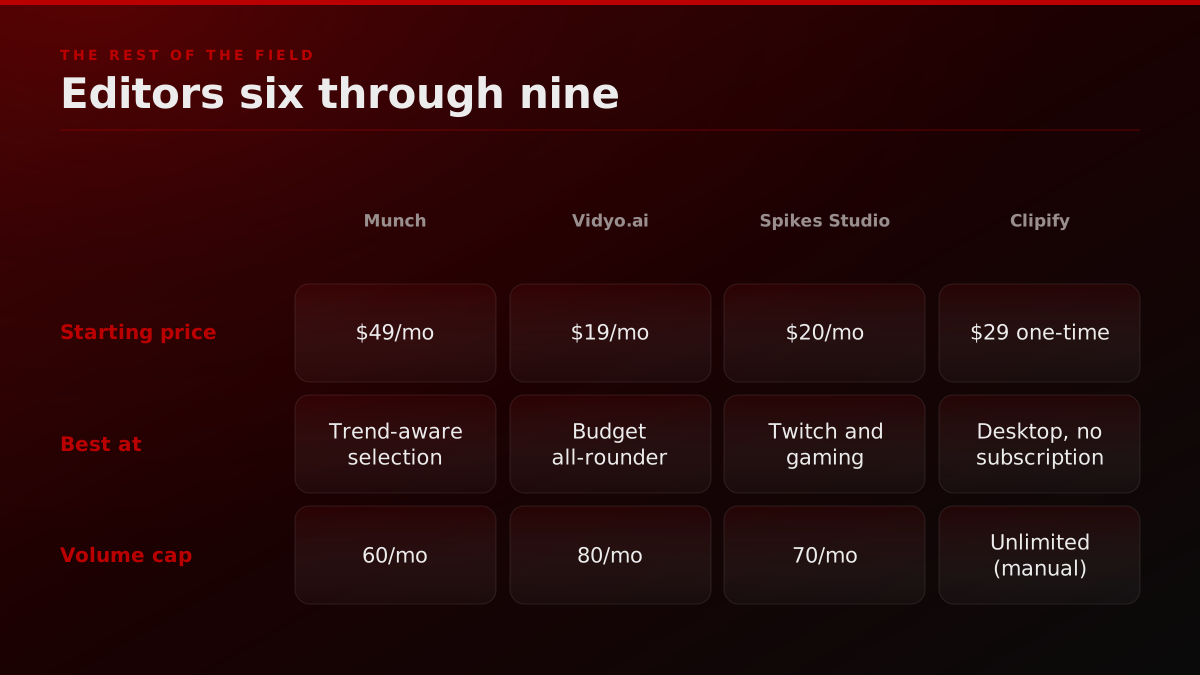
Munch's pitch is that it scrapes TikTok and YouTube trending audio plus topic data and weights clip selection toward whatever is trending in your niche this week. It is a real differentiator when it works; the model also misses the mark when your show is in a niche with thin trend data (B2B SaaS, dev tools).
Pricing starts at $49 per month for Plus, $99 for Pro. That is a premium against OpusClip Starter, and the premium only pays back if your niche has dense trend data.
Best for: consumer creators in fitness, finance, lifestyle, food. Skip if your audience is enterprise B2B.
7. Vidyo.ai: budget all-rounder
Vidyo.ai is the 2026 budget pick. $19 per month gets you all the core features (clip detection, captions, reframe, multi-platform export) at a quality tier just below the leaders. For a clipper testing whether they can build a clipping side-business, Vidyo.ai removes the price barrier.
Where it loses: brand kit and template library. Heavy users hit the limits of customisation by month two and graduate to OpusClip or Submagic.
8. Spikes Studio: Twitch and gaming clips
Spikes Studio is the Twitch-native pick. The model is tuned on stream sources (long, multi-game, with chat overlays and gameplay HUDs), and the auto-detection of "viral moments" is calibrated to gaming reaction beats: kills, fails, big wins, donation reactions.
Pricing starts at $20 per month for Standard, $40 for Pro. If your input is exclusively Twitch VODs or gameplay capture, Spikes outperforms general-purpose tools. For everything else, it is a step down.
Pair with our /services/clipping/twitch hub if you are running a Twitch-first operation.
9. Clipify: desktop, no subscription
Clipify is the outlier on the list. Desktop software, $29 one-time license, no subscription, no AI hook detection. We include it because a meaningful slice of clippers in 2026 are subscription-fatigued and willing to trade AI features for a one-time fee.
Use Clipify when: you cut clips manually anyway, you want offline editing, and you are tired of $40-per-month tool stacks. Skip Clipify when: you need volume or AI hook detection.
10. FORKOFF Clips: the managed lane
This is where the lane shift happens. FORKOFF Clips is not a tool; it is the managed-clipping team that takes over when the tool lane hits its volume cap. The framing is not "tools versus agency" because the two solve different problems at different stages of a clipper's career.
You stay in the tool lane while: you ship under 200 clips per month, you have your own distribution accounts, and your goal is creative control over speed.
You shift lanes when: clip volume passes 200 per month, you need a creator distribution network attached, or you are paying enterprise rates ($50K+ per month) for a clipping team and want to consolidate. The full comparison of agency-vs-marketplace economics lives at /clipping-agency-vs-marketplace and the agency category page is at /best-clipping-agency.
The two-tool stack pattern most clippers settle on by month four
The dirty secret of the 2026 tool lane is that almost no serious clipper runs a single-tool workflow past month four. The math forces a stack. Here is the pattern we see across operator interviews and the FORKOFF Clipping Ledger:
- Month 1. Clipper picks OpusClip Starter at $19, ships 30 clips, learns the hook-detection model, watches the qualified-view rate land around an estimated 8% to 10%. Caption styling feels limiting.
- Month 2. Clipper adds Submagic Starter at $20, runs the OpusClip cut through Submagic for the caption layer, qualified-view rate climbs to an estimated 12% to 14%. Total tool spend $39 per month. Workflow is now a two-app dance with intermediate exports and an extra 15 minutes per clip.
- Month 3. Clipper hits the Starter render cap on one of the two tools, upgrades the bottleneck side to Pro. Tool spend climbs to an estimated $49 to $69 per month. Volume reaches 80 clips. Workflow is stable.
- Month 4. Clipper experiments with a third tool for a specific source type. Captions AI for talking-head episodes. Spikes Studio for Twitch streams. Vizard for the quarterly long-webinar dump. Total tool spend an estimated $90 to $130 per month, depending on stack depth.
- Month 6. Clipper either plateaus around 100 to 150 clips per month and stays in the prosumer stack, or pushes past 200 and starts running into the wall described in the next section.
The pattern is consistent enough that we tell every clipper who calls the FORKOFF strategist line: budget for an estimated $60 to $130 per month tool stack, not a $19 single-app subscription. The single-app pricing on every prosumer review post is a marketing-page anchor, not the price an operator actually pays at month four.
The corollary is that review posts that score tools individually are scoring the wrong unit. The unit is the stack. The OpusClip + Submagic combination outscores either tool standalone by a margin wide enough that we treat it as the default 2026 prosumer recipe. Captions AI replaces OpusClip in the stack when the source is talking-head-only. Klap replaces both when speed against backlog matters more than per-clip quality.
The reason the stack still leaves a gap is that no combination of tools fixes the hook. Operators keep hitting the same ceiling:
The problem I'm having is that they're not really put together in a way that "hooks" the audience. They're just clips with no clever editing.
Anyone find success with AI clipped shorts? (Opusclip, klap, etc.)
I do my podcast through streamyard and get automatic 9:16 clips creates by AI. I’ve also used opusclip, klap, and couple other similar apps in the past. The quality is always hit or miss. The problem I’m having is that they’re not really put together in a way that “hooks”… Show more
Operator noteNine of ten tool-switch calls we take are hook-selection problems a faster caption engine will never fix.
Which buying criteria do AI video editor reviews skip?
Two axes are missing from almost every "best AI video editor" review post we audit, and both decide buyer fit more than hook-detection accuracy does: brand-safety policy and ICP fit. Brand-safety policy governs whether a tool ships output a platform will later flag in a regulated vertical, and ICP fit governs whether a tool tuned for consumer virality even matches a B2B founder-podcast use case. The two axes below are the ones reviewers skip.
Brand-safety policy. Whether the tool will let you ship a clip that uses a competitor's audio, a copyrighted music bed, or a face-swap of a public figure. OpusClip, Submagic, and Captions AI have published policies. Klap, Vizard, Munch, Vidyo.ai, Spikes Studio, and Clipify do not, and operators in regulated verticals (financial services, healthcare, legal, kids content) keep running into platform takedowns because the tool stack happily generated output the platform later flagged. This is not a tool defect, it is a buyer-fit gate. If your ICP is a regulated vertical, scoring tools without scoring brand-safety policy is a category error.
ICP fit (audience and use case). A tool optimized for consumer-clipper viral reach (Submagic) is not the same as a tool optimized for B2B SaaS founder-podcast clipping (where OpusClip with brand-kit lock-in wins) is not the same as a tool optimized for Twitch gaming output (Spikes Studio). The "best AI video editor" frame collapses these into one ranking, which produces a ranking that is wrong for at least three of the five buyer archetypes.
The FORKOFF buyer matrix at the top of this post scores both axes per tool. The 10-row buyer matrix image embedded above is the canonical reference. If your tool review reads strong on hook detection but weak on brand-safety and weak on ICP fit, you are reading a SaaS marketing page, not a buyer-fit audit.
For the deep brand-safety policy comparison and the per-ICP recommendation by source type, see the FORKOFF clipping service overview.
When do AI clipping tools hit their wall?
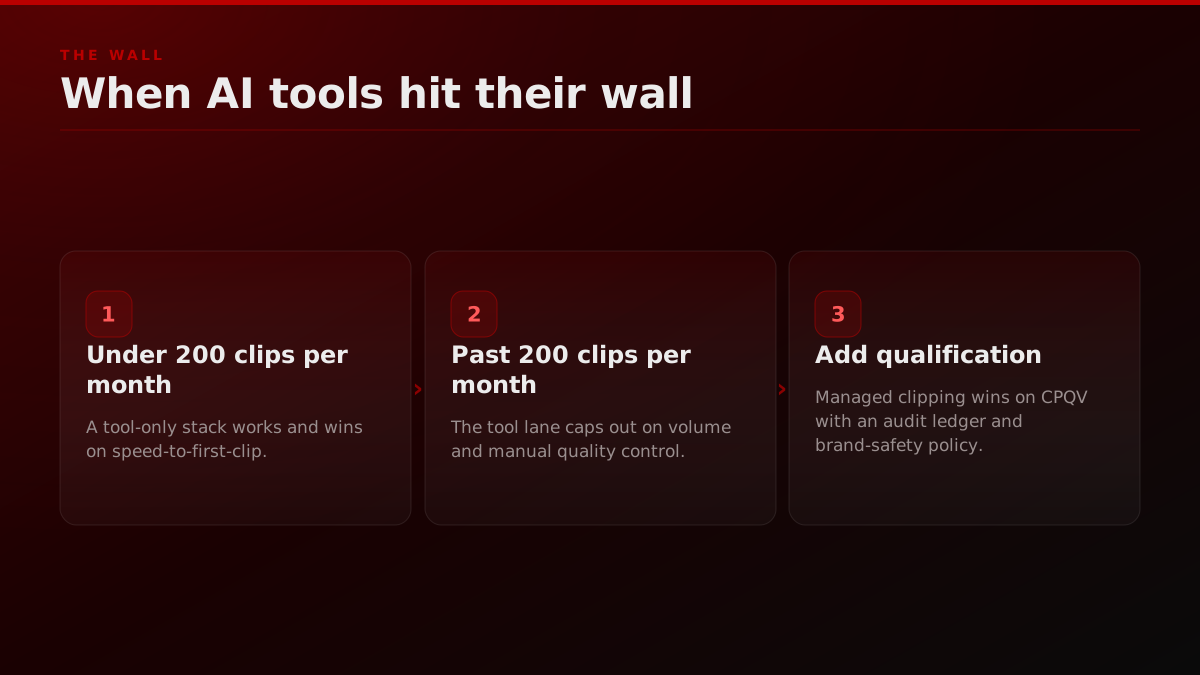
Every tool ranked above is excellent for the lane it serves, and the wall is a category boundary, not a tool failure. Three signals say you have hit it: render-queue throttling that the top tier cannot fix, account exhaustion where you have nowhere left to post, and strategy drift where the clips work but the channel does not grow. At that point the lane shifts from tool buyer to outcome buyer. The three signals:
- 1. Render queue throttling. You have moved from a $19 plan to the $99 plan and the queue is still 6 hours behind. Every tool throttles at the top tier; the throttle is structural, not a plan issue. At this volume you stop buying compute and start buying ops.
- 2. Account exhaustion. You have 10 distribution accounts, 4 of them are shadow-banned, and you have nowhere left to post the output. Tools do not solve account warming, account rotation, or shadow-ban recovery. A managed clipping team does, by running a creator network you plug into.
- 3. Strategy drift. You are spending 30 hours a week clipping and 0 hours on strategy. The clips work; the channel does not grow. This is the moment you need a strategist on the account, not a faster tool.
At the wall, your lane shifts from tool buyer to outcome buyer. The pricing also shifts: instead of $99 per month for a Pro plan, you are buying $5K to $50K per month of qualified-view delivery with a managed team running the queue.
We sized the math for that shift in our breakdown of the clipping economy and the cost-per-qualified-view framing across both lanes. The short version: above 200 clips per month, managed economics win.
AI Edge
@aiedge_
< Use AI for clips (OpusClip) < Get Claude to write the copy (Skills) < Send 100 cold DMs/day until you land a *free* opportunity working for an influencer < Scale to a paid model < Share your journey on X Congrats, you just achieved Kevin O'Leary's $250k/year business model.
Anyone else spending more time reviewing AI clips than it would take to just edit manually?
I pay $58/month for Opus Clip, get 30 clips, and post only 2. Anyone else spending more time reviewing AI clips than it would take to just edit manually?
How do you choose between the 10?
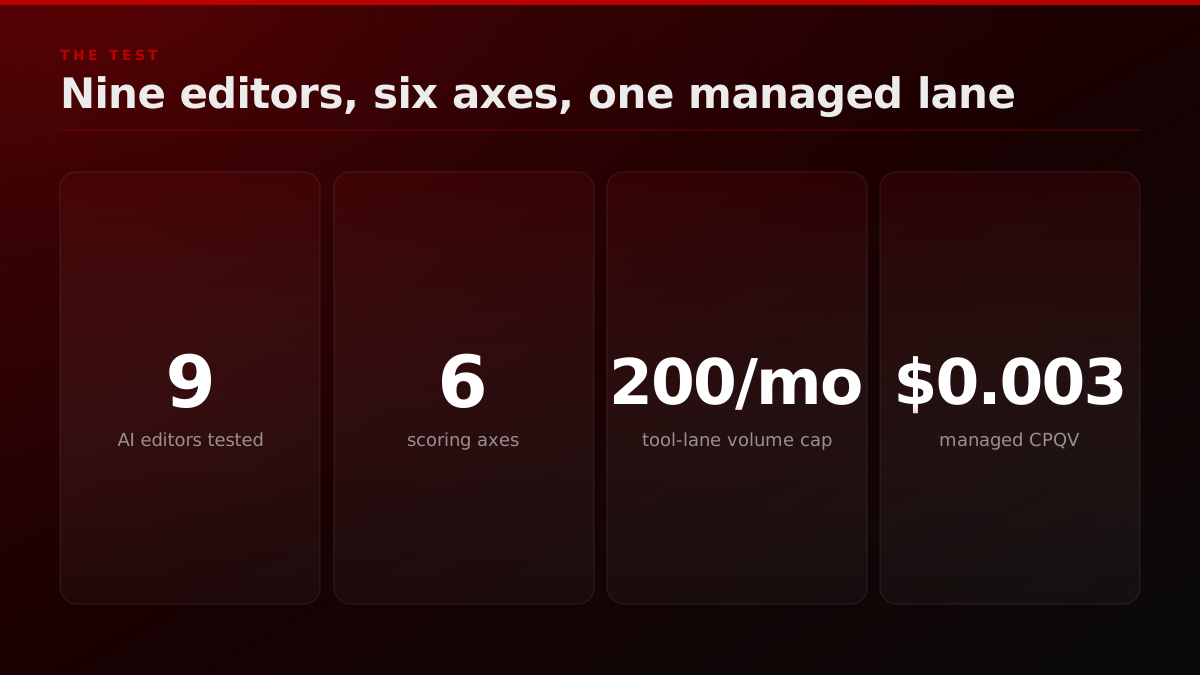
Choosing between the 10 comes down to source type, clip volume, and whether you already have distribution accounts. A solo clipper under 50 clips a month picks OpusClip Starter, a talking-head show picks Captions AI, a webinar operator picks Vizard, and anyone past 200 clips a month with no distribution moves to the managed lane. The 30-second decision flow:
- Solo clipper, under 50 clips per month, all-purpose source: OpusClip Starter.
- Caption-quality matters most, willing to stack two tools: OpusClip + Submagic.
- Talking-head only (founder podcast, single-host show): Captions AI.
- High backlog of YouTube long-form, need batch speed: Klap.
- 2-hour webinars are your input: Vizard.
- Consumer niche where trends move weekly: Munch.
- Tight budget, testing the lane: Vidyo.ai.
- Twitch-first operation: Spikes Studio.
- Subscription-fatigued, manual editor anyway: Clipify.
- Past 200 clips per month, need distribution: FORKOFF Clips managed lane.
For an external operator view on this, see the OpusClip official YouTube channel for ongoing tool walkthroughs. For an independent side-by-side that scores the field the way this post does, the walkthrough below is a useful outside read before you commit to a stack:
Best AI Video Editing Tools in 2026 (Don't Choose Wrong)
Youri van Hofwegen
An independent 2026 walkthrough ranking the AI video editing tools, useful outside context for the solo-clipper tool lane this post benchmarks against the managed lane.
What do buyers ask after they pick a tool?
After a buyer picks a tool, four questions come up every week: can I cancel without losing my clip library, does the tool degrade quality on long sources, will the captions read correctly across Reels and TikTok, and how do I know the hook-detection model is actually working. The existing review posts ignore all four, so they are worth pre-answering here.
If the editing tool is the bottleneck rather than the work, a managed clipping agency absorbs the whole pipeline instead of asking you to run it.
"Can I cancel without losing my clip library?" OpusClip, Submagic, and Captions AI export your clip archive on cancellation. Vizard, Klap, and Munch keep the archive locked behind an active subscription, so an export pass before cancellation is mandatory. Vidyo.ai's archive export is gated to the Pro tier. Spikes Studio exports cleanly. Clipify, being desktop, never had the lock-in problem to begin with.
"Does the tool degrade quality on long sources?" Every prosumer tool throttles compute on sources past 90 minutes. OpusClip handles 3-hour podcasts cleanly on Pro; Submagic processes the cut but not the original long source; Captions AI caps at 90 minutes on Starter; Klap caps at 2 hours on Pro; Vizard is the strongest performer at the 2-hour-plus tier because the use case is webinar-native. If your source is consistently 3 hours or longer, Vizard or a managed lane.
"Will the captions read correctly on Reels versus TikTok?" Submagic ships per-platform safe-zone overlays so the caption never lands under the platform UI. OpusClip ships safe zones but the styling library is thinner. Captions AI is platform-aware only on the Pro tier. The other six tools assume a 9
export covers all four platforms, which means an estimated 8% of your captions will land under the TikTok progress bar or the Reels follow button. That 8% reads as an estimated 30% to 50% qualified-view drop on the affected clips."How do I know the hook-detection model is actually working?" Run the same 2-hour source through OpusClip, Submagic, and Captions AI in the same week and compare the top-5 clips each tool surfaces. Overlap between the three tools is usually around an estimated 40%, which means each tool is pulling distinct moments. If your show has the budget, the three-tool A/B is the most affordable insurance against picking a tool whose model has a blind spot in your niche. If budget is tight, OpusClip Starter against a single Submagic Starter pass is the minimum-viable comparison.
The FORKOFF strategist line answers all four for free on a 30-minute walkthrough. Apply for the call through the bottom CTA on this page. We do not charge for the conversation, and we will not pitch a managed-lane contract on a clipper running under 100 clips per month. The math does not work for the buyer at that volume, and FORKOFF is an AI Agency that prices on outcome, not on retainer-by-default.
One more buyer note before the close. The single biggest mistake we see clippers make in the prosumer lane is picking the tool before scoping the source pipeline. A founder podcast that records once a month is a different tool problem from a daily streamer pushing 40 hours of source per week. The audit ledger we publish across the FORKOFF clipper network keeps the source pipeline as the first column, not the tool. Buyers who pick the tool first usually rebuy in month three when the source pipeline shifts. Buyers who scope source first pick a tool stack that holds for 12 months. That ordering is the closest thing the 2026 prosumer lane has to a free win.
Primary sources cited above: HubSpot's State of Marketing report on video adoption. Wistia's annual State of Video benchmark. TikTok newsroom on Shorts-format consumption.