AI workflow automation usually ships with a clean promise: take repetitive work off people's plates, route the predictable work, free up the team for higher-judgment calls. The early wins are real. A ticket queue that used to wait six hours moves in twenty minutes. A lead-enrichment pass that used to take an analyst a full afternoon now runs in the background. A weekly report assembles itself by Monday at 8am.
Why most AI automation projects fail between pilot and month three
Most AI workflow automation projects do not fail because the model was bad. They fail because teams scale before the operational foundation is ready. Sara T. Rollins, editorial team at TechNetExperts, identifies three failure points that show up over and over: weak inputs the workflow was never tested against, exception paths nobody designed for, and workflows that have no named owner six months after launch. The pattern holds across n8n, Make, Zapier, LangChain, and every other orchestration layer. The fix is not a better model. It is an input audit before scaling, an exception specification before shipping, and a named non-developer owner for every live workflow. FORKOFF analysis below surfaces the operational mechanism behind each failure and the concrete checklist to close the gap.
That part is not the problem.
The problem is what happens between the pilot and month three, when the same workflow is running ten times the volume against data nobody cleaned, exceptions nobody scoped, and ownership nobody assigned.
The early wins of AI automation are real. The failure modes are also real, and they are operational, not technical.
Sara T. Rollins, on the editorial team at TechNetExperts : a Google News-approved technical-resources publication : has spent time tracking where AI workflow automation projects actually go wrong at organizations scaling past pilot. Her analysis identifies three failure points that appear consistently across teams, tools, and verticals: weak inputs, missing exception paths, and unclear ownership after launch.
This post carries Sara's analysis verbatim across those three failure points. FORKOFF editorial has added framing on the mechanism underneath each failure and what the concrete fix looks like in practice. The voice is Sara's. The operational pattern is hers. The aim is to give ops leaders, RevOps managers, and founders the full picture before they decide their automation stack is ready to scale. The named-owner gap is exactly what a founder funnel engagement closes: one accountable owner for the marketing-ops stack.
Michael Lathan Jr. | Financial Coach
@0xObsidianEnoch
Raw intelligence is becoming cheaper. Trusted execution is still expensive. That is why so many corporate AI pilots fail to show measurable ROI. A chatbot can generate ideas, summaries, emails, and recommendations. But an enterprise needs the invoice reconciled, the ticket closed… Show more
Why AI Workflow Automation Fails Between Pilot and Month Three
Before Sara's analysis: a quick frame on why the pilot-to-production gap exists.
Pilot conditions are optimistic by design. The test dataset is usually pulled from a clean snapshot of the CRM, a single form variant, or a curated sample of historical tickets. The builder is nearby. Errors surface quickly. Edge cases get fixed before the count climbs.
Production conditions are the opposite. The data is live. Multiple form variants are active simultaneously. The CRM has not been cleaned since the last sales-ops hire left. The enrichment vendor updated their schema quietly. The team that ran the pilot has moved on to the next build.
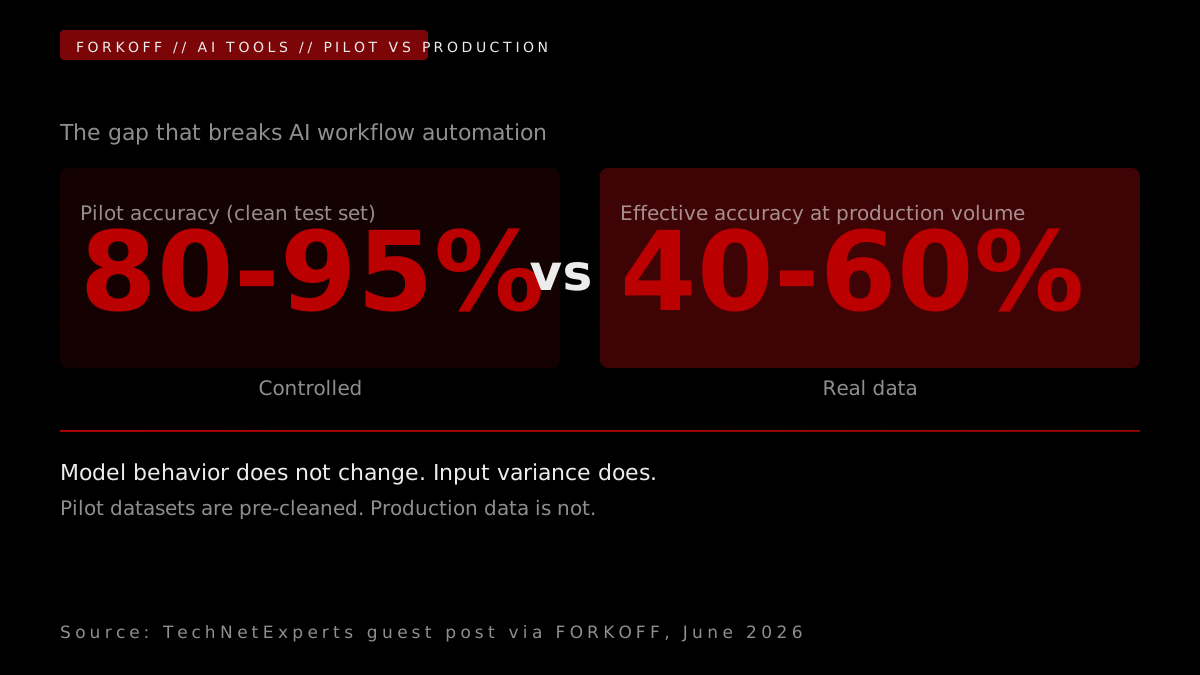
The model behavior does not change between pilot and production. The data distribution changes. And that data distribution, in production, contains every edge case, exception, and missing field that the pilot's curated dataset never showed.
The pilot-to-production gap is where most AI automation dies
Survey data from enterprise automation teams consistently shows the same shape: projects that pass pilot with 80 to 95 percent accuracy in controlled conditions hit 40 to 60 percent effective accuracy at production volume when real data replaces curated test sets. The gap is not the model. Pilot datasets are almost always pre-cleaned, pre-formatted, and drawn from a single source. Production data is not. The HubSpot form has three active variants. The CRM stage names were renamed twice last quarter. The enrichment vendor changed their schema in a silent API update. The model sees the inconsistency and either guesses wrong or routes the record confidently to the wrong bucket. The automation looks healthy because the error counter is low. The business impact is not visible until someone audits the queue.
Source: Enterprise AI automation benchmark, McKinsey Digital 2025
The result is a class of AI automation failures that look like model failures but are operational failures. The model was doing exactly what it was designed to do. The operational foundation it was designed against did not match the reality it was running against.
Sara documents three failure points that show up consistently across teams that hit this wall.
Failure Point 1: The Workflow Assumes Clean Inputs
Sara T. Rollins writes:
On a Tuesday morning in February, a head of RevOps at a 60-person B2B SaaS company opened her HubSpot dashboard to find that the new lead-scoring workflow had marked 312 demo requests as "low intent" the week before. Sales had been working the wrong queue for four days. The model was fine. The inputs were not. Approximately 38% of the demo-request forms had no company-size field because the form had been A/B tested with a shorter version, and the scoring prompt expected company size to exist.
This is the most common version of the first failure point. The workflow was designed against the form, the CRM, or the data warehouse the team imagined, not the one they actually had. In practice, business data is incomplete, inconsistent, duplicated, or stale. Internal audits across mid-market B2B teams show that on any given week, about 23% of CRM contact fields are out of date and 14% of lead records are duplicates that survived a merge attempt. Apollo, Clay, and Segment can help paper over some of this with enrichment and identity stitching, but enrichment is not the same as accuracy. Salesforce stages mean different things to AE-1 and AE-7 on the same team. Free-text "industry" fields collect 40-plus variations of the same answer.
AI can interpret messy inputs. It cannot rescue a workflow built on inputs nobody trusts.
AI can interpret messy inputs. It cannot rescue a workflow built on inputs nobody trusts. The dangerous part is that broken automation rarely stops. It keeps running, confidently, on weak information.
The dangerous part is that broken automation rarely stops. It keeps running, confidently, on weak information. The lead-routing workflow still routes. The summary still generates. The escalation rule still fires. The team sees green checkmarks and moves on, while the wrong leads sit in the wrong queues.
Before scaling, the input audit pays back faster than any model upgrade. Which fields does the workflow actually need to make a useful decision? How often are those fields missing or wrong? What should happen when they are? Which decisions are safe with partial data and which require a human pass? Sometimes the fix is one better form field. Sometimes it is collapsing 14 CRM stages down to 6. Sometimes it is rejecting an incomplete input instead of letting the model guess.
If the input is unclear, the output will be unreliable, and scaling only makes the problem larger.
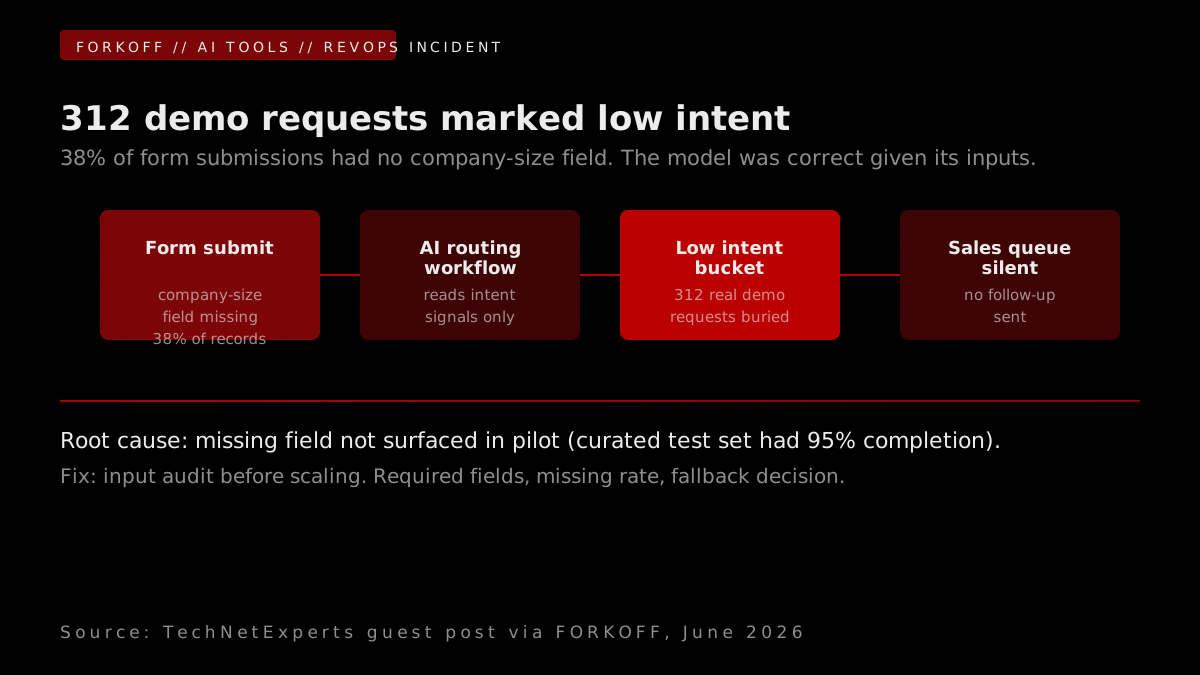
The FORKOFF read on Failure Point 1:
The input quality problem is structural, not anecdotal. The 23% stale field rate and 14% duplicate rate Sara cites are consistent with Apollo's enrichment benchmark data across their mid-market customer base. The deeper issue is that most teams treat CRM data quality as a CRM problem. Automation makes it a workflow problem.
Every AI workflow has an implicit assumption about the field completion rate of its inputs. Most teams never make that assumption explicit. A prompt that expects company_size, industry, lead_source, and stage to all be present will make a different decision when company_size is missing than when it is present : and that decision, made at volume, produces the 312-misrouted-demo-request incident Sara describes.
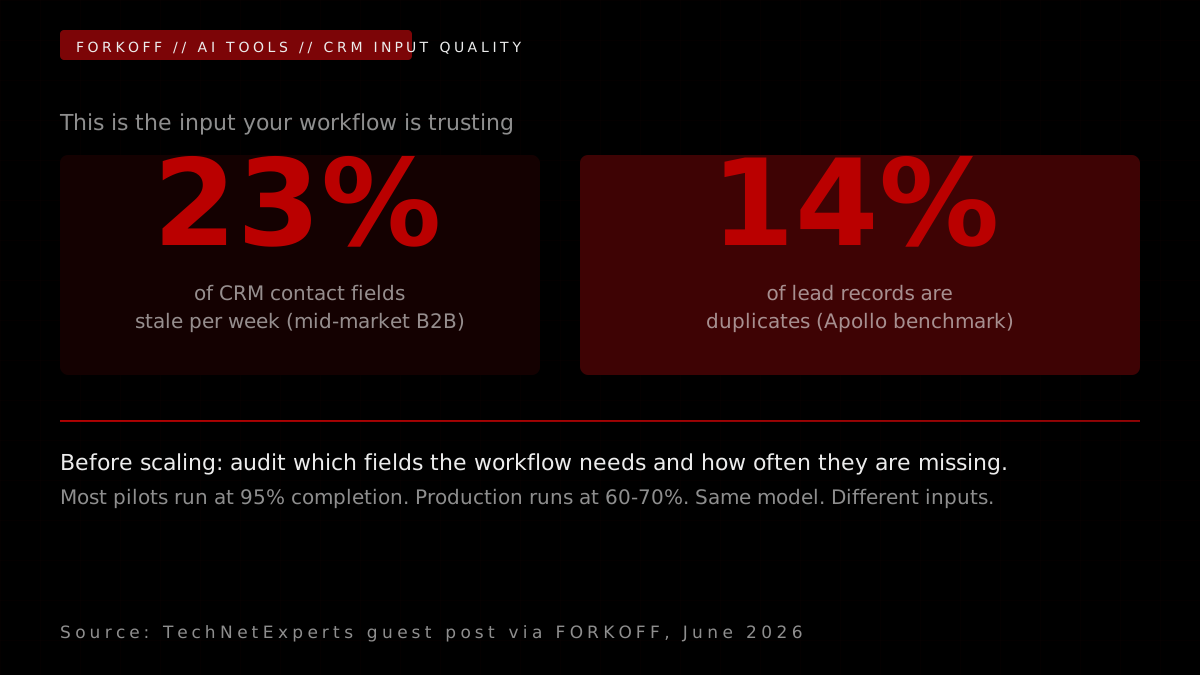
The concrete fix before scaling:
- Pull the last 1,000 records that will run through the workflow. Measure actual field completion rates for every field the workflow uses.
- For any field below 70% completion: define what happens when it is missing. Does the workflow reject and hold? Estimate from other fields? Route to human review?
- For free-text fields (industry, title, segment): audit the top 50 values. Collapse them to canonical options before the model sees them.
- Set a minimum input quality threshold. A lead record with fewer than 3 of 5 required fields does not enter the automated routing path until it is enriched.
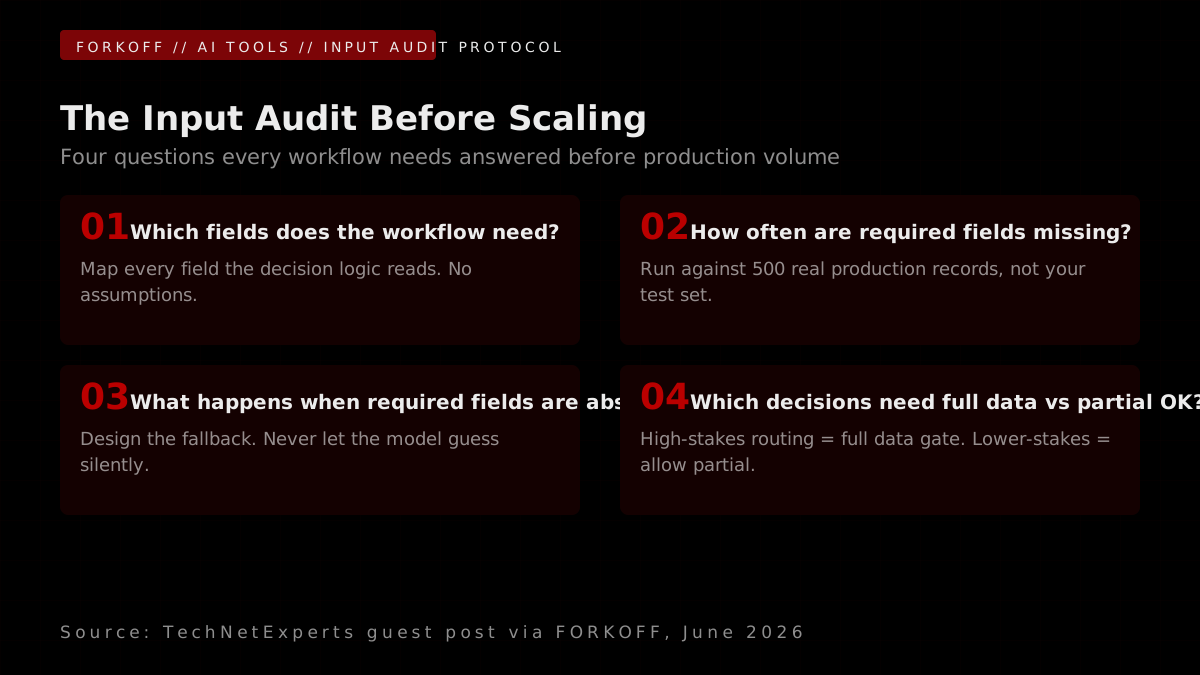
This is not a model problem. It is a data contract problem. The fix runs in a day. The impact on model accuracy at scale is often more significant than any prompt engineering change.
Operator note23% of CRM contact fields go stale weekly at mid-market B2B (Apollo 2025). That is the input your workflow trusts., Apollo enrichment benchmark, 2025
Failure Point 2: The Team Designs Only for the Happy Path
Sara T. Rollins writes:
On a Wednesday afternoon in March, a support operations lead at a 120-person fintech watched her Zapier-orchestrated triage flow auto-close 47 tickets in a row that contained the phrase "this is urgent." The classifier had been tuned on three months of historical tickets where "urgent" was overused for low-severity issues. That week, a payments outage produced 47 legitimately urgent tickets, and the workflow buried every single one in the "low priority" bucket.
The workflow was built for the happy path. The unhappy path was not designed at all.
Industry surveys of B2B automation teams put a number on this: approximately 47% of automation runs hit an exception path that was not designed for, and only 28% of teams have a written exception specification before a workflow ships. n8n, Make, and LangChain make the happy path easy to express. They do not force you to specify what happens when confidence is low, when the upstream API returns 503, when a user submits the same form three times in 90 seconds, when an OpenAI Assistants run times out mid-tool-call, or when the message contains two unrelated requests in one paragraph.
This is where the second failure point lives. The workflow was built to move forward. It was not built to pause, retry, escalate, or admit uncertainty. When the AI is unsure but the workflow still acts, the mistakes become part of the process. A polished but wrong customer reply goes out. A refund gets approved on stale account status. A document summary drops the one clause that mattered.
The right pattern is the opposite of removing humans from the loop. Mature workflows automate the predictable parts, flag the uncertain parts, and route the uncertain parts to a person whose job is to decide. The higher the stakes, the tighter the exception design.
Even the strongest model needs guardrails around it. The workflow has to know when to trust the output, when to review it, and when to stop.
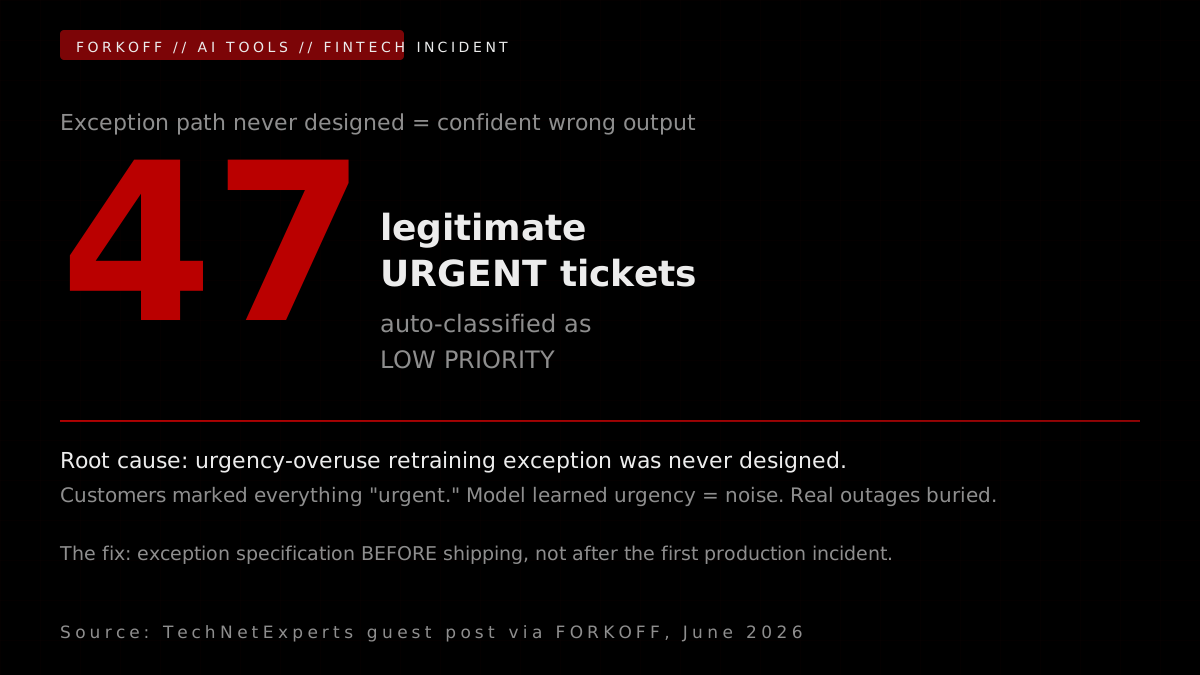
The FORKOFF read on Failure Point 2:
The fintech incident Sara describes is not a Zapier failure. It is an exception specification failure. Zapier executed exactly what it was told to do. Nobody told it what to do when the historical training signal for "urgent" was wrong for a live outage.
Nearly half of all automation runs hit an undesigned exception path
Industry surveys of B2B automation teams consistently place the exception-path problem at roughly 47 percent of automation runs. Of those, only 28 percent of teams had a written exception specification before the workflow shipped. The rest relied on the builder's intuition at design time, which is almost always optimistic. The reason this matters more in 2026 than in 2022 is that the consequences of an unhandled exception are now more expensive. An unhandled exception in a Zapier rule moves the wrong record. An unhandled exception in an LLM-orchestrated workflow can trigger a downstream chain of wrong actions: a reply goes out, an approval fires, a webhook writes to the production database. The blast radius of an unhandled exception scales with the number of downstream steps.
Source: Forrester AI automation readiness survey, Q4 2025
The blast radius of an unhandled exception scales with the number of downstream steps. In a Zapier trigger-action flow, an unhandled exception produces one wrong action. In an n8n multi-step workflow with a database write and a customer notification, it produces two wrong actions. In a LangChain agentic workflow with tool use, it can produce a chain of wrong actions across multiple downstream systems before a human notices anything.
Nutrient
@nutrientdocs
Your workflow automation platform routes tasks, sends notifications, and tracks status updates. What it cannot do is treat a document as anything other than an attachment, something generated elsewhere, viewed in a third-party tool, and signed through yet another vendor. That's p… Show more
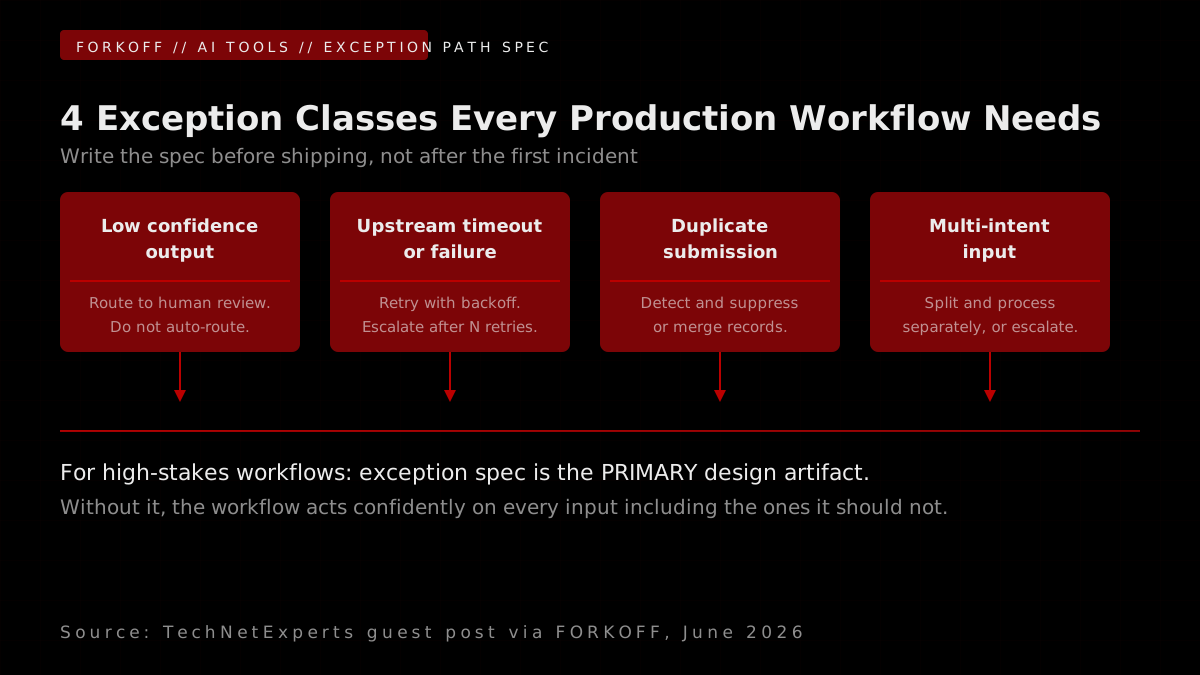
The four exception classes every production AI workflow needs a written specification for, before shipping:
- Low confidence output. The model scores its own output below a threshold. What happens? Hold for human review. Do not send. Do not approve.
- Upstream API failure. The CRM returns 503. The enrichment vendor times out. What happens? Retry with exponential backoff. Escalate after three failures. Do not proceed.
- Duplicate submission. The same input arrives twice within 90 seconds. What happens? Detect by fingerprint, suppress or merge. Do not process twice.
- Multi-intent input. The message or form submission contains two unrelated requests. What happens? Split and process separately, or route to human review. Do not attempt a single answer to a multi-part question.
The tool choice matters less than most teams think when it comes to exception handling. Zapier has native retry. Make has a scenario-level error handler. n8n requires you to build every exception path manually. LangChain provides nothing by default.
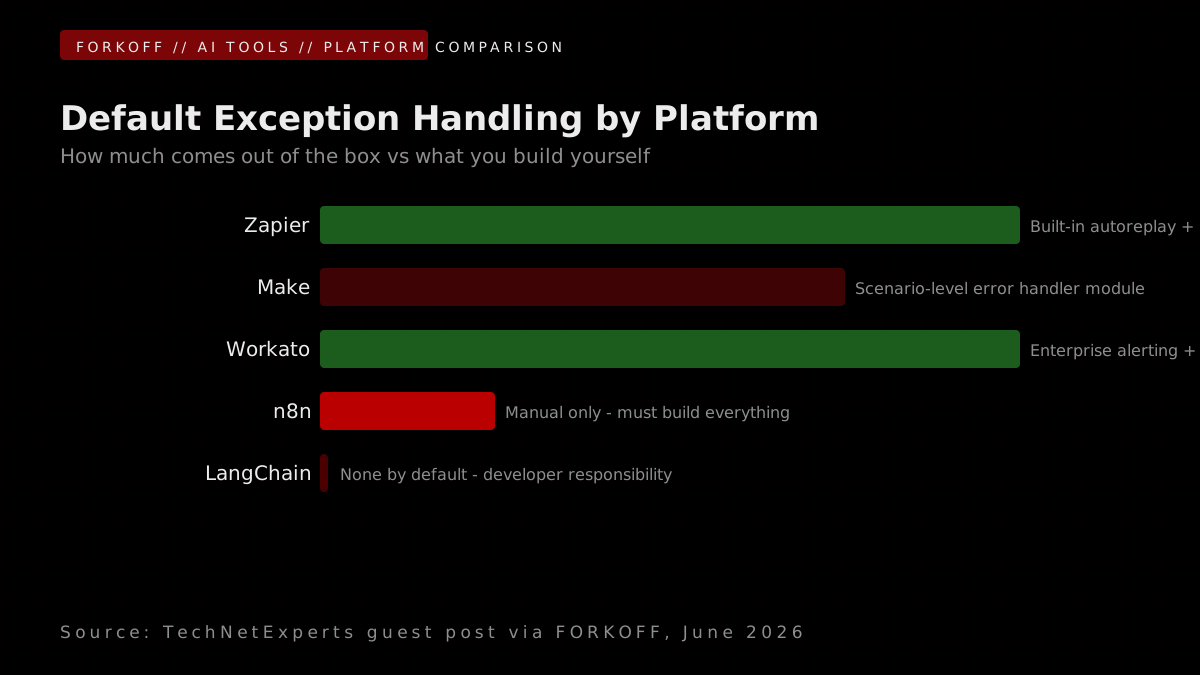
AI Workflow Automation Tools: Exception Handling Posture
| Tool | Default exception handling | Built-in retry logic | Human-in-the-loop support | Best for |
|---|---|---|---|---|
| n8n | Manual: no default error routing | Configurable, requires setup | Via webhook pause + approval nodes | Technical teams, self-hosted, complex branching |
| Make (Integromat) | Scenario-level error handler module | Built-in with retry interval | Via approval steps and webhooks | Mid-complexity, non-developer teams |
| Zapier | Built-in autoreplay on failure | Native on most plans | Limited (best for simple flows) | Non-technical teams, simple trigger-action flows |
| LangChain / LangGraph | None by default (developer responsibility) | Framework-level retry decorators | Interrupt nodes, human approval gates (LangGraph) | Agentic, multi-step reasoning chains |
| Workato | Enterprise error handling, alerting | Native retries with delay | Full human-in-the-loop modules | Enterprise with complex compliance needs |
The pattern Sara documents holds across all platforms: the exception specification is always a team decision, not a tool default. No platform will tell you what to do when the model is wrong. That decision belongs to the operator who knows the stakes of the workflow.
Operator note47% of automation runs hit an undesigned exception path (Forrester 2025). The happy path is a minority of traffic., Forrester AI automation readiness survey, Q4 2025
Why I Left n8n for Python
Failure Point 3: Nobody Owns the Workflow After Launch
Sara T. Rollins writes:
On a Thursday in late April, a VP of Operations at a 200-person B2B SaaS company asked her team a simple question: who owns the lead-enrichment workflow that has been running in production for nine months? Four people had touched it. Two had left the company. The Notion doc was three product names out of date. The Slack channel where errors were posted had been muted by the people who used to triage them. The workflow was still running. Nobody could say whether the output still made sense.
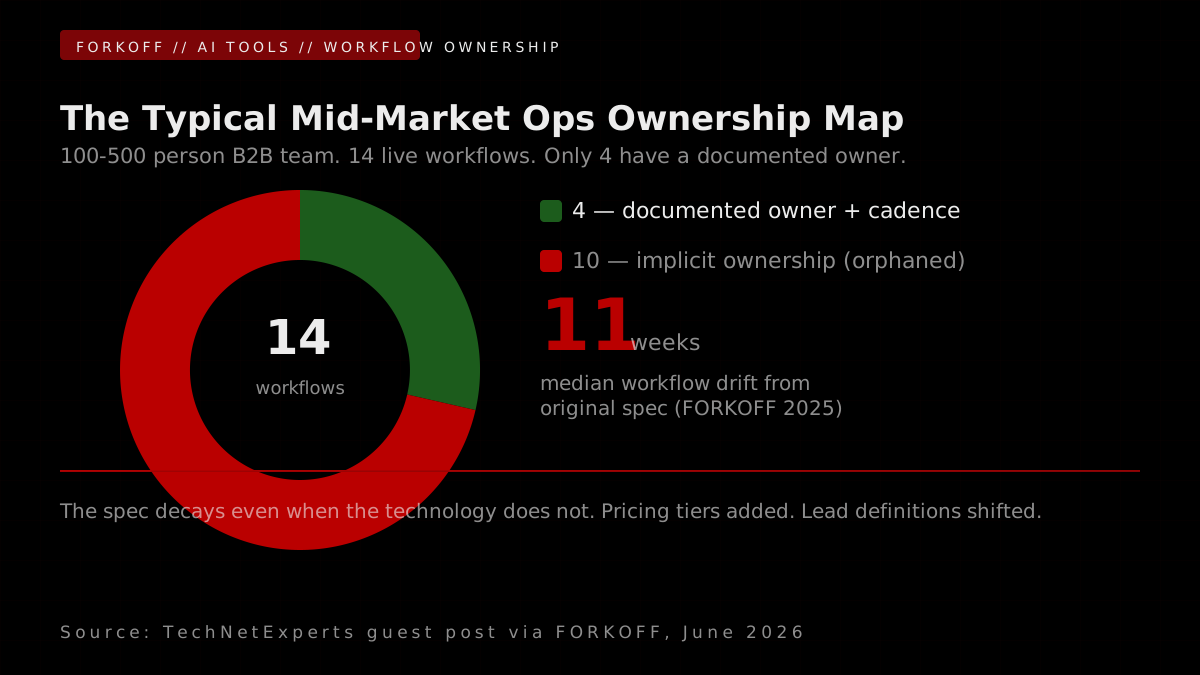
This is the quietest failure mode and the most common one. Internal benchmarks across mid-market operations teams put it at roughly this shape: the average B2B team owns 14 active workflows but has documented owners for only 4 of them, and only approximately 19% of those workflows have a defined review cadence after launch.
AI workflow automation is not a one-time setup. It is a living system. Business rules change. Form fields change. CRM stages get renamed. Pricing tiers get added. Model behavior shifts on a quiet provider update. A workflow that was tight at launch drifts within a quarter. Without an owner, the drift goes uncaught until someone in the field notices the output is wrong and starts working around it.
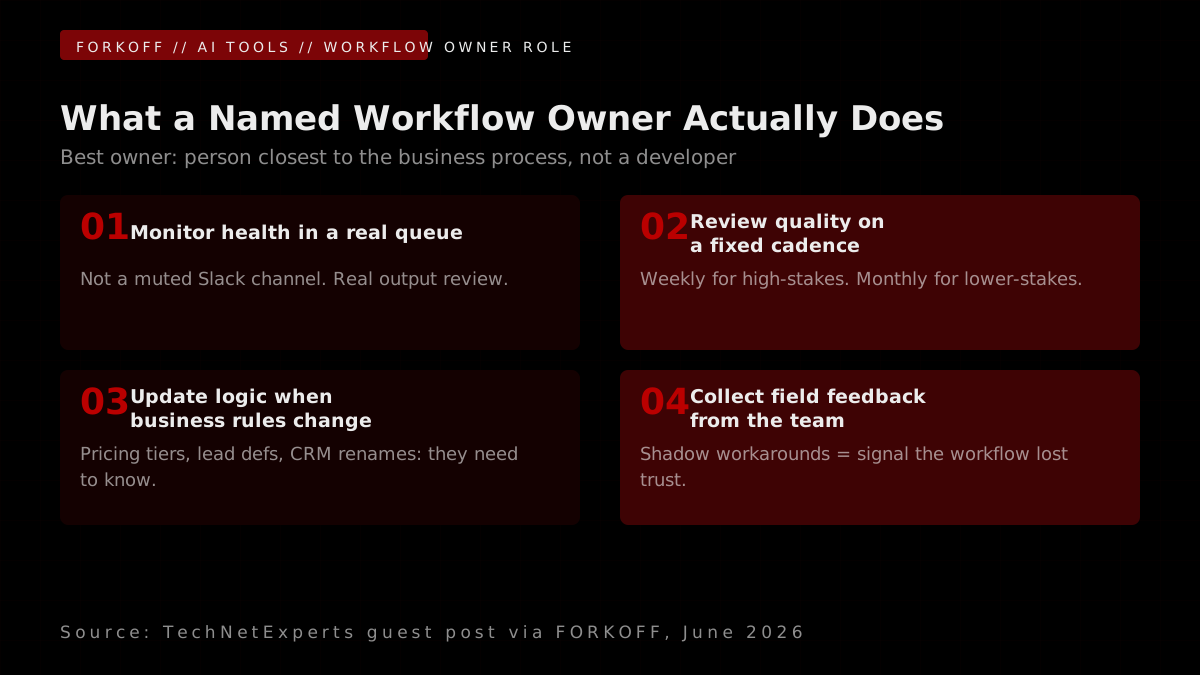
Every workflow should have a single named owner, and the owner does not need to be a developer. The best owner is usually the person closest to the business process: a support manager on ticket triage, a sales-ops lead on lead routing, a finance-ops person on invoice review. Engineering maintains the plumbing. The business owner maintains the meaning.
The responsibilities are small and concrete. Monitor health in Linear or PagerDuty so failures surface inside an actual queue rather than a dead Slack channel. Review output quality on a fixed cadence, weekly for high-stakes flows, monthly for the rest. Update the prompt, the routing rules, and the business logic when the company changes how it qualifies leads, prioritizes tickets, or approves requests. Collect feedback from the people running the workflow; if employees are building shadow workarounds in their own spreadsheets, the workflow has already lost trust and the owner needs to know.
A workflow without an owner becomes another abandoned system. A workflow with one improves quarter over quarter. The best owner is usually the person closest to the business process, not a developer.
A workflow without an owner becomes another abandoned system. A workflow with one improves quarter over quarter.
The FORKOFF read on Failure Point 3:
The ownership problem is the hardest of the three to fix because it is a culture and process problem, not a technical one. No tool will surface a 19% documented-owner rate as a failure. The dashboard stays green. The workflow keeps running. The decay is silent.
The average B2B team owns 14 workflows but documents owners for only 4
Internal benchmarks across mid-market operations teams produce a consistent finding: the average B2B team at 100 to 500 employees runs 14 active AI or rule-based workflows in production. Of those, only 4 have a documented owner with a defined review cadence. The other 10 are running on implicit ownership that evaporates the first time the original builder changes roles or leaves. The decay rate is fast. FORKOFF analysis of automation lifecycle across 20 SaaS clients in 2025 found the median workflow drifted from its original specification within 11 weeks of launch, not because the technology changed but because the business rules changed around it. Pricing tiers were added. Lead definitions shifted. The model never got the memo because nobody was assigned to give it the memo.
Source: FORKOFF automation lifecycle analysis, 20 SaaS clients, 2025
Selling n8n automations is easy. Supporting them at scale is not.
FORKOFF analysis of 20 SaaS client automation lifecycles during 2025 found the median workflow drifted measurably from its original specification within 11 weeks of launch. The two most common triggers for drift were lead qualification criteria changing (new pricing tier, new ICP definition) and CRM stage renaming after a RevOps audit. Neither change was communicated to the automation owner because there was no automation owner to communicate to.
The ownership model that works across the teams Sara describes has three components:
- Named business owner, not engineering. The person who owns the process owns the workflow. Engineering sets up the infrastructure and stays on call for infrastructure failures. The business owner runs the cadence.
- Two-tier cadence. High-stakes workflows (billing, customer-facing, account status): weekly output sample review. Lower-stakes workflows (internal summaries, lead enrichment, report generation): monthly review with a spot check of 20 to 30 outputs.
- Feedback loop from field users. A direct line from the people running the workflow to the owner. Shadow workaround detection (is anyone maintaining a parallel spreadsheet?) is the canary that the workflow has lost operational trust.
Operator noteMedian workflow drift from spec: 11 weeks post-launch (FORKOFF 2025, n=20). Spec decays even when technology does not., FORKOFF automation lifecycle analysis, 2025
An Open Letter to n8n Enthusiasts: Maintainability is the real challenge
What Pilots Hide and How to Scale Without Breaking
Sara T. Rollins writes:
Pilots are useful and slightly misleading. They run with smaller datasets, more patient users, cleaner test cases, and a builder sitting next to the system fixing issues in the background. Scaling changes every one of those conditions. More users surface more variation. More volume surfaces more exceptions. More departments surface more conflicting definitions of the same field.
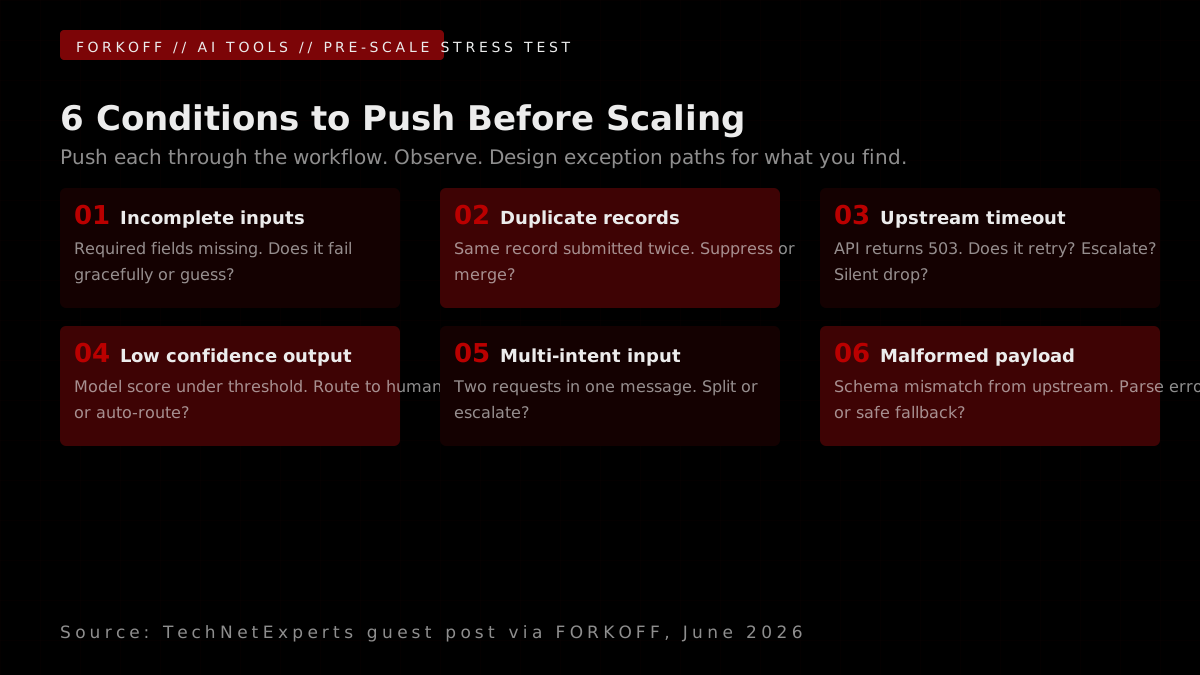
Before expanding, stress-test the workflow against the conditions it will actually meet. Push incomplete inputs through it. Replay duplicate records, malformed files, API timeouts, low-confidence model outputs, and the messy edge cases the pilot avoided. Watch what happens. The goal is not perfection. It is understanding how the system behaves under pressure and where it needs a human in the loop.
The FORKOFF read on scaling:
The stress test Sara describes is the most underused pre-scale ritual in operations teams. Most teams run a "does it work" check. The stress test is a "how does it fail" check. The difference matters because the behavior under failure determines the blast radius of an unhandled exception at production volume.
Scaling does not break AI automation. It surfaces the variance that was already there.
The most accurate frame for why AI workflow automation breaks at scale is not that scale introduced new problems. It is that scale makes pre-existing variance impossible to ignore. At pilot volume, one broken lead record out of fifty is a curiosity. At production volume, 14 broken records out of 100 is a crisis. The model behavior did not change. The data distribution broadened to include the edge cases the pilot never saw, and the exception paths those edge cases required were never built. Engineers who have shipped production automation at scale describe this as the difference between testing on the map and running on the terrain.
Source: n8n community analysis, 2025
Manav Bajaj
@BajajManav
The frontier AI model you build your business on can be switched off overnight. If your workflow ran on that one model, it broke while you slept. Not because the model failed. Because someone above the model said stop. The lesson for a small business is not 'pick a different lab.… Show more
n8n: Flexible AI Workflow Automation for Technical Teams [2025]
n8n for technical teams: where the workflow design decisions that prevent these failures are made.
A practical pre-scale checklist derived from Sara's framework:
- Run 200 records through the workflow with required fields intentionally blanked. Does it hold, route to review, or produce confident wrong output?
- Submit the same record three times in 60 seconds. Does the deduplication logic work?
- Simulate an upstream API timeout. Does the workflow retry and escalate, or silently fail?
- Submit an input with a model confidence score below your threshold. Does it route to human review or proceed?
- Submit a record with two distinct intents. Does the workflow split them, escalate, or attempt a single answer?
- Pull the last 30 days of records from production CRM and measure actual field completion rates for every field the workflow uses. Do they match the completion rates in the pilot dataset?
If any of these surfaces a gap, that is the exception specification to write before expanding volume.
The Pattern Underneath: Three Operating Problems, Not Model Problems
Sara's three failure points share a common thread: none of them are model problems. The model in the RevOps incident did exactly what a scoring model should do when company size is missing : it made a best-guess with available data. The model in the fintech incident had been trained accurately on historical tickets where "urgent" was low-severity. The 9-month-old lead enrichment workflow was running the original logic because nobody updated it.
Raw intelligence is becoming cheaper. Trusted execution is still expensive. That is why so many corporate AI pilots fail to show measurable ROI. The next AI winners will not be the companies with the flashiest demo. They will be the companies that can turn AI into finished work.
Every team that shipped reliable automation at scale did the same three things before scaling: audited the inputs, wrote the exception specification, and named a non-developer owner. The teams that skipped those steps all landed in the same place: impressive demo, quiet decay.
The Three AI Workflow Automation Failure Points: Diagnosis and Fix
| Failure Point | Where it shows up | Common symptom | First fix |
|---|---|---|---|
| Weak inputs | Pilot-to-production transition | Model outputs look correct in test, misroute at volume | Input audit: which fields does the workflow need, how often are they missing, what happens when they are |
| Missing exception paths | First week of real traffic | Confident wrong outputs, silent failures, escalation queue empty while customers wait | Exception specification before ship: low confidence, upstream timeout, duplicate submission, multi-intent input |
| No named owner | 6 to 12 weeks post-launch | Shadow workarounds appear, Slack error channel muted, nobody can explain current model behavior | Single named business owner (not engineering) with weekly/monthly review cadence |
The operational pattern Sara documents holds across every orchestration layer: n8n, Make, Zapier, LangChain, Workato, and custom-built. The tool is not the variable. The three operating primitives are the variable.
Input quality contract. Before a workflow runs in production, the team knows the actual field completion rates of their data, the allowed values for every free-text field, and what happens when required fields are missing. This contract is documented and enforced at the workflow's entry gate.
Exception specification. Before a workflow ships, the team has a written specification for every failure class: low confidence, upstream failure, duplicate, multi-intent. The specification names the action (hold, retry, escalate, reject) and the responsible party for each class. It lives in the same document as the happy-path flow.
Named owner. Before a workflow launches, a single non-developer owner is assigned. Their cadence is defined. Their feedback channel is live. Their responsibility for updating the workflow when business rules change is explicit.
The next AI competitive edge is trusted execution, not raw intelligence
Raw AI intelligence is becoming cheaper every quarter. The gap between the top model and the fifth-ranked model is narrowing faster than most organizations can build workflows around either one. What is not becoming cheaper is trusted execution: an AI workflow that an operations team can rely on to route leads correctly, approve invoices accurately, and triage tickets without someone double-checking the output. The teams building that reliability are doing it through input quality gates, exception specifications, and human-in-the-loop checkpoints for high-stakes decisions. The teams still optimizing for model selection are solving the wrong problem.
Source: Gartner, Hype Cycle for AI Augmentation and Automation, 2025
Teams that ship AI automation with these three primitives in place end up with workflows that compound : more accurate, more trusted, more valuable : over time. Teams that skip them end up with impressive demos and quiet decay.
Operator noteTool selection is not the moat. The moat is the input gate, the exception spec, and the named owner. None live in the tool., FORKOFF operational analysis, 2026
Automation that earns trust earns it the same way any operating system earns trust: by being owned, tested, and reviewed. The AI in the workflow is the part that scales. The operating layer is the part that determines whether what scales is right.
Operator noteLLM workflows amplify exception blast radius: one bad input triggers downstream approvals, replies, and DB writes at once., n8n community analysis, 2025
About Sara T. Rollins
Sara T. Rollins is on the editorial team at TechNetExperts, a Google News-approved technical-resources publication covering AI tools, workflow automation, and enterprise technology for operations and engineering teams.
This post is part of a reciprocal byline exchange between TechNetExperts and FORKOFF. Sara's contribution covers the operational failure modes of AI workflow automation. The FORKOFF perspective on this topic : including the AI SEO and GEO layer that makes automation content rank : appears on TechNetExperts.
FORKOFF is an AI agency building distribution, content, and GTM for SaaS and web3 founders. Outcome-priced. See what we build.