Twitch clipping is the production cycle that turns a 6-hour live stream into 5 to 10 short-form video assets published across TikTok, YouTube Shorts, Reels, and X. The native Twitch clip captures the moment; the vertical re-cut ships it to the feeds where 90 percent of streamer audience growth now happens. This guide covers the full workflow from the Alt+X shortcut through OBS source capture to the 4-platform distribution loop.
About these numbers
FORKOFF first-party operator data from managed clipping and short-form video distribution engagements, supplemented by publicly available creator economy data (Whop, Epidemic Sound, Patreon 2025-2026). All figures are directional estimates based on operator observations across 2025 and 2026; individual outcomes vary.
TL;DR
Twitch clipping happens at two altitudes. The native 60-second clip is triggered by Alt+X on desktop, the share sheet on mobile, or the OBS Replay Buffer for source-resolution capture. The off-platform vertical re-cut is where qualified views compound: same source moment, four destinations (TikTok, YouTube Shorts, Reels, X), watch-time-tuned per platform. The pillar walks through both lanes and ends with the buyer-side question of when to keep clipping yourself versus when to hand the production cycle to a managed desk pricing on a per-qualified-view ledger.
What is Twitch clipping?
Twitch clipping is the act of capturing a 5 to 60 second moment from a live Twitch stream or an archived VOD and publishing it as a standalone shareable asset. The clip is hosted at a clips.twitch.tv URL, can be embedded on the open web, and can be downloaded as an MP4 file for re-cutting onto vertical short-form platforms.
Two cohorts use the term differently. Streamers say "clipping" and mean the in-platform 60-second control they hit during a raid or a poggers moment. Brand-side buyers say "clipping" and mean the full production cycle of source capture plus vertical re-cut plus distribution onto TikTok, YouTube Shorts, Reels, and X. Both definitions are correct, and the brand-side one is set out in full at what clipping is as a distribution model. The pillar covers both.
A native Twitch clip earns views inside the Twitch ecosystem. A vertical re-cut earns views inside the algorithmic feed of every other platform on the open internet. The same source moment can do both at once, and the operators who run both lanes from one source clip ship 3x to 7x the qualified-view yield of operators who only publish the native asset.
Native Twitch clipping: the in-platform workflow
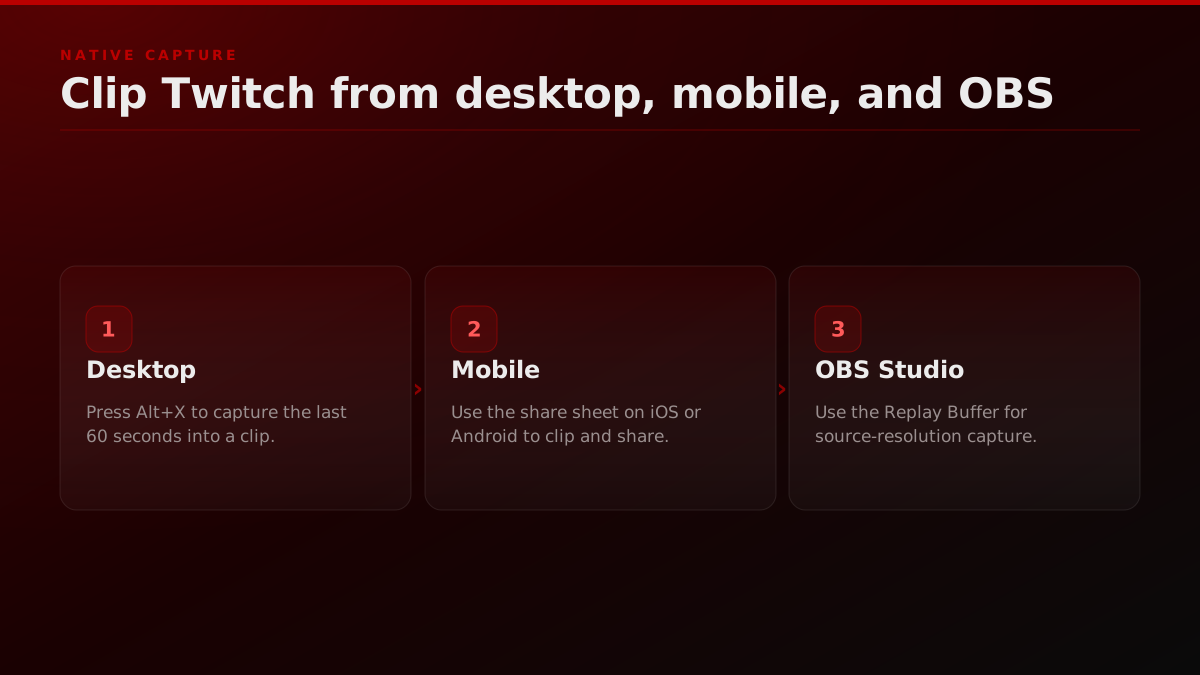
The Twitch player on twitch.tv ships a clipping control directly under the video. On desktop the keyboard shortcut Alt+X opens the clip editor for the last 90 seconds of stream. The clip editor shows a timeline with two drag handles. Drag the in handle to mark the start, drag the out handle to mark the end, and the editor enforces the 60-second cap automatically.
The title field below the timeline is the most under-used surface on Twitch. Default titles like "Best moment" or "lol" get filtered out by Twitch search and YouTube search the moment the clip leaves the platform. Titles that pack named entities, the streamer handle, and the actual moment compound across every search index that crawls clips.twitch.tv. Two or three named entities per title is the operator floor.
How to Create Clips on Twitch - Make a Twitch Clip
Gauging Gadgets walks through the native Twitch clip control end to end, the same in-player capture this section covers before the vertical re-cut lane begins.
After publish the clip lives at a URL of the form clips.twitch.tv/CapitalizedSlug-RandomString. That URL embeds in any tweet, any Reddit post, any blog, and any Discord channel. The clip is also discoverable inside Twitch under the channel Clips tab, sortable by all-time, by trending, and by recent.
The mobile workflow is the same primitive with a different control surface. Open the stream in the Twitch iOS or Android app, tap the share icon under the player, and the bottom sheet exposes a Clip option alongside Copy Link. Tap Clip and the same 60-second editor loads with mobile-friendly drag handles. Title, publish, and the clip URL is identical to the desktop output.
OBS clipping is the third lane and the one that matters for source-resolution downstream work. Enable Replay Buffer in OBS Studio settings, set a hotkey to Save Replay, and the buffer continuously holds the last 60 to 120 seconds of stream output in memory. Press the hotkey when the moment lands and OBS writes the buffer to disk as a full-resolution MP4. This bypasses the Twitch 60-second cap, captures source resolution rather than transcoded playback, and produces an asset that vertical re-cut tooling can crop to 9
without compression artifacts.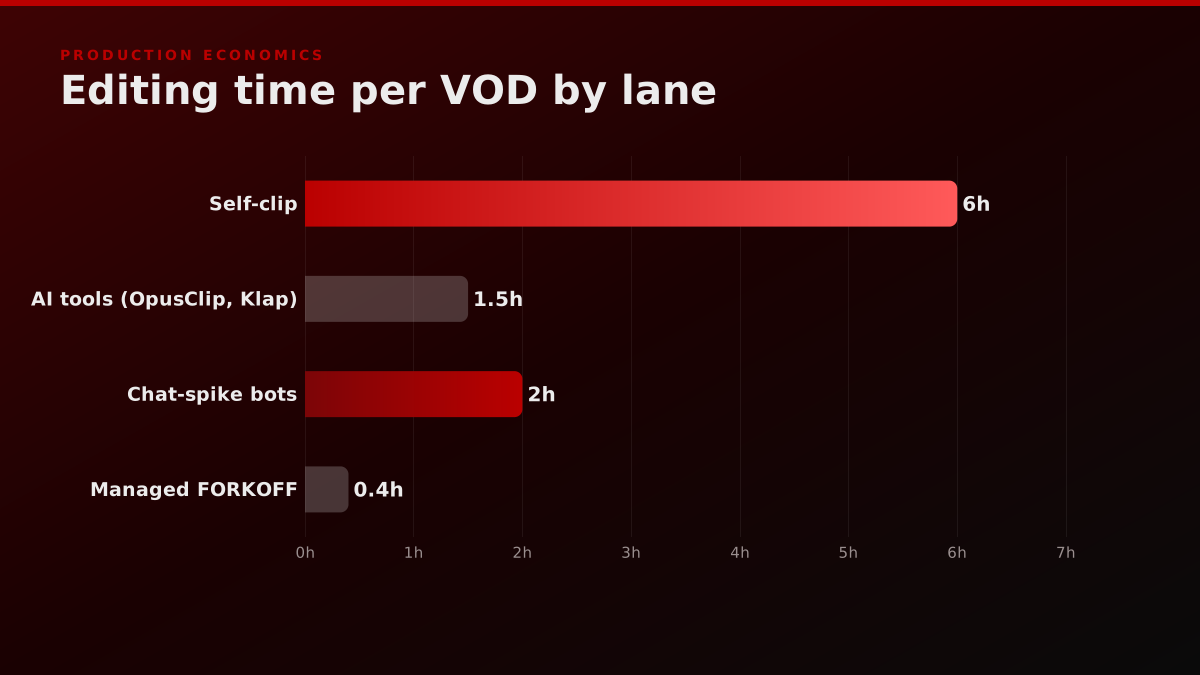
Off-platform vertical re-cuts: the FORKOFF wedge
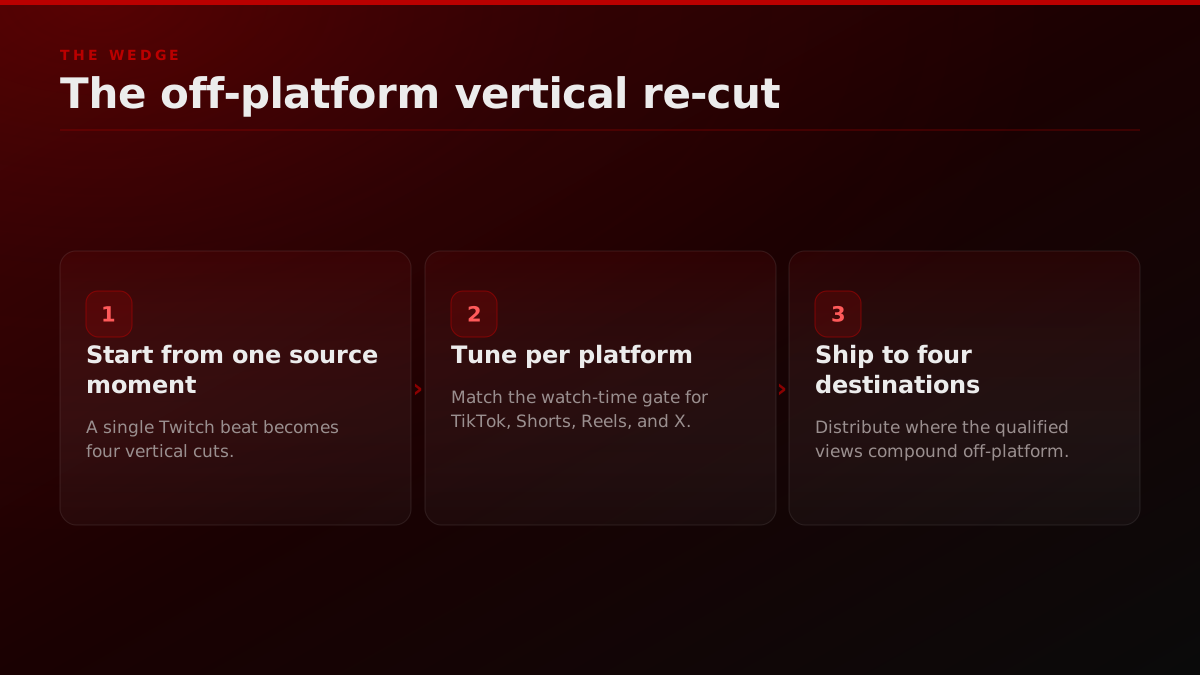
The native Twitch clip is the source asset; the vertical re-cut is the published asset that earns the qualified view on TikTok, YouTube Shorts, Reels, and X. These are two different production stages with two different unit economics, and operators who skip the re-cut lane capture only a fraction of the view yield a single source moment can produce. A game launch compresses this exact workflow into a 7-day sprint, covered in clipping a game launch for Twitch and Kick.
Scrubbing through 3 hours of footage to find one moment, then editing it for 45 minutes? While also trying to stream consistently? Nah.
Operator noteRosters that plateau ship the native Twitch clip and stop; the qualified views a brand pays for live in the vertical re-cut.
The vertical re-cut takes the 60-second native clip or the OBS source MP4 and crops it to a 9
frame for TikTok, YouTube Shorts, and Instagram Reels. The crop is not a center-crop. It tracks the streamer's face, the chat overlay, the gameplay focal point, or all three depending on the moment. A center-crop kills retention by minute one because the focal action is off-frame. A face-tracked crop holds retention because the eye lands on the streamer reacting and the algorithm reads the engagement.The second variable is captions. Vertical short-form platforms route 70 to 85 percent of plays through sound-off feeds. A clip without captions loses the joke, the reaction, and the punch line within 3 seconds. Captions ship below the streamer face, large, on a single line, with the punch words in a brand color.
Hook design is the third variable and the most under-built. The first 1.5 seconds of a vertical clip decide whether the algorithm shows it to the next viewer. A native Twitch clip starts with the moment because the audience landed on it deliberately. A vertical re-cut has to start with a hook that pulls a stranger in. The hook is usually a frame from the punch line played first, with a "wait for it" caption, then the buildup, then the payoff.
At FORKOFF we treat this lane as the wedge for a unit-economics reason. A native Twitch clip earns Twitch ad share at an estimated $0.01 to $0.07 per thousand views. A vertical re-cut on TikTok or Shorts can earn brand sponsorship distribution at $0.003 per qualified view on the FORKOFF ledger, roughly 3x to 33x lower than the unmanaged industry average of $0.01 to $0.10. The full mechanism is documented at Twitch clipping built for streamers.
How do you clip on Twitch from desktop, mobile, and OBS?
Clipping on Twitch runs across three surfaces: the desktop browser (Alt+X opens the clip editor directly in the player), the iOS or Android Twitch app (tap the share icon under the player, then Clip), and OBS Studio's Replay Buffer for source-resolution capture that bypasses the 60-second platform cap. Each surface produces a shareable clips.twitch.tv URL or a full-resolution MP4 ready for vertical re-cutting. Clippers cutting someone else's stream rather than their own should set up accounts first, covered at how to start clipping.
Desktop
- Open the live stream or VOD on twitch.tv. Any browser works.
- Press Alt+X. The clip editor overlay opens with the last 90 seconds pre-loaded.
- Drag the in and out handles until the timeline isolates the 5 to 60 second moment.
- Type the title. Pack named entities first: streamer name, opponent or guest name, the moment in 4 to 6 words.
- Click Publish. The clip URL appears at the top of the editor. Copy it.
To download the MP4, append ?download=true to the clip URL or paste it into an MP4 downloader extension.
Mobile (iOS and Android)
- Open the Twitch app. Load the stream or the channel VOD list.
- Tap the share icon under the player. The bottom sheet exposes Clip alongside Copy Link.
- Tap Clip. The 60-second timeline loads with two drag handles.
- Drag to isolate the moment. Add a title with the streamer name plus the moment.
- Tap Publish. The clip URL is shared via the iOS or Android share sheet.
OBS Studio (source-resolution capture)
- Open OBS. Go to Settings then Output. Switch Output Mode to Advanced and find the Replay Buffer tab.
- Enable Replay Buffer. Set Maximum Replay Time to 90 or 120 seconds. Set the path to a folder you watch.
- Go to Settings then Hotkeys. Find Replay Buffer and bind a hotkey to Save Replay.
- Start the Replay Buffer from the OBS dock. The buffer is now holding the last 90 to 120 seconds of stream in memory.
- When a moment lands, press the hotkey. OBS writes a full-resolution MP4 to disk before the buffer cycles.
The OBS lane is mandatory once the streamer or the agency is shipping more than 20 clips per week, because the source quality compounds across every downstream re-cut. Twitch transcoded playback at 1080p loses detail that a 1080p OBS source preserves, and that detail matters when the re-cut is cropped, captioned, and recompressed for short-form distribution.
Which Twitch moments make the best clips?
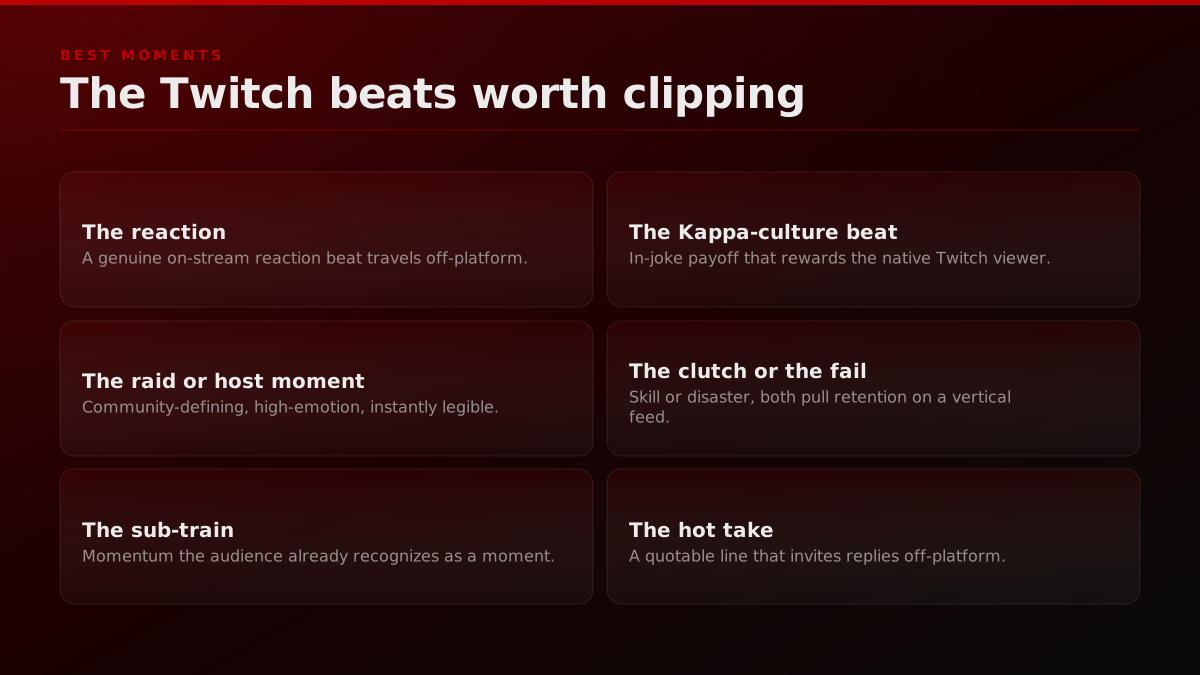
Not every moment on a Twitch stream is clip-worthy. The 6 patterns below are the operator floor for what to capture: the reaction, the raid, the sub-train, the Kappa-culture beat, the clutch or fail, and the hot take. Each one re-cuts cleanly to vertical short-form because the hook is self-contained in the source moment.
- The reaction. A streamer reacting on camera to a chat message, a game event, or a viewer donation is the highest-yielding clip pattern on Twitch. The reaction face plus the on-screen context is self-contained.
- The raid or host moment. When a streamer raids another at the end of a session, the receiving stream gets a flood of new viewers and a moment of cultural cross-over. The greeting clips earn views from both fanbases.
- The sub-train. When 15 or more subs land in a 5-minute window the streamer reacts on camera, the chat overlays explode, and the moment self-documents. Sub-train clips re-cut well for TikTok because the energy reads on a sound-off feed.
- The Kappa-culture beat. A clip that lands a Kappa moment, a deadpan delivery on a serious question, or a community-coined inside joke compounds inside the Twitch ecosystem because the audience reads the cultural beat as proof of platform fluency.
- The clutch or the fail. Gameplay clips of a clutch win or a hilarious fail ship to TikTok and Shorts almost without modification. The hook is the gameplay state in the first frame.
- The hot take. When a streamer states a controversial position on a game patch, a tournament result, or a streaming-industry beat, the clip travels off-platform faster than any other category.
Watch-time gates per platform
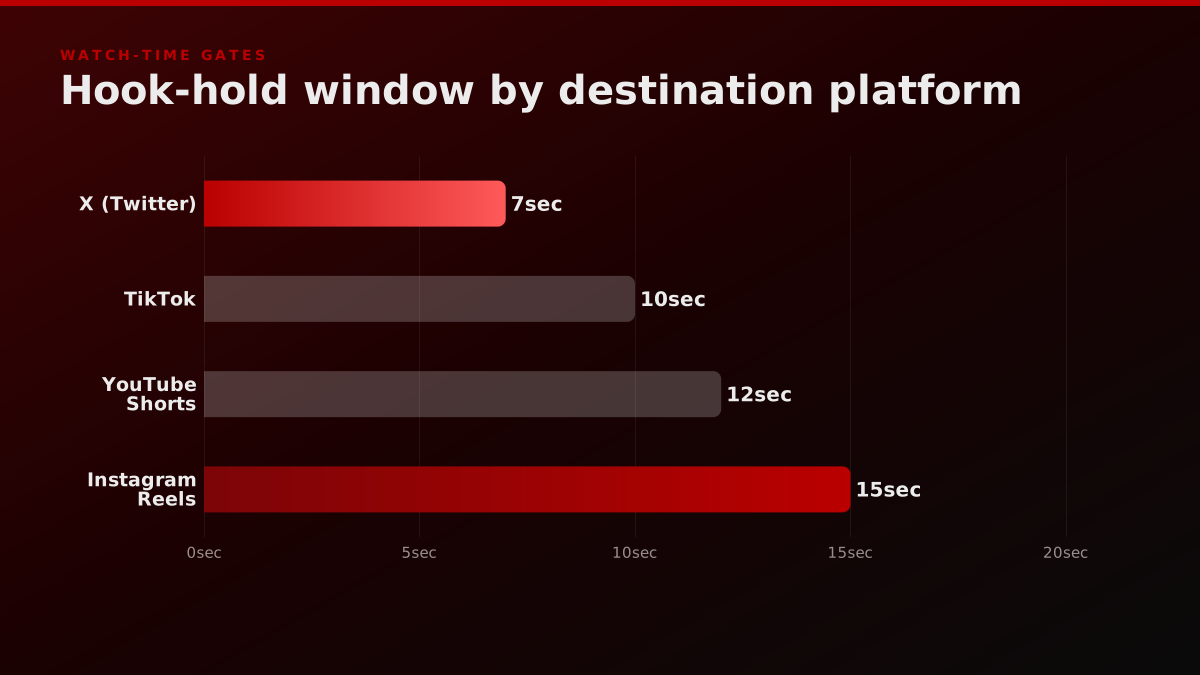
Each short-form destination has a different watch-time gate that the algorithm uses to decide whether the next viewer sees the clip. Operators who optimize the re-cut for the destination gate ship clips that compound. Operators who ship the same 60-second native clip to every platform leave half the views on the table.
- TikTok: 8 to 12 seconds. TikTok's For You algorithm rewards clips that hold attention through the first 8 seconds and then convert the watch into a complete or a loop. A 60-second TikTok with a slow buildup gets de-ranked. A 12-second TikTok with the hook in the first 1.5 seconds and the payoff at second 10 gets shown to the next 100 viewers.
- YouTube Shorts: 10 to 15 seconds. Shorts rewards a similar hook but tolerates a longer payoff because the feed is more lean-back than TikTok. The Shorts algorithm scores on a combination of swipe-rate, complete-rate, and re-watch.
- Instagram Reels: 12 to 18 seconds. Reels tolerates the longest hook because the Instagram feed is mixed format and the audience is conditioned to trail-off rather than swipe. A 15-second Reel with a 2-second hook plus a 10-second buildup plus a 3-second payoff is the operator pattern.
- X (Twitter) video: 6 to 9 seconds. X video is the shortest gate because the feed is text-dominant and video is competing with tweets, polls, and quote-tweets for the same scroll.
The full distribution playbook with watch-time gates and re-cut templates lives on the Twitch clipping built for streamers hub and on the compare clipping agencies page for brand-side buyers.
Anyone else overwhelmed by editing 6-8 hour Twitch VODs into highlights?
I’m a newer streamer and honestly this is the part that’s starting to burn me out a bit. Most of my streams run 6-8 hours, and after each one I want to turn them into highlights for YouTube Shorts / TikTok. But in reality… * I forget where the good… Show more
Distribution to TikTok, YouTube Shorts, Reels, and X
The native Twitch clip publishes once. The vertical re-cut publishes 4 times, once per destination, with format-tuned variants for each platform. TikTok gets burned-in captions and a cover frame set to the hook; Shorts gets a title packed with named entities; Reels gets a 2-line caption with a CTA; X gets a native upload of the 6 to 9 second cut with no external link.
Zach Bussey
@zachbussey
Twitch is experimenting with turning the mobile app into a perpetual free-scrolling experience.
- TikTok. Vertical 9, 1080x1920, captions burned-in below the streamer face, native TikTok captions field populated with 3 hashtags pulled from the moment plus the streamer handle. Cover frame is the hook frame, not the payoff frame.
- YouTube Shorts. Same vertical 9 source. Title field gets the named entities plus the moment in 6 to 8 words. Description gets a 30-word context paragraph plus a link to the original Twitch clip URL.
- Instagram Reels. Same vertical 9 source. Caption gets a 2-line hook plus 3 hashtags plus a CTA to the streamer's profile. Cover frame is the streamer face mid-reaction.
- X video. Native X upload of the 6-9 second cut, not a YouTube link or a TikTok cross-post. The X algorithm de-ranks external links sharply. Caption is one line, no hashtags, with the @ handle of the streamer.
The four-publish pattern multiplies the qualified view yield per source moment by 3x to 7x compared to single-platform publish, per the FORKOFF Clipping Ledger 2026-Q1 sample of 3,085 clips. The aggregate qualified view yield is the metric that compounds, not the per-platform number, and the managed clipping at compound rates revenue case is the case study most operators read first.
Industry context
Twitch confirms in its public Help Center that clip creation is a per-channel toggle, that VOD clipping windows run 14 days for non-affiliates and 60 days for affiliates and partners, and that streamers can revoke clip permission for individual users without disabling clipping channel-wide. The platform-side defaults are why every clipping desk runs a permission-check pass before crediting any clip toward a CPQV ledger.
Source: Twitch Help Center, clip creation and permissions
Qualified-view economics: CPQV vs raw views
Raw views are the surface number on every short-form dashboard. They count every play of a clip whether the viewer watched 0.5 seconds or the full 12. The metric is useful for vanity but it does not survive a finance review and it does not correlate with downstream action like profile clicks, branded search, or deal flow.
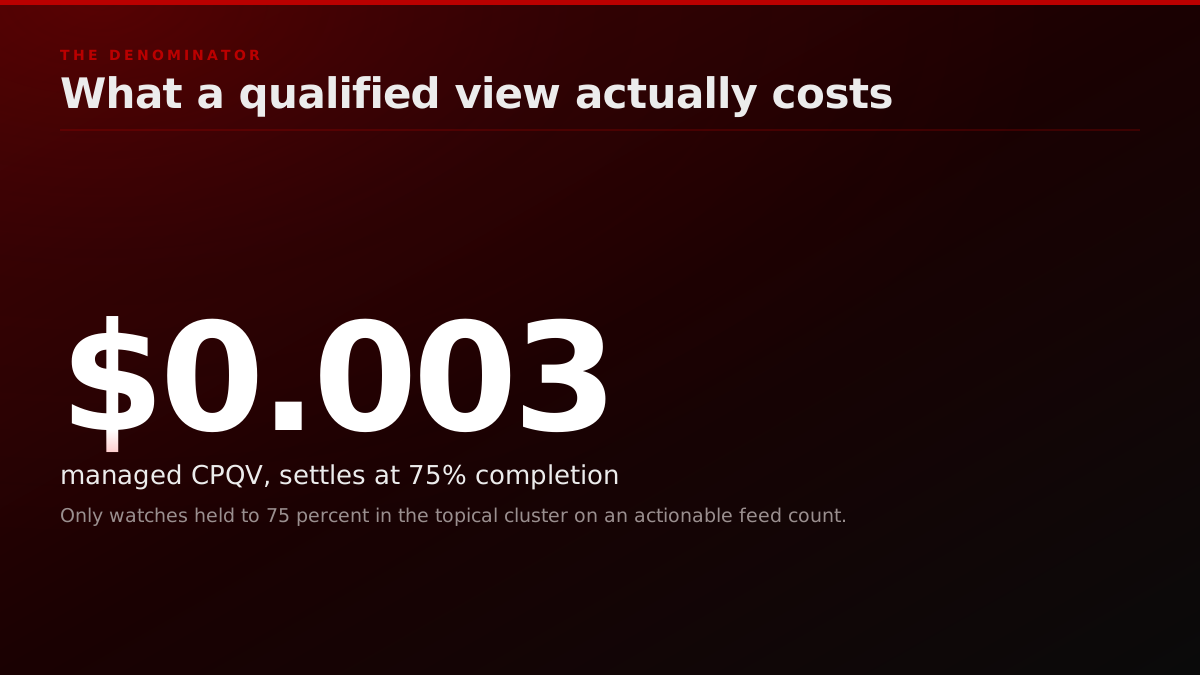
Qualified views are the operator metric. A qualified view is a watch held to at least 75 percent completion, by a viewer the algorithm has clustered into the topical surface, on a feed where the viewer can act on the result. Three properties, all required. Two out of three is noise.
Cost per qualified view (CPQV) is the unit price. At FORKOFF the ledger settles at an estimated $0.003 per qualified view on the managed-clipping engagement, against an unmanaged industry average of $0.01 to $0.10. CPQV is the metric that finance, partners, and brand-side spenders can audit because it carries a denominator. Raw view count carries no denominator. CPM carries the wrong denominator (impressions, not qualifying watches).
Operator note5B+ views processed is a filtered count, not impressions; we bill only watches held to 75 percent, so it reads under raw dashboards.
Why this matters for Twitch specifically. Twitch streamers who clip themselves and ship to TikTok with no infrastructure can land 100,000 raw views on a viral clip and convert zero of them into followers, profile visits, or downstream subscriptions. The same clip routed through a managed Twitch clipping pipeline with watch-time-tuned variants per platform converts the same source moment into 30 to 40 percent qualified-view yield, which is the figure that maps to followers and downstream action. The unit economics live on the Twitch clipping built for streamers ledger and the transparent agency pricing buyer-side companion explains the same math against retainer, per-clip, and campaign pricing models.
VOD to clip pipeline: scrubbing a 6 hour archive without burning a day
Finding clips takes longer than actually editing them.
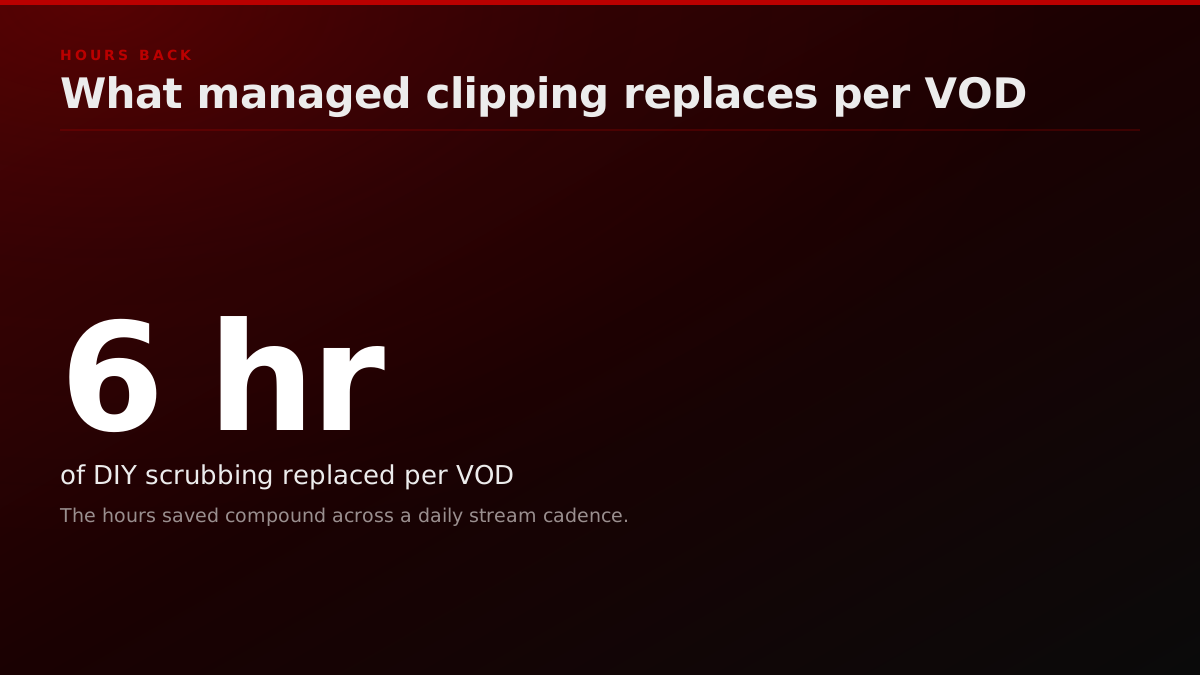
The hardest part of Twitch clipping is not the keyboard shortcut. It is the VOD. A typical Twitch session runs 4 to 8 hours. A clipper or a managed desk pulling 5 to 10 publishable moments from that archive cannot watch it in real time, and the average operator who tries to scrub linearly burns 6 hours of human attention on a single VOD. That math kills the production cycle before the first clip ships.
The raw VOD is a decaying asset
Twitch documents that past broadcasts are stored for 14 days for standard accounts and 60 days for Partner, Prime, and Turbo accounts, after which the VOD is deleted. Clips and manually saved Highlights are kept until the creator removes them. That asymmetry is the whole argument for clipping early: the source stream is on a countdown, but the clip and the vertical re-cut made from it are permanent. A managed desk pulls the 5 to 10 keepers before the VOD window closes so the archive is never the single point of failure.
Source: Twitch Help Center, Video On Demand
Twitch content retention by asset type and account tier
| Asset type | Non-affiliate storage | Partner, Prime, or Turbo | Re-cut implication |
|---|---|---|---|
| Past broadcast (VOD) | 14 days | 60 days | Clip the moment before the VOD expires |
| Clip (clips.twitch.tv) | Kept until deleted | Kept until deleted | The durable source asset for the vertical re-cut |
| Highlight | Kept until deleted | Kept until deleted | Keeps the best VOD segments past the window |
| Stream marker | Lives with the VOD | Lives with the VOD | Tag the moment live so you never scrub the archive |
Twitch Help Center, Video On Demand and Creating Highlights and Stream Markers, retention values sampled 2026-07-23.
The working pattern is a 3 pass scan, not a linear watch. The first pass loads the VOD inside the Twitch Highlighter view at 4x playback and watches for chat density spikes on the right rail. Chat density is a leading indicator of viewer reaction, and Twitch ships a chat replay scrubber that timestamps every message back to the stream timeline. The clipper marks every 5 minute window where chat density crosses 2x the session baseline. Most 6 hour sessions surface 8 to 14 candidate windows on the first pass.
The second pass loads each candidate window at 1x playback inside the standard Twitch player and watches for the on camera reaction that the chat density predicted. About 50 to 70 percent of candidate windows pan out, and the rest are chat reacting to a tangent that does not survive on a sound off feed.
The third pass is the trim. The clipper isolates the 8 to 20 second moment inside the candidate window, drags the in handle 2 to 4 seconds before the reaction starts to give the hook room, and drops the out handle on the punch frame. Total time on a 6 hour VOD inside a disciplined 3 pass scan is 35 to 50 minutes for 5 to 10 candidate clips, against the 6 hours a linear watch would burn.
AI tools accelerate the first pass but rarely replace it. OpusClip, Klap, and Vizard ingest the VOD and surface 30 to 50 candidate clips ranked by an internal score that blends chat density, audio peak, on camera motion, and (in newer releases) a small language model judging the dialogue. The accuracy is roughly 40 to 60 percent on the first pass, which means a clipper still has to watch every candidate to reject the misses. Chat spike bots like KoalaVOD and Clipt are stricter: they timestamp chat density without the audio or language model layer, and they perform better on engagement heavy streams where chat is the dominant reaction surface, and worse on quiet streams where the reaction lives on the streamer face. Either tool replaces 15 to 25 minutes of the first pass and leaves the second and third pass untouched.
The OBS replay buffer lane changes the math at the source. A streamer or a producer sitting next to the streamer who presses the save replay hotkey at the moment the reaction lands writes a source resolution MP4 to disk in real time. The VOD scrub is then optional rather than mandatory, and the 6 hour archive only gets scrubbed for moments the producer missed live. Most managed desks at FORKOFF run both: producer side OBS capture for the live session plus a next morning 3 pass VOD scan to recover the moments the producer did not press the hotkey on.
Twitch ships a native tag-it-live tool
Stream Markers is a first-party Twitch feature that lets a broadcaster or an editor drop a timestamped marker during the live stream, from the dashboard, a hotkey, or the /marker chat command. The markers surface later inside the VOD Highlighter, so the moments are already indexed before anyone opens the archive. This is the platform-native version of the OBS Replay Buffer habit, and it is why a producer who tags live spends minutes, not hours, on the next-morning scan.
Source: Twitch Help Center, Creating Highlights and Stream Markers
Operator noteEvery managed Twitch roster we run puts a producer on the OBS replay hotkey live; a moment tagged live is a moment nobody scrubs for.
The "repurpose your content to TikTok" advice everyone gives - here's how to actually do it
Every growth guide says the same thing: "Post clips to TikTok/Shorts/Reels to grow your Twitch." Cool. But nobody explains HOW without it becoming a second job. When I started, I tried recording my full streams and editing clips afterward. That lasted about 2 weeks before I gave up. Scrubbing through… Show more
Bot detection on Twitch clips and downstream platforms
A clip that goes viral on a feed is worth nothing if half the views came from view-fraud bots. Every short form platform that pays out via the partner program or routes brand spend through a managed marketplace runs a bot detection layer between the raw play count and the qualified count, and Twitch ships a similar layer on its native clip view counter.
The Twitch side is the cleanest. The native clip view counter de duplicates by viewer fingerprint, ignores plays under 3 seconds, and discards plays from IP ranges flagged by Twitch as botnet sources. The visible view count on a clips.twitch.tv URL is already a filtered number. Twitch does not publish the exact filter rules, but the discrepancy between a raw embed view and the filtered Twitch view is rarely above 8 to 12 percent, which is the operator floor for a clean Twitch surface.
The TikTok, YouTube Shorts, Reels, and X side is messier. Each platform ships its own bot detection, and each one tunes the filter differently because each one has a different fraud incentive shape. TikTok filters aggressively on watch duration anomalies, because its For You algorithm is the primary fraud target. A clip with 10,000 views and an average watch of 1.2 seconds gets de ranked inside hours, because the watch profile reads as bot generated. YouTube Shorts filters on geographic IP clustering, because brand sponsorship rates vary by geography and clippers gaming the geo distribution were a 2024 fraud wave. Reels filters on engagement ratio, because Instagram already runs the deepest engagement graph of any short form platform. X filters on accounts younger than 30 days plus accounts without a profile photo, because the network is the lowest cost surface to populate with throwaway accounts.
Operators who ship clips at volume run a 4 step fraud audit on every campaign that crosses a brand spend gate. Step 1 pulls the platform side analytics and compares average watch duration to the topical cluster median. A clip with watch duration below 35 percent of cluster median gets flagged. Step 2 maps the geographic distribution against the streamer's expected audience and flags any geography that contributes above 18 percent without a localized fan base. Step 3 audits the comment to view ratio against the cluster median; bot generated views ship with near zero comment volume because the bots are not running the engagement layer. Step 4 audits the profile click through to the streamer profile or the operator profile, because a real qualified view converts to a profile click on 0.4 to 1.2 percent of plays and a bot view converts on under 0.05 percent.
The 4 step audit is the floor for any clip published under a brand spend ledger. The CPQV settlement at FORKOFF explicitly excludes any clip that fails 2 or more steps in the audit, and the published $0.003 per qualified view rate is calculated on the post audit denominator rather than the raw view count.
Clipper economics: how clippers actually get paid
The clipper at the bottom of the production stack is the operator who watches the VOD, isolates the moment, cuts the vertical re cut, captions it, and ships it to one or more destinations. The 4 payout structures below describe how the clipper actually gets paid in 2026.
The first structure is per clip flat. A streamer or a managed desk pays the clipper a flat rate per published clip across an agreed destination set. Floor rates in 2026 sit at an estimated $8 to $15 per clip for the standard 4 platform publish, with experienced clippers commanding $20 to $35 per clip when the moment requires source footage editing, custom hook design, or platform specific watch time tuning. The structure favors the buyer because it caps the budget per VOD, and it favors the clipper only when the clipper can ship at high volume.
The second structure is rev share on view earnings. The clipper publishes the clip under an account they control, the platform pays out via the partner program, and the clipper splits a percentage with the streamer. Splits range from 70 percent to the streamer plus 30 to the clipper on the streamer dominant end, to 50 50 on the more clipper friendly end. The structure favors clippers working with large established streamers and disfavors clippers working with smaller streamers where the per clip view yield is volatile.
The third structure is sponsor pool. A brand commits a fixed monthly pool to a managed desk, the desk routes clips through a roster of clippers, and clippers earn a share of the pool based on qualified view contribution. The structure is dominant in the FORKOFF managed lane because it ties clipper pay to the same denominator (qualified views) that the brand audits, and it removes the per platform volatility that breaks the rev share lane.
The fourth structure is retainer. A streamer or a managed desk pays the clipper a flat monthly retainer in exchange for an agreed clip volume per week. Retainers sit at an estimated $1,200 to $3,500 per month for a 20 to 40 clip per week commitment, and they favor clippers with stable schedules and disfavor buyers who need elastic capacity around tournament cycles or product launches.
Most clippers running a full time motion combine 2 or 3 of the structures. A common pattern at the top of the clipper bid stack is a retainer with one anchor streamer plus rev share on a secondary roster plus per clip work on overflow VODs. The diversification removes the per streamer concentration risk and lets the clipper absorb a single roster departure without losing the month.
Which platform should a Twitch clip go to first?
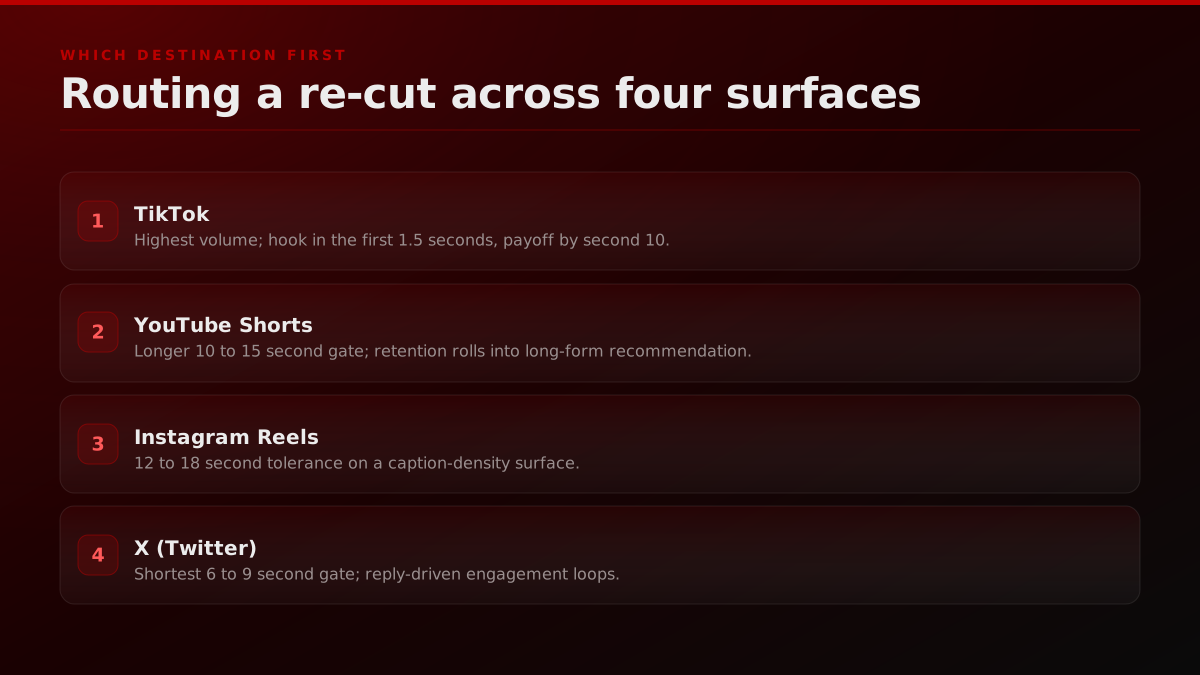
Not every clip ships to every platform. The 60 second sub train clip with chat overlay is a TikTok and Shorts asset and a poor Reels asset because the Instagram audience reads chat overlays as foreign visual grammar. The 8 second hot take quote is an X asset and a poor TikTok asset because the TikTok algorithm rewards a longer arc. The platform routing decision is per clip, not per session.
The working decision tree at FORKOFF runs on 4 inputs. Input 1 is moment type from the 6 patterns above. Input 2 is hook strength inside the first 1.5 seconds, scored 1 to 5 by the editor. Input 3 is sound off legibility, scored 1 to 5 by whether the moment reads without audio. Input 4 is the streamer's existing audience distribution per platform.
A reaction moment with hook score above 4 and sound off legibility above 3 routes to all 4 platforms with platform tuned variants. A reaction moment with hook score above 4 but sound off legibility below 3 routes to TikTok and Shorts only, because Reels and X audiences scroll past sound dependent content faster. A clutch or fail moment routes to all 4 platforms by default because gameplay state reads visually and the hook is the first frame. A hot take routes to X first and to TikTok and Shorts as a follow up at 9 to 12 hours later, because the X surface metabolizes opinion fastest and the TikTok and Shorts versions benefit from the X conversation as social proof in the comments.
The routing decision compounds across the week. A clipper shipping 80 clips per week through the 4 input decision tree publishes about 220 to 260 destination level posts (clips times platforms), against an undisciplined 4 platform broadcast that would publish 320 (every clip everywhere) and ship 80 dead posts. The dead post penalty is real on every algorithmic feed, because each feed weighs the publisher's recent performance into the next clip's reach, and a sequence of low engagement publishes lowers the ceiling on the next viral candidate.
When should you use a managed agency instead of clipping yourself?
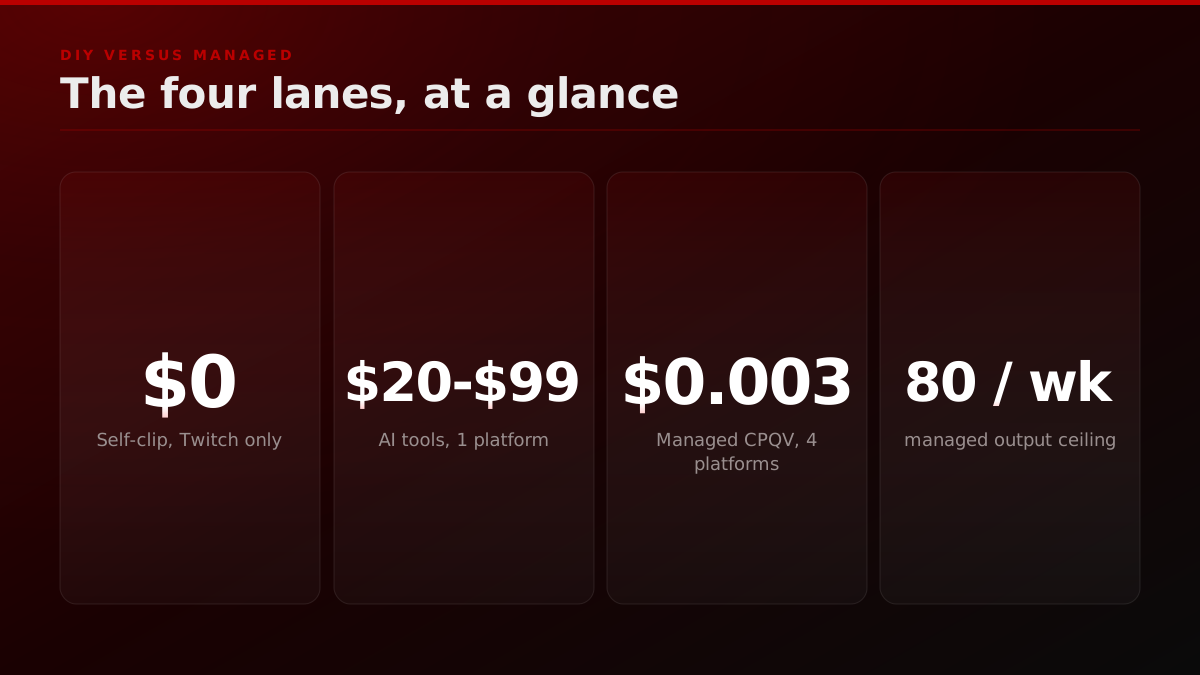
The DIY lane works until it does not: once the clip volume crosses 20 publishes per week per platform, or a brand-side buyer requires a qualified-view ledger with a CPQV denominator, the manual production cycle becomes the bottleneck. At that point FORKOFF's managed clipping campaigns take the Twitch-to-short pipeline off the desk.
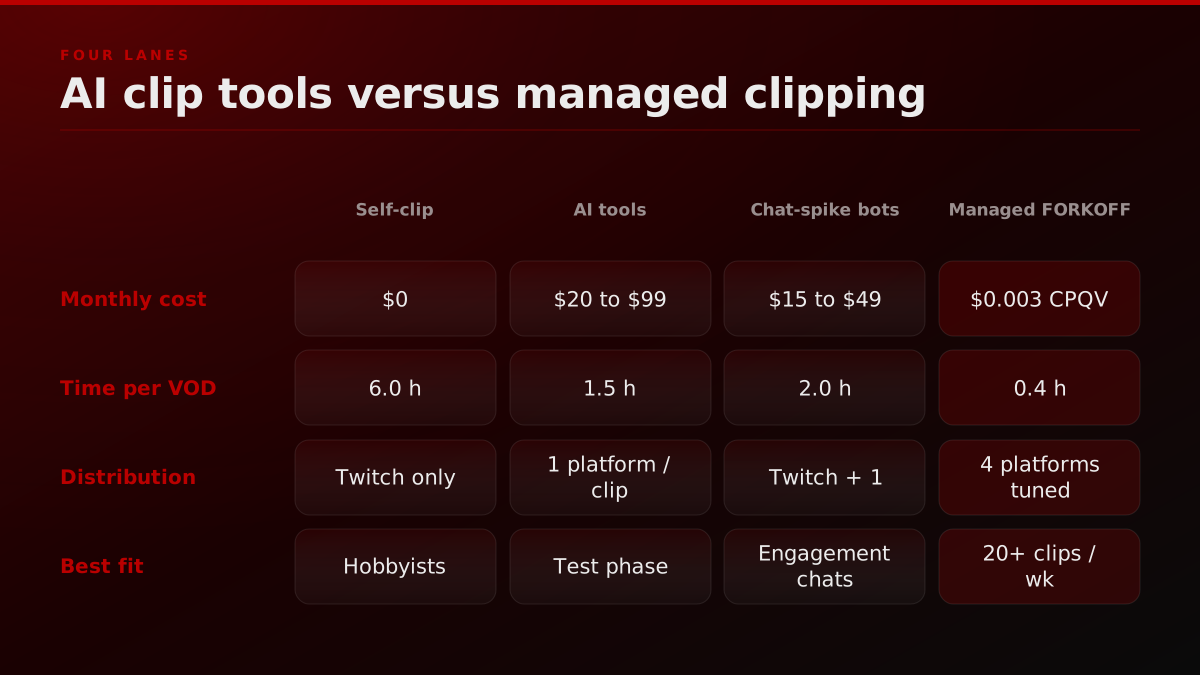
The DIY lane works for the first two months of any streamer's clipping motion. AI tools like OpusClip, Klap, and Vizard ship a a serviceable native clip plus a vertical re-cut for an estimated $20 to $99 per month. The output is template-driven, the captions are auto-generated, the cropping is center-cropped or face-tracked depending on the tool, and the publish is one platform at a time. The full breakdown is on the AI clip tools comparison page.
The managed-agency lane unlocks at the threshold where the production cycle becomes the bottleneck. The thresholds:
- The streamer is shipping 4 or more streams per week and the VOD backlog is growing faster than the clip output.
- The off-platform re-cut lane crosses 20 clips per week per destination platform, which is roughly 80 publishes per week aggregate.
- Brand-side spend on the streamer's distribution requires a denominator (CPQV, qualified-view ledger, audit-ready settlement).
- The streamer has a talent-agency or a roster relationship and clipping is centralized across 5 or more streamers.
At those thresholds the DIY tool stops scaling because the human production cycle (cropping, hook design, caption tuning, watch-time variant testing per platform) cannot run on a $99 subscription. Managed desks ship the production cycle on a per-qualified-view price that maps to brand-side budget. The buyer-side decision is rarely a hot swap. Most streamers run the DIY tool and the managed desk in parallel for a quarter while the qualified-view ledger fills out, then route the highest-value source moments through the managed lane and keep the DIY output for the rest.
AI clip tools vs managed clipping, side by side
| Lane | Monthly cost | Time per VOD | Distribution | Best fit |
|---|---|---|---|---|
| Self-clip (in-Twitch) | $0 | 6.0 h | Twitch only | Hobbyist streamers |
| AI clip tools (OpusClip, Klap) | $20 to $99 | 1.5 h | 1 platform per clip | Test phase, 0 to 2 months |
| Chat-spike bots (KoalaVOD) | $15 to $49 | 2.0 h | Twitch + 1 destination | Engagement-heavy chats |
| Managed FORKOFF clipping | $0.003 CPQV | 0.4 h | 4 platforms tuned | 20+ clips/wk, brand spend |
FORKOFF Clipping Ledger 2026-Q1 sample n=3,085 clips. CPQV settles only on watches held to 75 percent completion in the topical cluster on an actionable feed.
For an external operator view on this, see the Harris Heller streaming-strategy channel for Twitch clip discipline.
Primary sources cited above: Twitch's Help Center documentation on clip permissions. StreamElements' State of the Stream live-streaming report. Sprout Social's 2026 short-form video benchmarks.